Grocery shopping is expected to be a seamless experience. However, long queues, time-consuming weighing processes, and repeated price checks can make shopping feel exhausting, even when a customer is buying just a few items.
This scenario is particularly common in the fresh produce section. After selecting fruits or vegetables, customers must weigh the items and ensure the correct product variety is selected. Yet, the process does not always end there. Upon reaching the checkout counter, cashiers may still need to search for product codes, verify prices, or ask customers to re-weigh items because labels are unreadable or system data is mismatched.
These recurring hurdles highlight that smooth retail operations depend not only on cashier service speed, but also on how product information and weighing results flow from one stage to the next.
So, how can you ensure a smoother transition from the weighing scale to the checkout counter? This article explores the required workflows, data accuracy standards, and how integrating scales with a Point of Sale (POS) system helps minimize manual data entry and streamline retail transactions.
Why Weigh-Scale Items Still Cause Bottlenecks at the Checkout
Weighing and checking out items in a supermarket involves several interconnected stages. Customers select products, weigh them, and bring the results to the cashier to be processed alongside other items. However, when information from the weighing area is unrecognized or improperly utilized by the checkout system, transaction bottlenecks occur.
Several factors contribute to this condition:
- Unclear or Incorrect Product Identification: The weighed product does not match the recorded name or code, requiring cashiers to perform manual verification.
- Price Discrepancies: Prices in the POS system differ from those used during weighing, often occurring during price updates or promotional periods.
- Damaged or Unscannable Labels: Blurred printouts or damaged labels prevent barcode scanners from reading data accurately.
- Incompatible POS Data Formats: Information generated from the weighing process does not align with formats accepted by the checkout system.
- Inconsistent Correction Procedures: Staff lack standardized guidelines for handling product errors, price discrepancies, or re-weighing requests.
When any of these issues arise, cashiers may need to temporarily pause transactions to inspect products, confirm prices, or ask customers to return to the weighing station. Beyond adding manual workload, this extends service times and creates bottlenecks at the checkout counter.
Consequently, checkout friction does not always stem from scale hardware or cashier speed. Problems frequently arise when information and operational workflows between departments lack synchronization.
Scale-to-POS Integration: Definition and Scope of Benefits
Scale-to-POS integration involves configuring systems so that data from the weighing process can be seamlessly utilized by the checkout system. The mechanism depends on the hardware and software used—such as scannable barcode labels or direct data exchange protocols. The primary goal is to help cashiers quickly recognize products and reduce manual data entry.
In practice, integration does not always mean scales must transmit data directly via the internet to the POS system. Some implementations rely on barcode labels containing encoded information to be read by checkout scanners. Other implementations involve direct system-to-system data exchange, depending on device capabilities and application architecture.
To understand the scope, three core components fulfill distinct functions:
- The Scale: Measures product weight and, depending on device capabilities, assists in product identification.
- The Barcode: Encodes product or transaction information into a scannable format.
- The POS System: Records and processes retail sales transactions.
Within supermarket POS operations, these three components connect the fresh produce weighing process with the checkout counter. Once products are weighed and labeled with a POS-compatible barcode format, cashiers can scan them to instantly retrieve product data without manually typing SKU codes.
However, these benefits rely heavily on data accuracy, hardware capabilities, communication mechanisms, and store standard operating procedures (SOPs).
Transaction Workflow: From Product Weighing to Payment
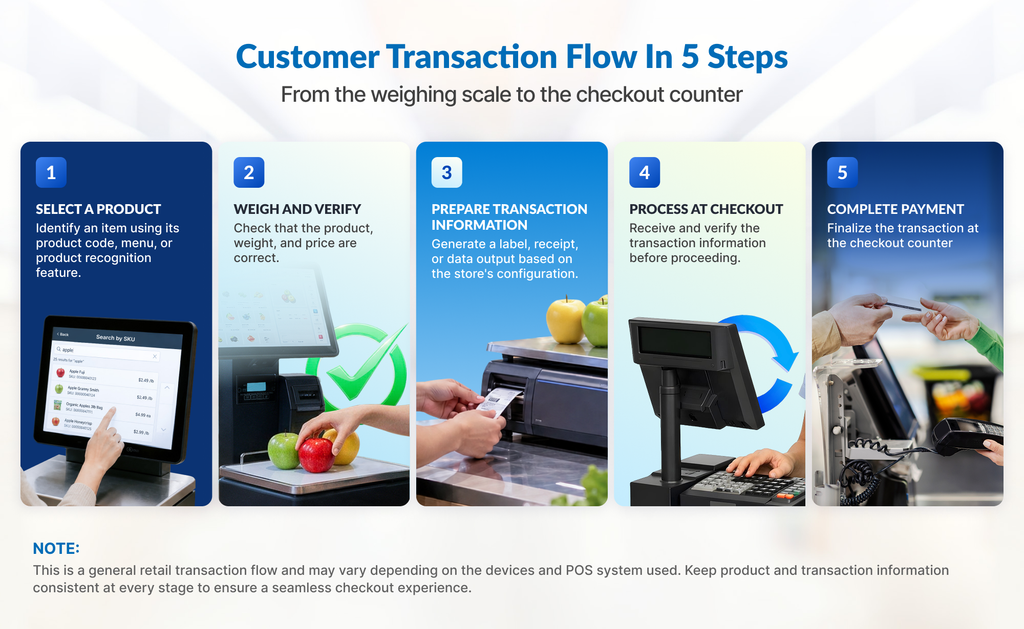
Understanding integration concepts requires examining how the process unfolds in daily store operations. Generally, a product’s journey from the weighing area to payment involves five interconnected stages:
1. Product Selection and Identification
Customers choose products to be weighed, such as apples in the fresh produce section. Product identity can be determined via lookup codes, touch-screen menus, scanning, or AI-assisted product recognition, depending on equipment capabilities.
2. Weight and Price Verification
Once the product is identified, the scale measures its weight. Information such as product name, unit of sale, net weight, and price must be verified to match the selected item and store policies.
3. Preparing Weighing Results for Checkout
Following verification, the weighing output is formatted according to the store’s mechanism, typically as a barcode label, receipt, or transaction data packet. Each output serves a different function and may not always be processed identically by the POS system.
4. Cashier Receipt and Product Verification
When customers bring items to the checkout, the system identifies product data through barcode scanning or prepared data exchange protocols. Cashiers verify the product identity and recorded value before proceeding.
5. Customer Payment Completion
After items and transaction values are verified and recorded, customers complete payments using available store payment methods. This stage remains distinct from the weighing and item-registration processes.
Through this workflow, product data and weighing results flow continuously up to the payment stage. Nonetheless, data transfer mechanisms and system compatibility must be tailored to the specific hardware and software deployed by the store.
Note: The workflow above illustrates a general process from weighing to payment. Actual mechanisms may vary depending on solution implementation and POS system capabilities.
Understanding the Role of Barcodes in Checkout Scanning
Barcodes are a foundational identification method in modern retail. They are scanned to help systems recognize products or read specific data according to established standards. Common retail barcode standards include UPC and EAN.
In retail operations, including retail barcode scale usage, barcodes appear in several forms with distinct functions:
- Packaged Product Barcodes: Codes printed on manufacturer packaging to identify pre-registered retail goods, such as packaged foods, beverages, or consumer goods.
- Weighed Product Barcodes: Codes printed on labels immediately following the weighing process. Depending on barcode formatting and system configuration, encoded information may include product identity, weight, or pricing. Formats must match POS compatibility to be processed smoothly.
- Receipt Barcodes: Some receipts feature barcodes for specific tracking needs, though these do not always function as scannable product identifiers during sales transactions.
It is important to note that a successfully scanned barcode does not automatically guarantee total data accuracy. While systems may recognize the code, staff must still verify product names, units, weights, and prices.
Consequently, manual checks remain necessary during price updates, product selection errors, or data discrepancies between weighing devices and the POS system. Successful scanning depends on barcode quality, code format compatibility, product data accuracy, and system configuration.
Maintaining Information Consistency Between Scales and Cashiers
Smooth operations from the weighing area to the checkout counter rely heavily on consistent data. If product data, weights, or prices differ between systems, cashiers must perform manual verifications before transactions can proceed.
To minimize these risks, several data points must remain aligned:
- Product Codes and Names: Identification codes and product names must consistently refer to the exact item, including similar varieties or types.
- Units of Sale: Consistent units (such as grams or kilograms) prevent calculation errors in weight and pricing.
- Net Weight and Tare Weight: Ensure pricing calculations account for net weight (product weight minus packaging/container weight) where applicable.
- Pricing and Promotional Rules: Unit prices, validity periods, and promotional terms must match across both scales and the POS system.
- Corrections and Re-weighing: Establish clear procedures for updating weighing results, voiding erroneous data, or re-weighing items to prevent duplicate transactions.
Beyond data alignment, stores should establish a single source of truth for each data category. For example, product codes and names are managed via the product catalog, while price and promotion updates follow the authorized pricing management system.
Clear division of responsibilities is equally vital. The merchandising team manages product info and pricing, the IT team oversees system configurations and data exchange, and store operations teams enforce verification and discrepancy-handling protocols.
Handling Exceptions: From Weighing Area to Checkout
| Issue / Condition | Key Elements to Inspect | Actionable Steps |
| Barcode Unreadable | Label condition and print quality | Re-print label or use store fallback procedures |
| Incorrect Product Selected | Product code and name | Correct product identity before proceeding with transaction |
| Price Mismatch | Price data and promotions | Confirm pricing with authorized personnel |
| Product Re-Weighed | Status of previous weighing result | Ensure outdated weights are discarded and not re-used |
| Hardware/Network Outage | Device status and network connectivity | Follow established recovery and escalation procedures |
With clear data sources and structured responsibilities, weighing data is processed consistently at the checkout counter.
Evaluation Checklist Before Integrating Scales and POS Systems
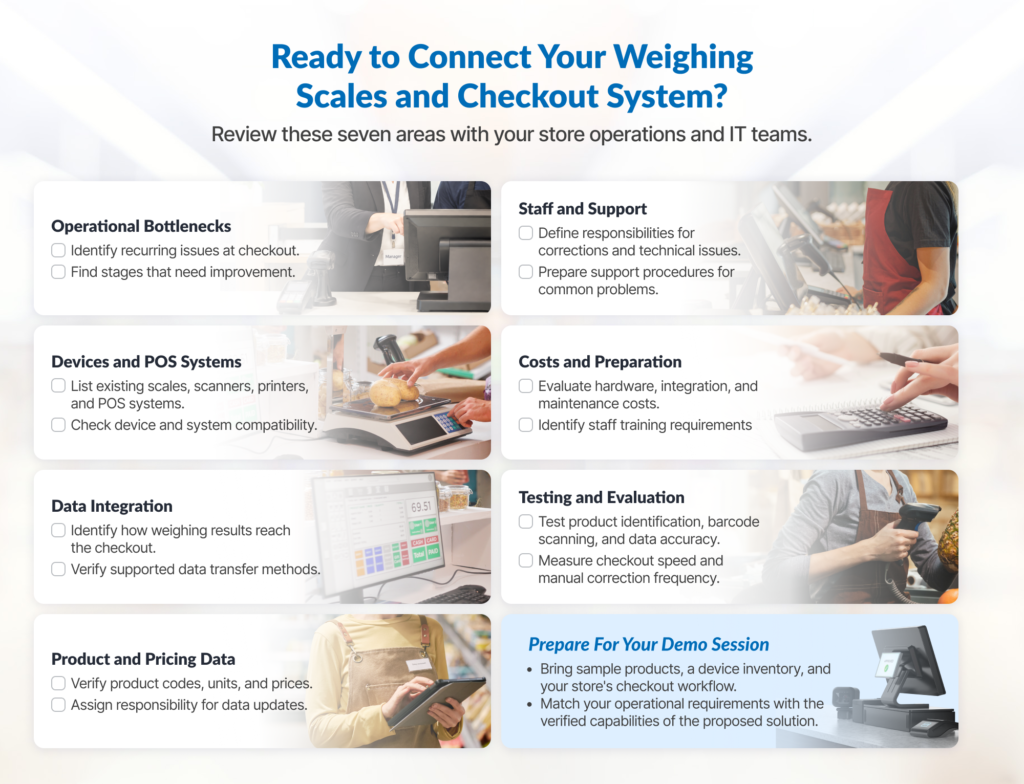
Before connecting scales to a POS system, retailers must assess operational conditions and hardware readiness. This preparation ensures chosen solutions genuinely fit store requirements rather than merely adding new hardware.
Consider these seven pre-implementation checklist questions:
- Where do operational bottlenecks occur most frequently?
Identify frequent issues, such as product selection errors, unreadable labels, or repeated price checks at checkout. - What hardware and POS applications are currently in use?
Catalog scales, barcode scanners, POS software, and peripherals, verifying compatibility for each component. - How will weighing results be transmitted to the checkout?
Determine whether data flows via printed barcode labels, direct system-to-system integration, or alternative supported mechanisms. - Who manages products, pricing, and promotions?
Assign ownership for updating data and maintaining cross-system consistency. - Who handles corrections and technical disruptions?
Establish standard operating procedures and assign accountability for product errors, price discrepancies, re-weighing, or technical failures. - What costs, preparations, and training are required?
Evaluate hardware, configuration, integration, maintenance, and staff training requirements. - How will pilot success be measured?
Define KPIs such as scan success rates, product identity accuracy, POS-received weight and price accuracy, manual correction frequency, and checkout speed.
After mapping these needs, conduct a limited pilot test using your own products, hardware, and operational environments. Involve daily operational staff to test both normal operations and edge-case exceptions.
Evaluate results before scaling implementation across additional products or branch locations. A phased approach allows retailers to identify adjustment needs early and prepare operations more effectively.
Scenarios to Test Before Full Implementation
Retailers should perform demonstrations using daily operational scenarios before deploying scale-to-POS integration. Testing should cover both normal functioning and error states.
| Test Scenario | What to Observe |
| Fresh Produce Weighed and Processed at Checkout | Do product identity, weight, and transaction values remain accurate? |
| Incorrect Product or Variety Selected | How do staff execute corrections before transactions continue? |
| Unreadable Label or Code | What alternative steps exist, and when is supervisor intervention required? |
| Product Price Updated | Is pricing information consistent across all connected stages? |
| Product Re-Weighed | How does the system prevent stale weights or duplicate entries? |
| Connection or Hardware Failure | What are system limitations and recovery procedures? |
Demonstration results help evaluate hardware, software, and operational procedures prior to broader rollouts.
Introducing SmartScale: Retail Operations Solution by PT Murni Solusindo Nusantara
SmartScale by PT Murni Solusindo Nusantara is an automated, AI-powered weighing and self-checkout solution designed to support fresh produce operations. This solution reduces reliance on manual product selection while structuring weighing and confirmation workflows.
AI-Powered Product Recognition
SmartScale utilizes cameras and weight sensors to help automatically recognize products. When items are difficult to identify, the system suggests recommendations based on visual matching, minimizing manual SKU searches or code entry.
Cloud-Based Catalog Management
Product information and imagery are managed via a centralized dashboard. This feature supports multi-device catalog synchronization, keeping product updates organized.
Weighing and Smart Checkout
Once products are identified and weighed, weight and pricing details are displayed for customer cart review and order confirmation. SmartScale prints a receipt as the output, after which customers complete payment at the checkout counter per standard store procedures.
By combining product identification, weighing, and guided confirmation, SmartScale streamlines fresh produce operations while integrating cleanly with existing store transaction workflows.
Frequently Asked Questions (FAQ)
Can all digital scales connect to a POS system?
No. Not all digital scales support POS integration. Compatibility depends on device communication interfaces, software applications, and POS-supported data formats. Retailers should verify hardware specifications and test compatibility prior to deployment.
Do barcodes always store weight and price?
Not always. Barcode contents depend on formatting and configuration. For weighed items, codes may embed product identity, weight, pricing, or combined data sets. The POS system must accurately read and decode these formats to ensure transaction integrity.
Do existing checkout terminals need to be replaced?
Not necessarily. Existing POS hardware can often be retained if compatible with scales and integration software. Stores should evaluate hardware specs, software versions, and communication interfaces, replacing hardware only when integration requirements demand it.
Must the system be permanently connected to the internet?
Connectivity requirements depend on system architecture. Some integration mechanisms operate on local area networks (LAN), while cloud-based catalog management and synchronization require internet connectivity. Network requirements and offline fallback procedures should be established beforehand.
What should be done if weighing results or prices mismatch?
Re-verify scale weights, product codes, stored pricing, and barcode configurations. Discrepancies can stem from unsynchronized data or misconfigured settings. If issues persist, verify scale calibration and application configurations with technical support.
Can customers pay directly at the scale?
Not always. Payment capabilities depend on device features and system configurations. In Murni’s SmartScale workflow, customers confirm orders and receive receipts at the scale before completing payment at the cash register, keeping weighing and payment distinct stages.
Conduct Thorough Evaluations for Optimal Integration
Achieving a seamless workflow from the weighing scale to the cash register depends on hardware readiness, data consistency, and clear operational guidelines. Before implementing scale-to-POS integration, ensure that data exchange mechanisms match your software capabilities and have been tested thoroughly under both standard and high-friction conditions.
To evaluate readiness, conduct live demonstrations using real products and operational scenarios from your own stores. This allows product identification, weight confirmation, and cashier intake workflows to be verified before full-scale deployment.
Discuss your store’s operational requirements and system compatibility with the specialist team at PT Murni Solusindo Nusantara and discover how SmartScale can support your fresh produce operations.