A retail customer holding a can of Coca Cola in a store aisle, with an electronic shelf label nearby displaying the discounted price of the drink

SMARTELABEL: Transforming Retail with Digital Price Label Technology

A retail customer holding a can of Coca-Cola in a store aisle, with an electronic shelf label nearby displaying the discounted price of the drink.

How much time does your store staff spend every single day simply printing and replacing paper price tags? Imagine there’s a sudden flash sale or a promotional event: how many labor hours are lost just trying to update hundreds of price labels manually across your shelves?

In the fast-paced Indonesian retail landscape, efficiency is the key to survival. As the retail sector faces pressure from the rapid growth of e-commerce, offline retailers must continue to adapt. Today, the secret to staying responsive and competitive lies in a digital innovation: Electronic Shelf Labels (ESL).

The Burden of Manual Retail Management

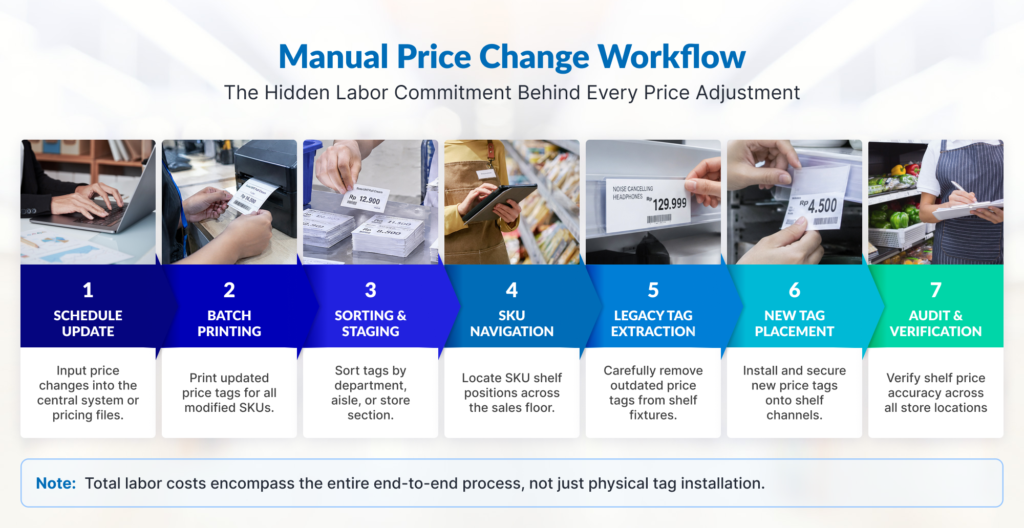
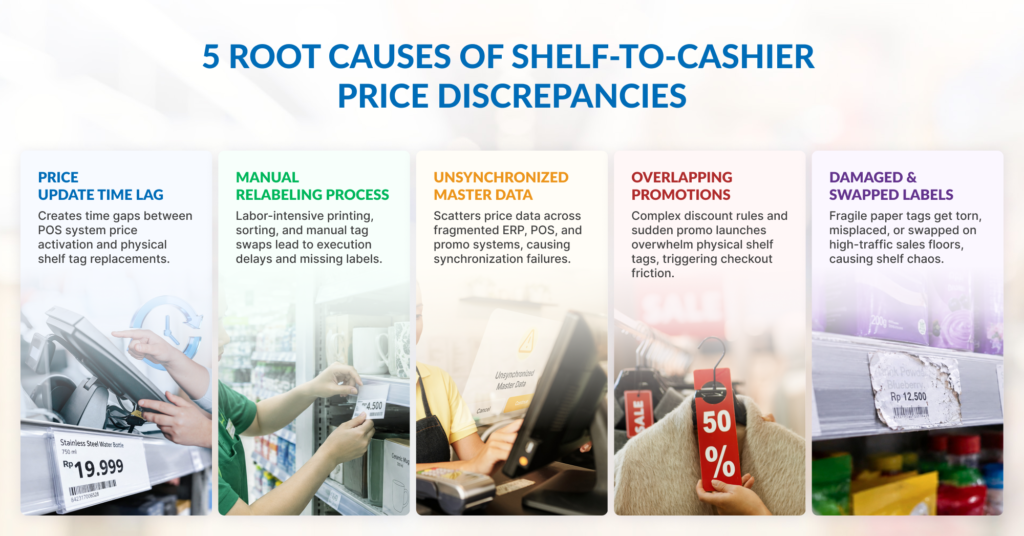
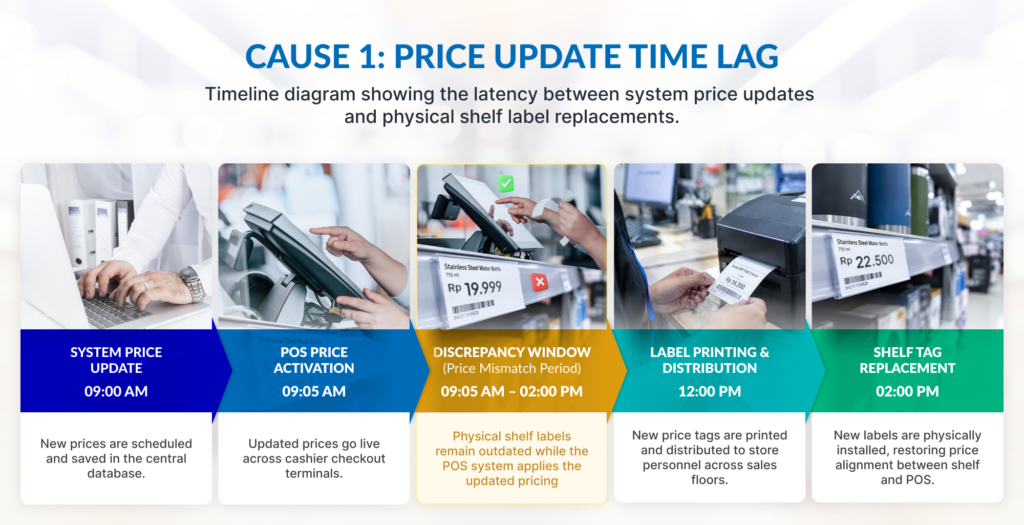
For years, product pricing management has been a primary pain point for retailers. Paper labels are not only labor-intensive but also prone to human error. Discrepancies between shelf prices and the point-of-sale (POS) system do more than just cause administrative headaches, but also erodes customer trust.

What is the Electronic Shelf Label (ESL)?

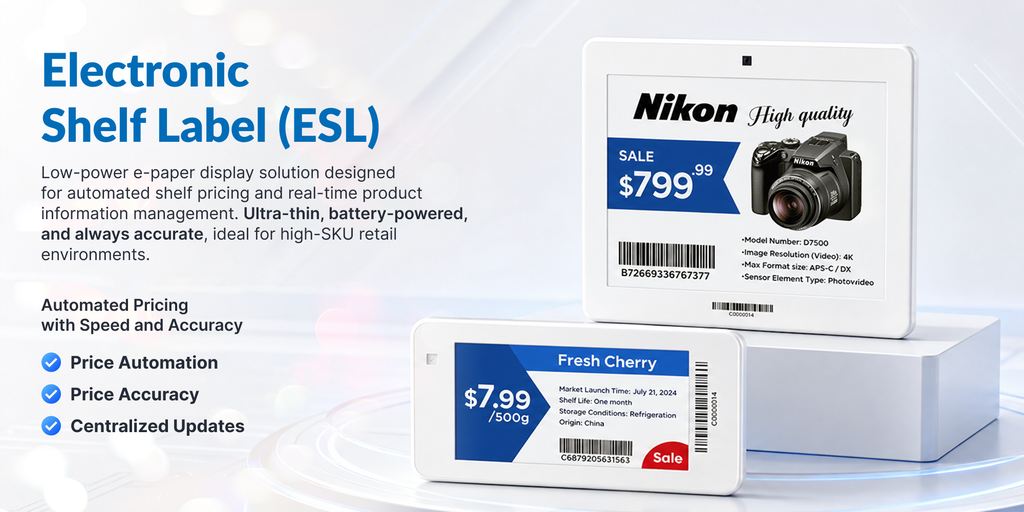
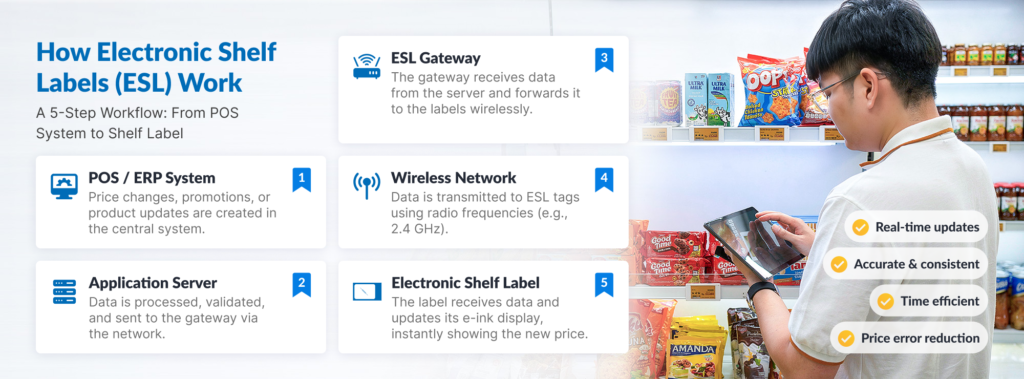
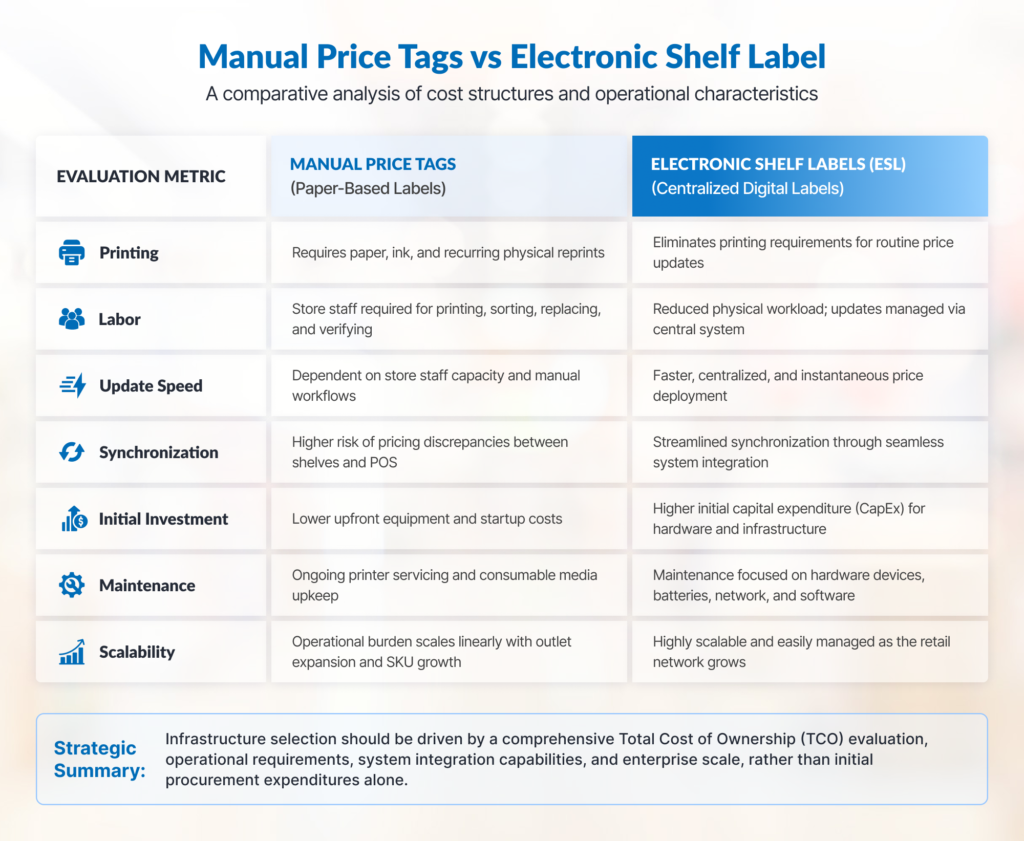
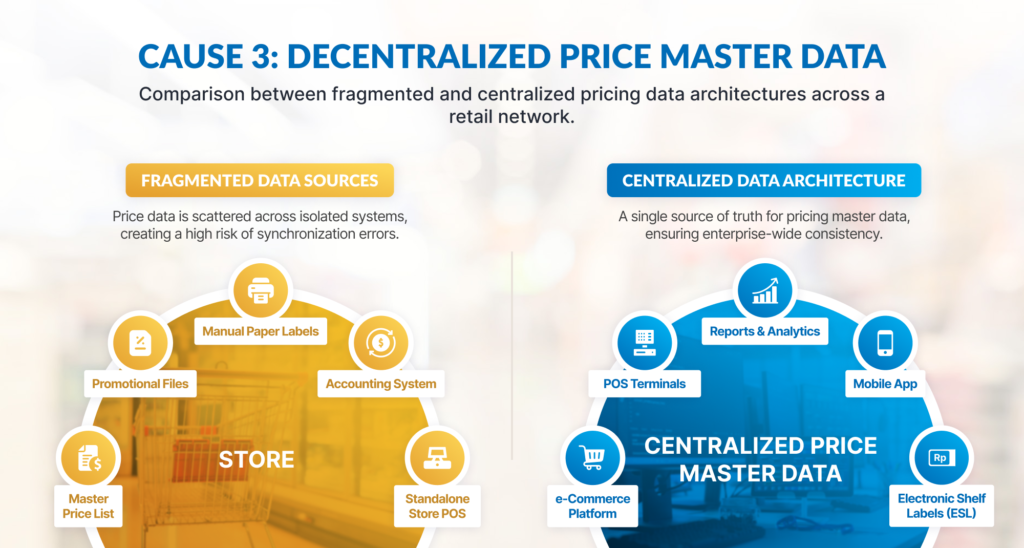
Electronic Shelf Labels (ESL), or digital price tags, are smart display devices that replace conventional paper labels. Centrally monitored and managed via a wireless network, this technology allows retailers to update prices and product information across an entire store (or even an entire chain of branches) in a matter of seconds.

The Tangible Benefits of Digital Labels for Retailers

Adopting ESL technology is more than just a strategic move to save on paper costs. Here is why it is becoming a must-have to retailers:

Real-Time Agility

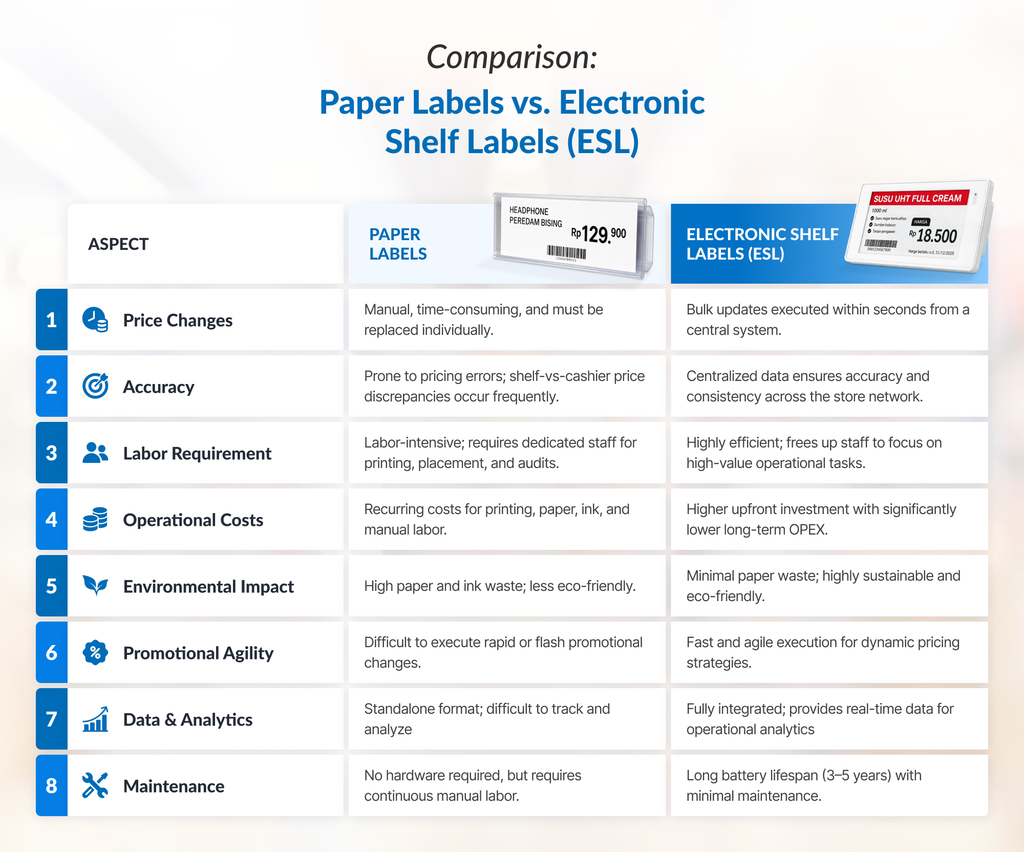
Whether it is a flash sale or a sudden market price shift, management can update prices instantly across all shelves within the store network.

Pricing Accuracy

By eliminating manual processes, this technology ensures that shelf prices are always up-to-date and synchronized with the POS system, thereby enhancing the shopping experience and strengthening customer trust.

An electronic shelf label displaying a milk carton, showing both the original price and the new discounted price
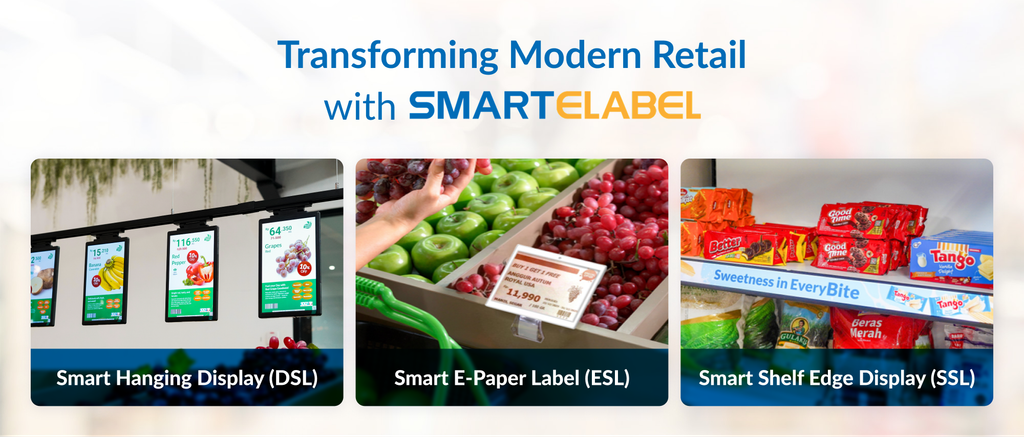
Electronic Shelf Labels (ESLs) allow retailers to update promotions and discounted prices quickly and efficiently.

Operational Productivity

Staff are no longer burdened with manual price tagging, freeing them up to focus on customer engagement and stock management.

Dynamic Promotional Media

Digital labels can display dynamic visual content that captures customer attention, thereby increasing the effectiveness of promotions directly at the shelf.

Hanging sign in the fresh produce section highlighting various products and their discounts.
Multimedia-integrated displays make products stand out with enhanced visuals, streamlining promotional efforts and driving higher sales.

Meet SMARTELABEL from PT Murni

For businesses looking to integrate these innovations, SMARTELABEL stands out as a leading solution in the Indonesian market. Specifically designed to meet the needs of modern retail, SMARTELABEL offers a seamless transition from conventional paper labels to a fully digitized and automated system.

By combining precise digital label data with robust system integration, SMARTELABEL helps you achieve a more adaptive operational flow, making your store not only competitive but also a leader in the market.

Considerations Before Switching to Digital Labels

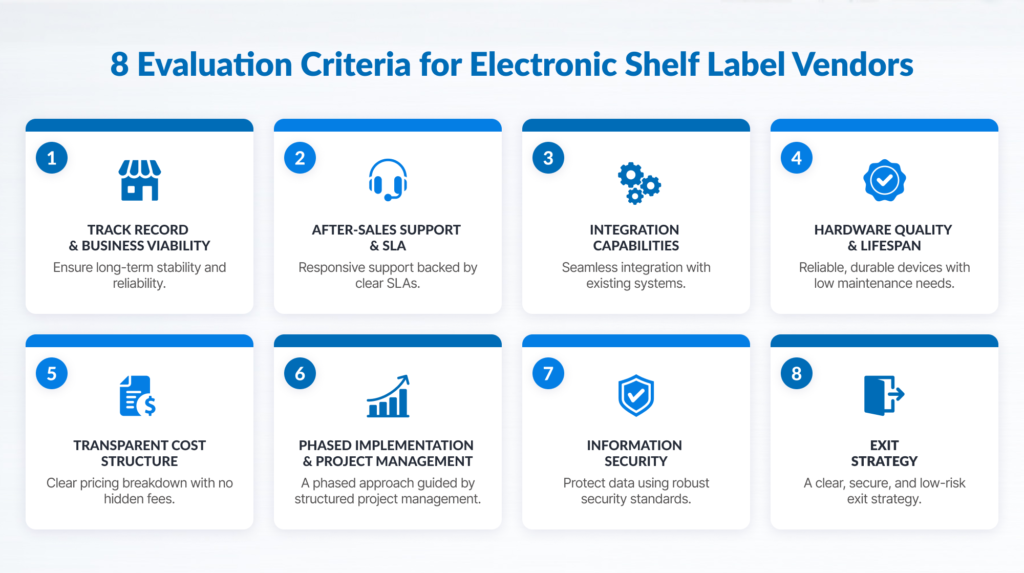
Before launching a full-store rollout, retailers should consider a few strategic steps:

Infrastructure Readiness

Ensure your store’s wireless network can support the communication needs of digital tags.

Pilot Programs

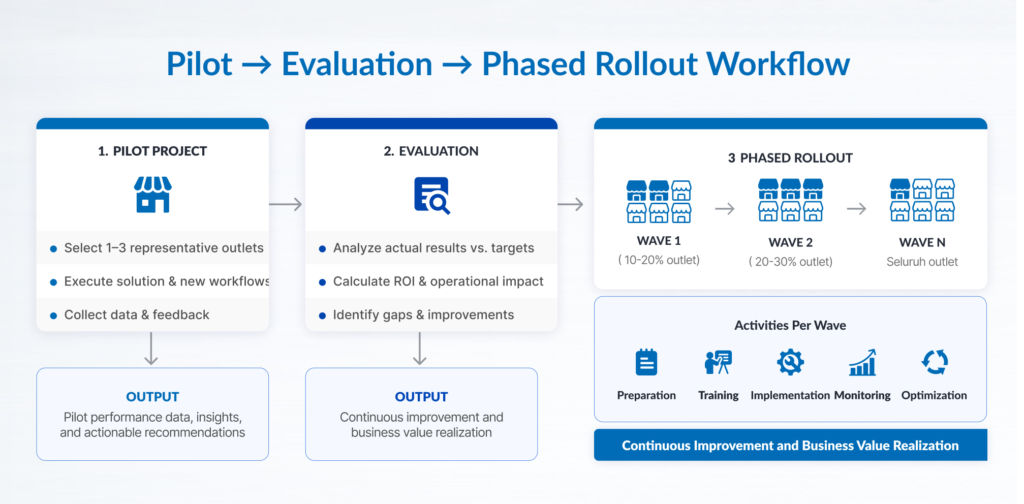
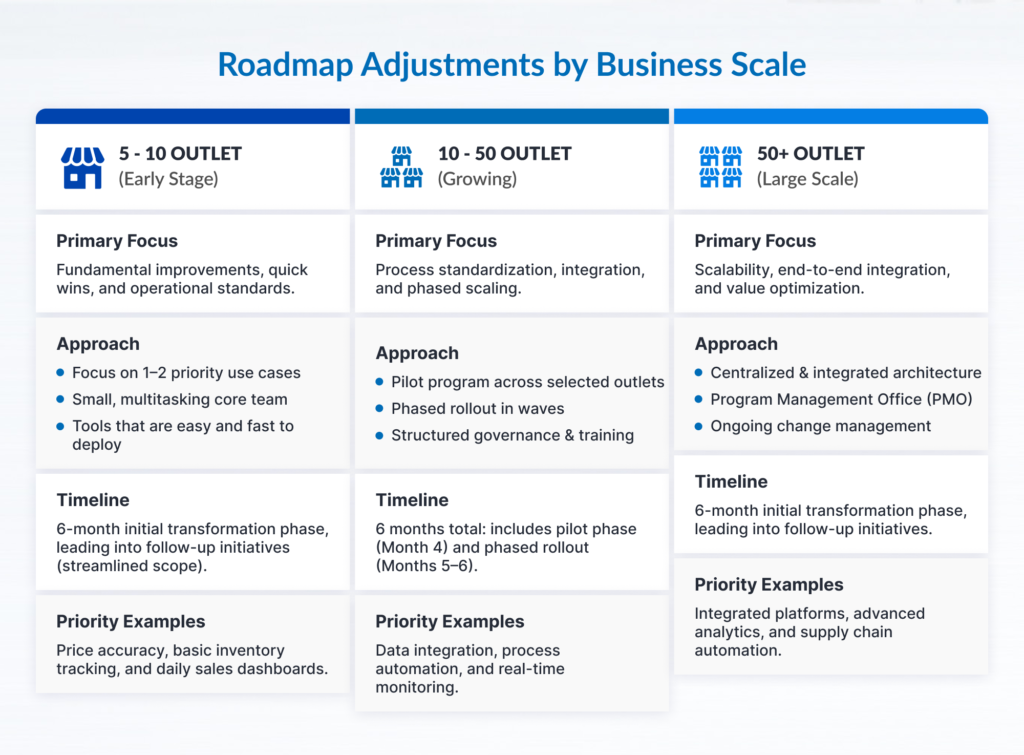
Start by implementing ESL in high-turnover departments, such as fresh produce or items with frequent price changes, to measure the ROI.

System Integration

Ensure that your chosen ESL provider can seamlessly sync with your existing ERP or POS software.

Frequently Asked Questions about SMARTELABEL

What is an Electronic Shelf Label (ESL)?

An ESL is a digital display device that replaces traditional paper labels. This technology enables automatic price updates through a wireless network.

Can SMARTELABEL be integrated with my POS?

Yes, SMARTELABEL is designed to support integration with various POS and ERP systems.

Is SMARTELABEL eco-friendly?

Absolutely! By eliminating paper labels, you contribute to reducing your environmental impact by minimizing paper waste and the need to print thousands of new paper price tags.

The Future of Retail is Automated

In the Indonesian market, where more than 4 million retail outlets compete for customer attention, digital transformation is a necessity. Whether it is by reducing manual labor or presenting information dynamically, ESL is an effective solution for achieving a more efficient operational flow and a higher-quality customer experience.

Are you ready to transform your retail store and increase operational efficiency? Explore more  about SMARTELABEL or contact us via this page to discover how this solution can change the future of your retail business.

Front office staff serving a customer using a banknote counting machine

The Strategic Power of Advanced Money Counting Machines with Counterfeit Detection

Front-office staff serving a customer using a banknote counting machine.

In business environments that frequently handle high-volume cash transactions, such as retail, banking, and service providers, the speed and security of counting every banknote are critical considerations. These two factors serve as the foundation for seamless daily operations.

At the same time, the circulation of counterfeit currency remains a significant threat globally, including in Indonesia. Bank Indonesia continues to urge the public to verify banknotes using the “3D” method (Look, Touch, Tilt). However, for businesses that process large amounts of cash daily, manual verification is clearly inefficient. This challenge is further exacerbated by the emergence of high-quality counterfeits, commonly known as “super-fakes,” which are nearly indistinguishable from genuine currency.

Consequently, to safeguard cash flow and operational integrity, many organizations are opting for advanced money counters equipped with multi-layered authentication systems.

What is an “Advanced” Grade Money Counter?

Moving beyond simple counting, advanced-grade money counters perform a comprehensive forensic audit of every banknote by combining multiple authentication technologies simultaneously. This multi-layered feature optimizes accuracy during the verification process, effectively preventing counterfeit notes from entering the system.

Furthermore, the machine automatically records the serial number of every banknote, facilitating seamless tracking and auditing between physical cash and digital records. This makes it a solution that is not only fast but also secure and practical to adopt.

Operational Benefits: Prioritizing Efficiency Without Sacrificing Accuracy

Managing large sums of cash is not just about counting visible volume; it is about providing the most accurate data possible—from the quantity of notes and total nominal value to, most importantly, ensuring every bill is genuine.

The following core functions address these three challenges simultaneously:

Piece Counter

Eliminate the need to pre-sort cash by denomination. Simply place the stack on the hopper, and the machine will automatically recognize, count, and display the breakdown per denomination, all within seconds.

Amount Counter (Total Value Calculation)

Manual counting is highly time-consuming. Through automation, a task that typically takes 30 minutes can be completed in just 60 seconds, allowing your team to focus more on customer service.

Counterfeit Detection (Single or Multi-Currency)

Capable of detecting and verifying various foreign currencies in addition to the Rupiah. This is the ideal solution for businesses handling foreign exchange, such as money changers, hotels, or the banking sector.

Fitness Sorting

This solution automatically separates unfit banknotes (torn, taped, or soiled) to maintain the quality of the cash intended for bank deposits.

Multi-Layered Protection: Trusted Counterfeit Detection Features

The most vital asset of these machines is their real-time authentication capability. As printing technology advances, “super-fakes” have become nearly impossible to detect with the naked eye. Advanced-grade machines utilize a multi-layered detection strategy:

Dual Contact Image Sensors (2CIS)

The industry standard for professionals. The machine captures high-resolution images of both sides of the note simultaneously to recognize denominations and verify serial numbers.

Full-Spectrum UV & IR Analysis

Ultraviolet and Infrared sensors scan for security inks. Counterfeit notes will appear faded or display incorrect patterns under IR light, triggering an automatic rejection.

Magnetic (MG) & Security Thread Sensors

Ensures banknotes are printed with government-standard materials by detecting magnetic traces in the ink and security threads.

Ultrasonic Thickness Detection

Prevents “double notes” (banknotes sticking together) and detects hidden counterfeit inserts.

Why This Solution Future-Proofs Your Business Security

The demand for currency authentication is increasingly relevant as the cost of human error rises. This is further highlighted by reports from the Federal Reserve, which noted a 19% increase in counterfeit currency circulation at the start of 2024.

Here is why leading businesses are switching to this solution:

1. Resilience Against “Super-Fakes”

    Modern counterfeiters can now mimic basic UV features. Advanced machines use multi-point “forensic” verification that modern forgery cannot bypass.

    2. Adaptive Technology

    The machine’s software can be updated regularly to recognize new counterfeit patterns, ensuring your hardware investment remains relevant long-term.

    3. Core System Integration

    This solution allows for direct integration into internal company systems. Cash totals update automatically in your ERP or banking ledger, seamlessly matching physical cash with digital financial data.

    Secure Your Business with Multi-Layered Protection

    For any business, a single counterfeit note is more than a nominal loss; it is a threat to security and profitability. Implementing an advanced money counter is a proactive step toward transforming vulnerability into technical certainty.

    Are you ready to face the future challenges of cash management security?

    Explore our catalog of advanced banknote counting machines and discuss your specific business needs with our expert team through this page or via email at info@murni.co.id.

    Cover illustration for touchscreen POS terminal

    Touchscreen POS Terminal: Key to Efficiency for Modern Businesses

    cover illustration for touchscreen POS terminal

    Touchscreen POS (Point-of-Sale) terminals have become a revolutionary business technology in this modern, digital era. They are now a vital component in many businesses, from retail stores and restaurants to cafes and hotels. This interactive technology not only provides ease of use but also serves as an effective solution to improve both work efficiency and service speed.

    This article will explore the various benefits of touchscreen POS terminals and provide a guide on how to choose the right device for your business needs.

    Understanding the POS Terminal: More Than Just a Cash Register

    Simply put, a POS (Point-of-Sales) Terminal is a combination of hardware and software used to process sales transactions. Surpassing the functions of conventional cash registers, modern POS systems can integrate various essential features, from inventory management and sales tracking to customer management. The evolution from physical keys to POS touchscreen monitors has also revolutionized how businesses interact with their customers and manage daily operations.

    The main benefits of this business solution include:

    More Effective Decision-Making

    Supported by comprehensive data recording, which facilitates detailed sales and business performance analysis.

    Accurate Inventory Data Access

    Simplifies monitoring product availability in the warehouse, reducing the risk of stock-outs or overstocking.

    Real-time Financial Recording

    Supports automatic tracking of revenue and expenses, simplifying financial reporting processes.

    Higher Customer Satisfaction

    Fast and error-free transaction processes create a better shopping experience for every customer.

    More Practical and Efficient Information Updates

    Facilitates quick and efficient updates for product data, prices, promotions, and stock levels.

    Choosing the Right Touchscreen POS System

    Although touchscreen POS monitors have proven to revolutionize business operations, choosing the right touchscreen POS system can be challenging. Detailed planning is required to build an effective POS system, given the wide variety of products, software options, and the differing needs of each business.

    To simplify this process, here are 5 key criteria to consider when selecting the best touchscreen POS terminal for your business:

    1. Hardware and Software Compatibility

    The foundation of an effective touchscreen POS terminal lies in its compatibility. Ensure that the system you choose can seamlessly integrate with existing peripherals or those you plan to acquire in the future, such as barcode scanners, receipt printers, cash drawers, or external payment systems.

    An illustration of a customer using a touchscreen POS terminal at checkout counter
    Device compatibility in a touchscreen POS system supports integration with various peripherals according to business needs.
    Image source:
    Elo Touch

    2. Screen Quality and Device Durability

    The screen is the primary interaction point of this solution, making its quality paramount. A high-quality touchscreen POS terminal must offer high touch responsiveness, a clear display—even in bright lighting conditions—and resistance to liquids, dust, and minor impacts that may occur during business operations. To ensure this, pay attention to the IP (Ingress Protection) Rating, which indicates the device’s level of protection against solid objects and liquids; the higher the number, the better its durability in supporting various operational environments. 

    Furthermore, the quality standards such as ISO 9001 for manufacturers indicate strict quality management processes, which indirectly contribute to the overall durability and reliability of the product, including screen components. Electrical safety standards like CE, FCC, and EMC are also relevant as they ensure the device operates without electrical issues that could affect screen performance or device longevity, while RoHS signifies the use of safer materials.

    3. Performance and Specifications

    Device performance and specifications are crucial factors when choosing a POS touchscreen because they directly determine your business’s speed, efficiency, and operational reliability. A fast processor and sufficient RAM ensure the POS application runs smoothly without lagging, which is essential for rapid transaction processing and avoiding queues. A responsive system also enables you to multitask and integrate the device with various other business applications, such as inventory management, CRM, and financial recording, to achieve more integrated and efficient business operations. 

    Additionally, devices with high specifications are better equipped to support advanced future features, such as real-time data analytics and software updates. The quality of internal components also contributes to system stability and device reliability, thereby reducing the risk of downtime that can hinder business processes.

    4. Transaction Security Standards

    Transaction data security is a top priority for every business. According to an article by Astra Security, up to 43% of cyberattacks target small businesses, and 46% of these attacks target businesses with 1,000 or fewer employees, with estimated losses up to $25,000. 

    Therefore, it’s crucial to ensure that the touchscreen POS terminal you use meets strict industry security standards, such as PCI DSS (Payment Card Industry Data Security Standard). This standard is specifically designed to protect sensitive customer information, especially credit card data, and prevent fraud. Advanced security features like data encryption and tokenization are critical in modern POS systems. Encryption transforms data into unreadable code, while tokenization replaces sensitive data with unique values that hold no real worth if stolen, ensuring customer information remains safe from increasing digital threats.

    Illustration of a customer processing a credit card payment.
    A secure payment system provides peace of mind for customers to continue transacting with a business.
    Image source:
    Freepik

    5. Technical Support and After-Sales Service

    Even the best systems might experience errors. Ensure your touchscreen POS terminal provider offers responsive technical support and reliable after-sales service. This includes warranties, repair options, and the availability of a support team ready to assist you if you face any obstacles. Robust service support will ensure your business runs smoothly without interruptions.

    Ready to Optimize Your Business with the Best Touchscreen POS Terminal?

    Choosing the right touchscreen POS terminal is a smart investment for your business’s efficiency and growth. By considering the criteria discussed above, you can ensure that you acquire a system that not only meets your current needs but also supports your business’s future development.

    With over 33 years of dedication to providing diverse ICT-based solutions for businesses in Indonesia, PT Murni is ready to help you find the best POS solution that is integrated, reliable, and secure. Explore our range of touchscreen POS terminal solutions or visit the following page to consult directly with our sales team regarding your specific business needs.

    References:
    Mekari. Point of Sales (POS). Retrieved from https://mekari.com/blog/point-of-sales-pos/. Final POS. Guide to Choosing POS Hardware for Your Business. Retrieved from https://finalpos.com/guide-to-choosing-pos-hardware-for-your-business/. Fiserv. POS System Guide. Retrieved from https://merchants.fiserv.com/en-us/resources/pos-system-guide/. Fortinet. POS Security. Retrieved fro https://www.fortinet.com/resources/cyberglossary/pos-security. Elo Touch Solutions. What kind of IP ratings or ingress protection do Elo products have? Retrieved from https://elosupport.elotouch.com/hc/en-us/articles/31649720004119-What-kind-of-IP-ratings-or-ingress-protection-do-Elo-products-have. AV Display. Industry Standards and Certification Requirements for Industrial Touch Screens. Retrieved from https://www.av-display.hk/blog/industry-standards-and-certification-requirements-for-industrial-touch-screens. Touchwindow. Certifications. Retrieved from https://www.touchwindow.com/c/Certifications.html

    Cover image for teller cash recycler tcr article

    TCR: Smart Solution for Service Transformation at the Branch

    cover image for teller cash recycler tcr article

    Teller Cash Recycler (TCR) is a key supporting element for cash handling processes at the frontline of the banking industry, especially amidst Indonesia’s rapid development of automation technology. However, why does the TCR remain vital and relevant, even in an era dominated by digital payment methods?

    The High Volume of Cash-based Transactions in Indonesia

    Despite the growing popularity of cashless transaction methods in major cities, cash still plays a significant role in Indonesia’s banking ecosystem. This continued reliance on physical currency is primarily driven by various factors, including Indonesia having a substantial unbanked and underbanked population. Many regions also lack robust digital infrastructure, and financial literacy initiatives are still ongoing.

    A woman buying groceries from a local street vendor.
    Cash-based transactions are common among shoppers at traditional markets and local vendors.
    Image source: Freepik

    According to the Visa Consumer Payment Attitudes 2023 study, up to 80% of respondents continue to use cash as a payment method. This is especially true for everyday purchases such as fuel, convenience store items, and food and beverages. The combination of these demographics, infrastructure gaps, and existing consumer habits ensures cash remains a vital part of daily transactions across the country.

    Challenges for the Banking Industry

    The high volume of cash transactions presents distinct challenges for the banking industry, particularly for frontline staff who directly interact with customers. Manual cash handling often comes with its own set of difficulties: it’s time-consuming, prone to errors, and carries high security risks.

    This is where the Teller Cash Recycler (TCR) emerges as a revolutionary innovation, transforming how banks manage cash at the front lines.

    Understanding Teller Cash Recycler (TCR): Quick Definition & Basic Functions 

    Simply put, Teller Cash Recycler (TCR) is an automatic cash deposit and withdrawal machine specifically designed to simplify and accelerate the tasks of a bank teller. Unlike a conventional banknote counting machine, TCR boasts the more advanced and integrated capabilities.

    The basic functions of a TCR include:

    Cash Deposit

    TCR accepts cash deposits from customers, then automatically verifies the authenticity and counts the denomination of each note.

    Secure Storage

    Verified cash will be securely stored within the TCR’s internal cassettes.

    Cash Withdrawal

    When a customer wishes to withdraw cash, TCR will accurately dispense the requested amount from its internal storage.

    Sorting and Verification

    TCR can sort cash by denomination and condition (FIT for circulation or UNFIT), while also detecting counterfeit money using its advanced sensors.

    Automatic Reporting

    Every cash transaction processed by the TCR is digitally recorded, minimizing the need for manual entries and streamlining the reconciliation process.

    A Brief History and TCR Implementation in Indonesia

    The concept of automated cash handling machines has existed for decades, but modern TCRs, with their advanced cash recycling capabilities, have only rapidly evolved in the last two decades. This technology initially gained popularity in mature banking markets and has since expanded to various other countries, including Indonesia.

    In Indonesia, TCR adoption shows a significant upward trend, particularly among large banks prioritizing operational efficiency and enhanced security. The demand for banking automation solutions like TCR continues to grow in line with banks’ commitment to optimizing branch services.

    How Does a TCR Work: A Closer Look

    The operational mechanism of a TCR is based on a series of precise automated processes. When cash is inserted:

    1. Advanced detection sensors scan each banknote to identify its denomination, physical condition, and authenticity. Counterfeit notes or those rejected (e.g., due to severe tears) are automatically separated by the machine through the reject tray.
    2. Accepted banknote is sorted and stored in different internal storage cassettes according to its denomination. Cash recycling capability is a core benefit of TCR; so, freshly deposited cash from one customer can be directly used for withdrawal transactions by another customer.
    3. Every cash movement (in and out) is digitally recorded and integrated with the bank’s core system, enabling accurate real-time monitoring and reporting.

    Benefits of TCR for Banks: Beyond Efficiency

    Implementing a TCR brings a profoundly transformative impact on banking operations. Here are some of its primary benefits:

    Increased Efficiency and Speed of Cash-based Transactions

    TCR significantly reduces the time tellers spend manually counting and verifying cash. Deposit and withdrawal transactions can be completed in mere seconds. TCR can also be implemented in a customer-facing setting, enabling tellers to assist more customers at once. This directly leads to shorter customer queues and increased transaction throughput at the branch.

    an illustration of teller cash recycler (TCR) in customer-facing implementation setting
    Teller Cash Recyclers (TCRs) can also be implemented in customer-facing settings for enhanced operational efficiency.
    Image source: IBS

    Enhanced Security in Cash Handling

    TCR machines minimize cash exposure at the teller counter by providing a secure internal storage system within the device. This significantly reduces the risk of robbery and theft. Furthermore, advanced counterfeit detection features protect banks from financial losses due to counterfeit banknotes.

    Minimizing Human Error

    The TCR eliminates the potential for counting errors that often occur with manual handling. Its accuracy ensures that cash balances are always correct, minimizing discrepancies and the time spent on end-of-day reconciliation.

    Optimizing Cash Handling Cycles within the Bank

    With its cash recycling feature, TCR reduces the amount of cash that needs to be refilled from the vault or transferred from a cash center. This leads to the optimization of cash inventory at the branch, reducing the need for manual cash replenishment while also lowering the frequency and cost for Cash-in-Transit (CIT).

    Supporting Digital Banking Transformation

    Although a TCR handles physical cash, its presence strongly supports digital transformation strategies. By automating routine cash management tasks, tellers have more time to interact with customers, offer digital products and services, and act as financial consultants. 

    This enables bank branches to function as more modern, customer-oriented service centers, rather than just places for cash transactions.

    A Strategic Investment for Superior and Competitive Banks

    The Teller Cash Recycler (TCR) is no longer just an optional addition; it’s an essential strategic component for modern banking operations. Its ability to optimize efficiency, enhance security, and drive cost savings makes the TCR highly significant for banks aiming to remain competitive and relevant in the digital age.

    As a digital business solution enabler with over 33 years of experience and an official distributor of TCR solutions, PT Murni Solusindo Nusantara is committed to delivering innovative solutions tailored to the specific needs of Indonesian banks, helping them achieve smarter and more efficient branches.

    Interested in learning more about how TCR solutions can revolutionize your bank branch operations? Visit this page or contact our sales team via hotline 1500 913 or email at tcr@murni.co.id now for further consultation!

    Also Read:
    Memahami Teller Cash Recycler (TCR): Teknologi yang Populer Digunakan di Dunia Perbankan Indonesia Saat Ini 

    References
    DBS Bank. (n.d.). Indonesia has the fourth largest unbanked population in the world: Here’s how Bank DBS Indonesia promotes financial inclusion. Retrieved July 8, 2025, from https://www.dbs.com/newsroom/. Independent Banker. (2017, November 1). Timeline: 180 years of banking technology. https://www.independentbanker.org/article/2017/11/01/timeline-180-years-of-banking-technology. Visa. (2024, March 19). Budaya Cashless Marak di Indonesia Seiring Penggunaan Uang Tunai yang Terus Menurun. https://www.visa.co.id/about-visa/newsroom/press-releases/nr-id-240319.html

    Cover Image 1 1200x500

    A Guide to Efficient Cash Processing in the Digital Age

    Cash Processing in the Digital Era, An Illustration.

    Cash remains essential in the digital era, which is why businesses and financial institutions need to practice efficient cash processing. Discover how efficient cash processing ensures seamless transactions, from local shop purchases to major bank deposits, keeping the economy flowing smoothly.

    What is Cash Processing?

    An Illustration on How Cash Processing Simplify Business Operation.
    An Illustration on How Cash Processing Solution Simplifies Business Operation.

    Cash processing refers to all the activities involved in managing and handling physical currency, from the moment it enters a business until it is returned to circulation or deposited. This systematic process involves several key components:

    • Receiving and Counting: This initial stage involves securely accepting cash from customers and accurately counting the amount. This often involves the use of automated counting machines to ensure speed and accuracy.
    • Verification and Sorting: Once counted, cash is verified for authenticity and sorted by denomination. This helps detect counterfeit notes and categorize bills. Sophisticated technologies like UV, magnetic ink character recognition (MICR), and banknote sorting machines are commonly used for this purpose.
    • Deposit and Reconciliation: The final stage involves depositing the sorted and verified cash into a bank account, which can be done through a cash deposit machine (CDM). Cash reconciliation is also important in this stage to ensure that the deposited amount matches the counted amount, confirming that there are no discrepancies or errors.

    The Importance of Efficient Cash Processing

    Efficient cash processing is vital for maintaining financial accuracy and security. Inaccurate cash handling can lead to significant financial losses, operational inefficiencies, and even legal repercussions.

    With efficient cash processing, comes many benefits, including:

    • Reduced Errors: Efficient cash processing includes the use of automated systems, which minimizes human error and leads to more accurate financial records. This is crucial for accurate reporting, auditing, and regulatory compliance.
    • Enhanced Security: Robust cash processing procedures, including counterfeit detection, minimize the risk of fraud and theft. This safeguards both the business/financial institution’s assets and the funds of its customers.
    • Improved Operational Efficiency: Streamlining cash processing tasks significantly improves businesses’ operational efficiency. Automated systems reduce manual errors, reduce processing time, and ultimately lead to cost savings and improved customer experience. This also frees up staff to focus on other value-added tasks.

    Two (2) Industries Most Affected by Cash Processing

    Efficient cash processing is advantageous for any businesses and institutions across various sectors. However, it is imperative for these two industries:

    The Banking Industry

    Cash Processing in Banking Industry, an Illustration.
    Cash Processing in Banking Industry.

    The banking industry relies heavily on efficient cash processing for its daily operations. Banks and financial institutions handle vast amounts of cash daily, and any inefficiencies in cash processing can have a significant impact on their transactions, customer experience, and even their reputation. It is important for banks and financial institutions to have efficient cash processing to:

    • Maintain optimal cash levels in ATMs
    • Process daily deposits from business customers
    • Manage currency circulation
    • Ensure regulatory compliance

    The Retail Sector

    Cash Handling in the Retail Industry.
    Cash Handling in the Retail Industry.

    The retail sector, particularly businesses with high cash transactions, needs efficient cash processing to ensure smooth operations. Inefficient cash processing can lead to delays and security breaches, which potentially cause bottlenecks, financial losses, reputational damage, and even loss of customer trust. By implementing efficient cash processing practices, retailers can:

    • Reduce counting errors
    • Minimise shrinkage
    • Improve staff efficiency
    • Enhance security measures

    Efficient and secure cash processing lies in the balance between maintaining traditional security measures and embracing technological advancements. Many businesses have successfully implemented technologies developed for efficient cash processing and achieved positive outcomes to improve their financial operations.

    Like those businesses, you can stay ahead of the game by investing in robust and technologically advanced solutions for cash processing, such as the ones offered by PT Murni Solusindo Nusantara.

    Click here or contact us today at info@murni.co.id to help get you started.

    1732084966 patient nurse sitting reception desk talking female receptionist about disease diagnosis healthcare 1200x500

    Is a Queue Management System the Right Investment for Healthcare Facilities?

    Queue Management System in a Healthcare Facility.
    Queue Management System in a Healthcare Facility. Source: Freepik

    Healthcare facilities usually handle a high volume of patients daily, and managing patient flow efficiently is crucial. Long wait times, overcrowding, and disorganized queues can lead to frustration, displeasure, and decreased productivity.

    Many healthcare facilities are using queue management systems to improve patient flow and enhance the patient experience. However, the question remains: are these systems worth the investment?

    The Benefits of Queue Management Systems

    Illustration of Patients Satisfied with the Quality of Healthcare Services
    Illustration of Patients Satisfied with the Quality of Healthcare Services. Source: qmatic

    Queue management systems offer a range of potential benefits for healthcare facilities. They can:

    Reduce waiting times

    With queue management systems, patients can book appointments and check in online, which reduces the need for physical lines. This means that patients can spend less time waiting and more time receiving medical care.

    Improve patient satisfaction

    Queue management systems provide real-time updates and estimated wait times, allowing patients to plan their visits accordingly. This transparency can alleviate anxiety and frustration, leading to improved patient satisfaction.

    Enhance staff efficiency

    Queue management systems can streamline administrative processes, freeing up staff to focus on patient care.

    Optimize healthcare processes

    Queue management systems can collect valuable data on patient flow, wait times, and bottlenecks, enabling healthcare facilities to identify areas for improvement and optimize their operations.


    Illustration of Patient Queues at Healthcare Facilities.
    Illustration of Patient Queues at Healthcare Facilities. Source: Freepik

    While queue management systems can offer numerous benefits, there are also potential drawbacks to consider:

    Increased complexity

    Patients and staff may find the system confusing to use, which can slow down healthcare processes and cause frustration. To avoid this, healthcare facilities should prioritize user-friendly interfaces and provide adequate training for staff.

    Technical difficulties

    Queue management systems rely on technology, which can sometimes fail or malfunction. Technical issues can lead to delays and frustrated patients.

    Lack of integration

    If the system is not properly integrated with existing systems like electronic medical records, it can create more work for staff and lead to data discrepancies.

    SMARTQUEUE®, Queue Management System for Optimal Patient Experience.
    SMARTQUEUE®, Queue Management System for Optimal Patient Experience. Source: BSS

    SMARTQUEUE®, a queue management solution from Business Smart Solutions (BSS), is designed to address the unique challenges faced by healthcare facilities.

    As an omnichannel queue management system, SMARTQUEUE® prioritizes patient care and encourages continuous business growth through a range of beneficial modules. These modules work seamlessly together to streamline patient flow, optimize operational efficiency, and improve the overall patient experience.

    Here are several key features of SMARTQUEUE® that can be beneficial to healthcare facilities:

    Seamless integration

    SMARTQUEUE® integrates seamlessly with existing healthcare systems to ensure data accuracy and smooth operation.

    User-friendly interface and multilingual capability

    SMARTQUEUE® is available in multiple languages and features a user-friendly interface that is easy for patients and staff to use. This ensures that all patients feel comfortable and supported throughout their healthcare journey.

    Real-time dashboard monitoring and centralized reporting

    SMARTQUEUE® provides real-time data on patient volume, wait times, service quality, staff performance, and other critical metrics across multiple locations. These insights can be used to identify areas for improvement and make data-driven decisions to enhance patient care.

    Multiple check-in options for customers

    SMARTQUEUE® offers various check-in options, including virtual queueing, ticketing kiosks, and concierge services. This flexibility allows patients to choose the most convenient method for their needs, which will reduce waiting times and improve the overall patient experience.

    In addition to those features, SMARTQUEUE® also offers useful features such as Virtual Caller, Multimedia Display, Personalized Custom Design, and additional modules, including SMS Notifications, Appointment Booking System, and Customer Feedback Solution.

    To find out more about SMARTQUEUE®, click here or contact us at info@murni.co.id.

    Do you need help finding the right solution for your business?

    We’re ready to assist you.

    1500913                                            sales.office@murni.co.id

    Source link