Featured image: A store clerk and customer reviewing a price discrepancy on a product label at a retail checkout area

5 Main Causes of Price Discrepancies Between Shelves and Cash Registers in Retail Stores

Featured image: A store clerk and customer reviewing a price discrepancy on a product label at a retail checkout area

Price discrepancies between shelf labels and cash registers remain one of the most persistent operational challenges in the retail industry, especially across multi-branch chains.

Consider a scene familiar to every store manager: a customer arrives at the checkout counter, only to discover that the price scan on the register screen is higher than the tag on the shelf. The cashier checks the system, only to find that the price on the POS does not match the one displayed on the shelf. This issue goes far beyond customer inconvenience. Price discrepancies can also slow down checkout lines, cause purchase cancellations, reduce potential sales, and, over time, erode customer trust in the brand.
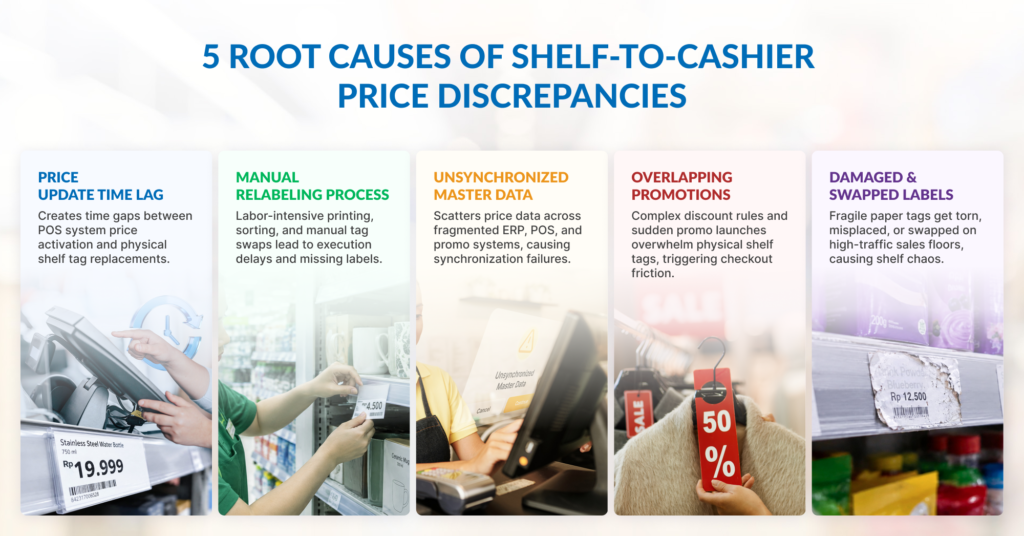
Infographic: 5 main causes of price discrepancies in retail stores

Crucially, these price mismatches rarely result from staff negligence. Instead, they stem from inherent time lags in price updates, manual processes, and unsynchronized systems.

Here are the 5 main causes of price discrepancies in retail stores:

  1. Time lag between system price updates and physical shelf label replacement.
  2. Manual label replacement processes prone to human oversight.
  3. Unsynchronized price master data across systems and store locations.
  4. Overlapping promotional programs and complex pricing rules.
  5. Damaged, misplaced, or swapped shelf labels.

Read on to explore why each of these issues occurs and how to address them at the root cause.

1. Time Lag Between System Price Updates and Physical Shelf Label Replacement
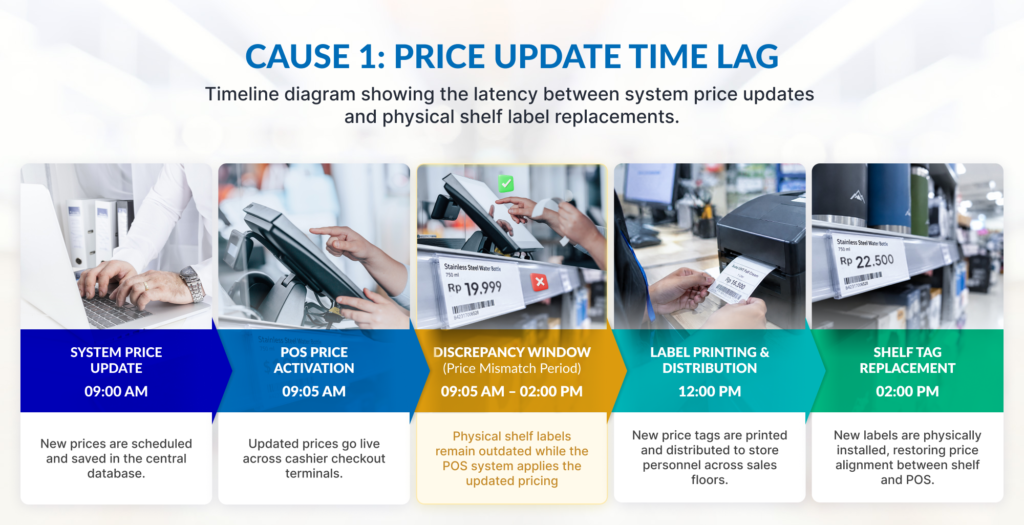
Visual diagram: the delay between digital price updates in the system and manual shelf-tag replacement
Manual shelf-tag replacement speeds cannot keep pace with instant digital updates pushed across store POS systems, resulting in costly opportunity losses driven by pricing discrepancies and delayed promotional rollouts

How It Happens

Price changes are usually scheduled in the central database to take effect at a specific time, such as midnight (00:00 AM). However, store staff can only physically replace the shelf labels once their shift begins the following morning. During this interval, the POS system charges the new price while the shelf displays the old one.

Why It Is Hard to Avoid

As a store expands its Stock Keeping Unit (SKU) catalog and increases promotional frequency, the window of discrepancy grows wider. Replacing hundreds of paper tags across multiple aisles requires hours of manual labor that cannot happen instantaneously.

Visible Symptoms

Timing delays trigger heavy checkout friction during opening hours. Price mismatches spike as early morning shoppers pick up items before staff finish replacing shelf tags. This creates immediate customer disputes on campaign launch days, especially for fast-moving items and daily promotional deals.

Aggravating Factors

Last-minute flash sales and sudden promo changes worsen this operational delay. Without advance warning from central teams, store associates are forced into rushed, reactive relabeling on an active sales floor, directly leading to price disputes at the register.

2. Manual Label Replacement Processes Prone to Human Oversight

How It Happens

Store staff print batches of price change lists and walk the floor to swap paper tags individually. Labels are easily missed when an item is temporarily out of stock, hidden behind merchandising displays, or when price update lists are too long to complete in a single shift.

Why It Is Not the Staff’s Fault

Manual relabeling is a high-volume task executed on the floor while staff actively assist shoppers. Without an automated verification mechanism, missing a label among thousands of SKUs is a natural outcome of process design, not a lack of effort.

Visible Symptoms

These issues usually show up as unpredictable price errors across unrelated aisles, rather than following a clean pattern. Often, it’s shoppers who catch these mismatches at checkout instead of store audits, creating friction right at the register. 

Aggravating Factors

Manual relabeling errors surge under operational pressure. High employee turnover, frequent shift rotations, and constant customer interruptions make missed aisles and misplaced price tags almost inevitable.

3. Unsynchronized Price Master Data Across Systems and Store Locations
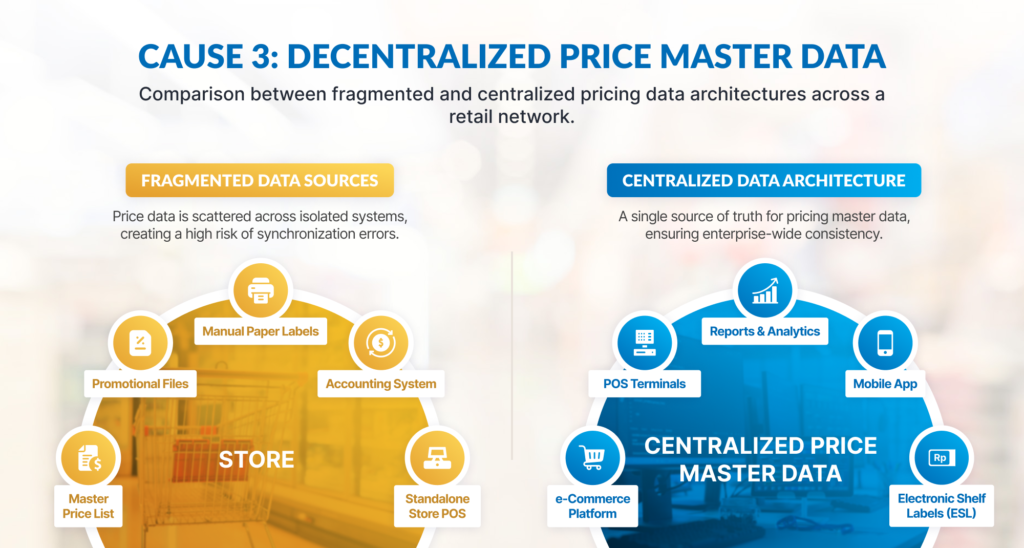
Comparing pricing data architecture: Decentralized vs centralized master data in retail networks
Fragmented, unsynchronized data sources frequently trigger store-wide pricing errors that erode profit margins and customer trust, while wasting valuable staff hours on reactive, last-minute corrections.

How It Happens

Retailers often manage pricing across disconnected platforms: enterprise resource planning (ERP) databases, local POS databases, and separate promotional files. When these platforms fail to sync properly, the register pulls data from one source while the printed label reflects another.

Why It Is Hard to Avoid

Keeping pricing synchronized across multiple store locations is a constant challenge. Complex regional pricing, local inventory markdowns, and store-specific loyalty deals create endless opportunities for errors. Worse, temporary network drops or cloud outages at local branches can silently block price updates from applying, leaving store teams unaware that their tags are displaying outdated prices.

Visible Symptoms

Data synchronization failures typically manifest as localized anomalies rather than chain-wide outages. Pricing discrepancies often cluster within specific branches or isolate particular vendor lines due to failed database batch updates.

Aggravating Factors

The real danger of unsynchronized master data is its hidden nature. Because these errors stem from deep back-office database pipelines, floor staff have no way of knowing a shelf tag is wrong until checkout.

4. Overlapping Promotional Programs and Complex Pricing Rules

How It Happens

A single SKU may qualify for multiple simultaneous campaigns, such as a seasonal discount, a quantity bundle, a membership tier price, and a payment gateway cashback. Shelf labels typically display only one static figure, while the POS engine calculates complex multi-tiered logic at checkout.

Why It Is Hard to Avoid

High promotion volume only works if your shelf tags can keep up. When marketing teams launch overlapping discounts without coordinating with the operational crew, physical shelf labels quickly fall out of sync with the complex pricing rules running in your central database.

Visible Symptoms

Major sales events like weekend flash promos often trigger a wave of checkout price disputes. Cashiers spend excessive time manually double-checking promotional terms and overriding register prices to fix customer confusion.

The Floor Reality

From an IT and system perspective, the cash register calculation is technically accurate based on active promotion rules. However, from the shopper’s perspective, a legitimate price mismatch has occurred because the number printed on the shelf tag did not convey the specific conditions required to trigger that final price. This disconnect erodes customer trust at the exact moment a promotion was intended to build loyalty.

5. Damaged, Misplaced, or Swapped Shelf Labels

How It Happens

Paper price tags are inherently fragile and vulnerable to physical wear. They frequently tear, fade under bright retail lighting, fall out of shelf channel strips, or become displaced during routine stocking. Furthermore, high customer interaction – such as shoppers picking up products, comparing options, and returning items to incorrect shelf positions – often leads to tags being accidentally covered, knocked loose, or swapped entirely.

Why It Is Hard to Avoid

In high-volume stores, heavy foot traffic, rapid restocking, and harsh conditions (such as freezer temperatures or high humidity) quickly wear down paper tags. Without constant manual audits, keeping thousands of paper labels clear and intact becomes nearly impossible.

Visible Symptoms

These issues cause frequent price complaints, especially in high-traffic zones like produce, frozen goods, and clearance bins. Damaged or missing tags lead to shelf chaos, mismatched prices, and confused shoppers at the point of purchase.

Aggravating Factors

When management treats shelf-tag maintenance as a secondary or low-priority operational task, minor visual defects compound rapidly. Leaving damaged or misplaced tags uncorrected erodes store presentation, leads to customer frustration at checkout, and consumes valuable staff time resolving preventable pricing disputes.

Why Price Discrepancies Cost More Than the Price Difference

The financial impact of a pricing error extends far beyond absorbing a small price difference at the register. The true cost impacts operational health across four layers:

  1. Customer Trust: Shoppers who experience a price discrepancy are far more likely to double-check their receipts on future visits or choose a competitor altogether. Data on consumer behavior shows that trust in pricing accuracy is a fundamental driver of customer retention.
  2. Staff Productivity: Every checkout discrepancy halts the payment queue, requiring cashier explanations, price verification walks, and supervisor intervention.
  3. Margin Erosion: When store policy dictates honoring the lower displayed price for the customer, the unrecorded difference reduces item gross margins.
  4. Regulatory Compliance: According to Indonesian consumer protection regulations (UU No. 8/1999), business operators are required to provide accurate information regarding the terms and prices of goods offered, ensuring that charges match advertised prices.

Disclaimer: This article provides operational insights for retail management and does not constitute formal legal advice. Store policies should be aligned with applicable local regulatory guidelines.

How to Prevent Price Discrepancies: Process, Control, and Automation

Addressing price discrepancies requires a structured, multi-tiered approach that scales from basic operational discipline to technology adoption.

LevelFocus AreaActionable Steps
Level 1: Process Improvement (Immediate, No Cost)Operational Discipline• Establish a single source of truth for pricing master data.
• Schedule paper tag updates before price changes activate on POS.
• Prioritize fast-moving goods and promotional SKUs during tag swaps.
• Implement daily random spot checks covering 10–20 SKUs.
• Set a clear cashier resolution policy to handle mismatches instantly.
Level 2: Control & Audit (Systematic Tracking)Verification & Metrics• Log every pricing error by store, SKU, time, and root cause.
• Review promo calendars weekly to catch conflicting discount rules.
• Conduct category-level price audits on a rotating basis.
Level 3: Process Automation (Structural Resolution)Integrated Infrastructure• Deploy centralized price management systems that push updates to all shelf display points simultaneously, eliminating time lags.
• Integrate shelf display systems directly with central POS data layers.

While automated shelf display solutions structurally eliminate time lags and manual relabeling errors, technology alone cannot fix underlying master data inconsistencies or poor promotional planning. Operational discipline remains essential at every scale.
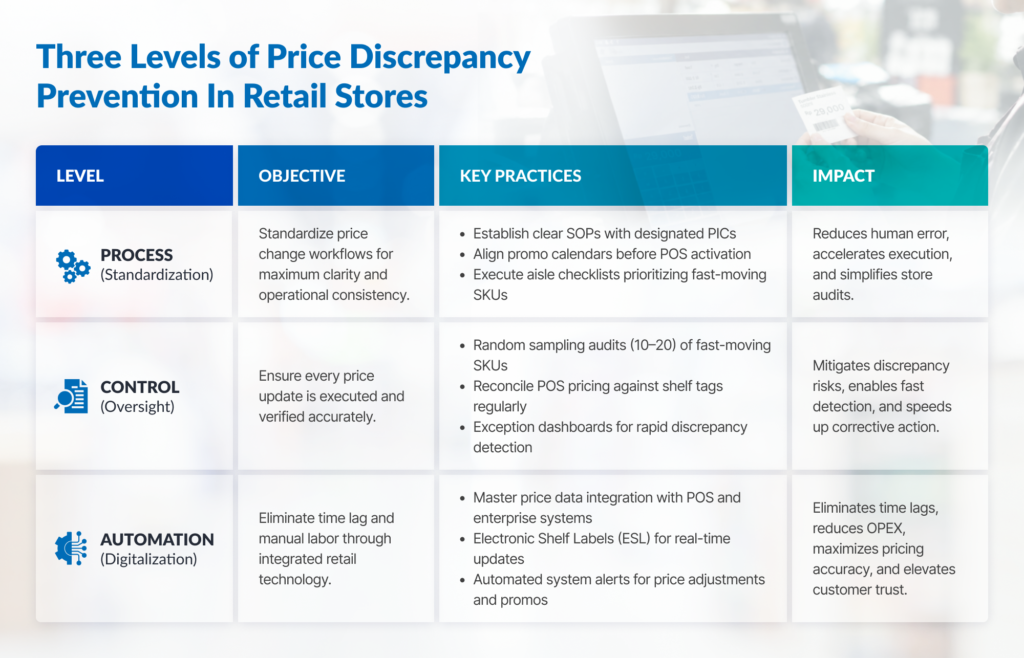
Table: A three-level framework for preventing price discrepancies through process alignment, quality control, and system automation
Addressing price discrepancies requires more than corrective action; it demands a multi-layered preventive strategy built for long-term value, driven by the active participation of all staff and management.

Frequently Asked Questions

If the shelf price differs from the register price, which price should apply?

Industry best practice and consumer protection standards dictate honoring the lower price displayed on the shelf. Doing so preserves customer trust, prevents checkout friction, and ensures compliance with transparent pricing disclosure rules. Retailers should establish clear, storewide Standard Operating Procedures (SOPs) to handle these discrepancies consistently.

Is a retail store legally required to give the lower price to the customer?

Under Indonesian Consumer Protection Law (UU No. 8/1999), consumers are legally entitled to accurate, truthful, and non-misleading pricing information. Furthermore, under modern retail regulations issued by the Ministry of Trade (Permendag No. 35/M-DAG/PER/7/2013), if a discrepancy occurs between the shelf tag and the POS scan, retailers are required to honor the lower displayed price. Charging a higher rate creates immediate legal and regulatory compliance risks.

How often should retail price audits be conducted?

Stores relying on manual paper labeling should execute daily random spot checks across 10 to 20 high-velocity SKUs, paired with comprehensive weekly category-level audits.

Which cause of price discrepancy occurs most frequently across retail networks?

The most prevalent cause is the operational time lag between central POS system updates and physical shelf tag replacement on the sales floor, particularly during fast-paced promotional transitions.

Can digital shelf labels completely eliminate price discrepancies?

Electronic Shelf Labels (ESL) structurally eliminate display timing lags, manual tag placement errors, and physical degradation. However, because ESL displays pull directly from central repositories, discrepancies caused by backend master data sync failures or overlapping promotion rules still require strict database hygiene.

How should cashiers be trained to handle price mismatch complaints?

Cashiers should be empowered to override minor price variances immediately at the register without requiring protracted supervisor approval. To ensure long-term resolution, every price adjustment must be logged into the store system to facilitate root-cause analysis by the operations team.

Building a Foundation for Price Accuracy

Price discrepancies between shelf tags and registers aren’t caused by careless staff, but stem from the structural flaws built into manual paper workflows. While spot checks and manual audits offer temporary relief, achieving true long-term pricing accuracy requires connecting physical shelf-edge displays directly with central enterprise databases.

For more practical strategies on maintaining shelf-edge pricing accuracy and improving store workflows, browse our full collection of retail operational guides here.

Featured image: retail store interior with electronic shelf labels (ESLs) and digital signage

Smart Retail: Technologies, Systems, and Solutions for the Modern Store

Featured image: retail store interior with electronic shelf labels (ESLs) and digital signage

As the Internet of Things (IoT) matures, smart retail technologies are playing a pivotal role in transforming brick-and-mortar operations, inventory management, and the overall customer experience. In recent years, the physical store environment has undergone a subtle yet profound evolution: paper price tags are giving way to digital displays, scales automatically issue barcodes, interactive screens engage shoppers, and traditional checkout counters are no longer the sole transaction point.

This shift extends far beyond aesthetics. By automating labor-intensive, repetitive manual tasks, these technologies allow store staff to focus on customer service and high-value operations. For retail enterprises, strategic deployment of smart retail solutions optimizes operational efficiency, protects profit margins, and delivers an elevated shopping experience.

This comprehensive guide provides an end-to-end roadmap of the modern retail technology landscape, detailing core functions, operational advantages, and implementation strategies tailored to various store scales.

Dive Deeper to The Concept of Smart Retail

Smart retail integrates data-driven systems and IoT hardware to automate store operations, heighten inventory accuracy, and enhance in-store customer engagement. This transformation relies on three operational pillars:omnichannel data accuracy, peak-hour throughput, and multi-store consistency.

At its core, smart retail is not merely a collection of standalone gadgets; it relies on seamless, real-time connectivity across core enterprise systems, including Point of Sale (POS) platforms, inventory databases, and shelf-edge displays.

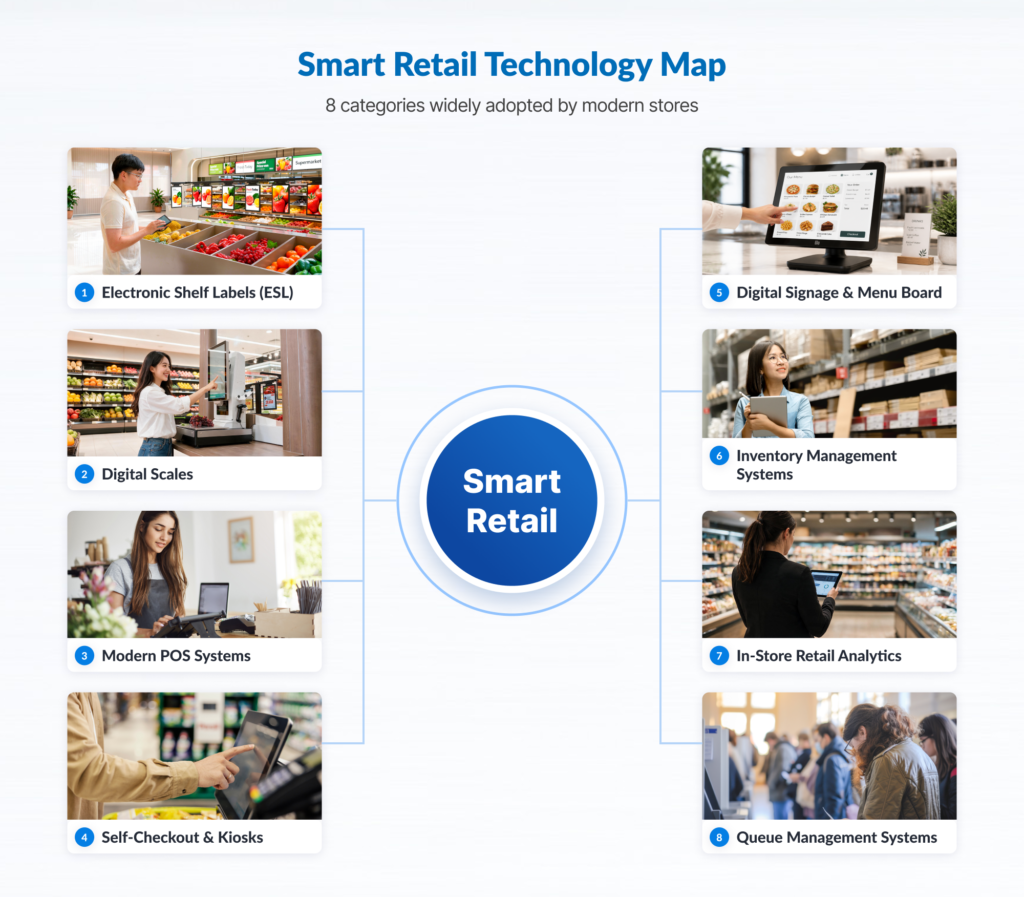
Within the modern retail technology ecosystem, store operations generally encompass eight core categories:

  • Electronic Shelf Labels (ESL) automate shelf pricing updates and eliminate pricing discrepancies.
  • Digital Scales & Automated Labeling expedite product weighing and automated barcode generation.
  • Modern POS & Extended Transaction Points synchronize transactions, payments, and stock levels in real time.
  • Self-Checkout & Self-Service Kiosks provide self-service alternatives while reducing front-end queuing.
  • Digital Signage & Menu Boards enable centralized management of promotional content and dynamic display updates.
  • Inventory Management & Traceability deliver real-time stock visibility to prevent stockouts.
  • Store Analytics & Footfall Monitoring capture customer flow data to optimize labor scheduling and store layout.
  • Queue Management Systems regulate customer flow to decrease perceived and actual wait times.

Smart Retail Technologies and Core Functions

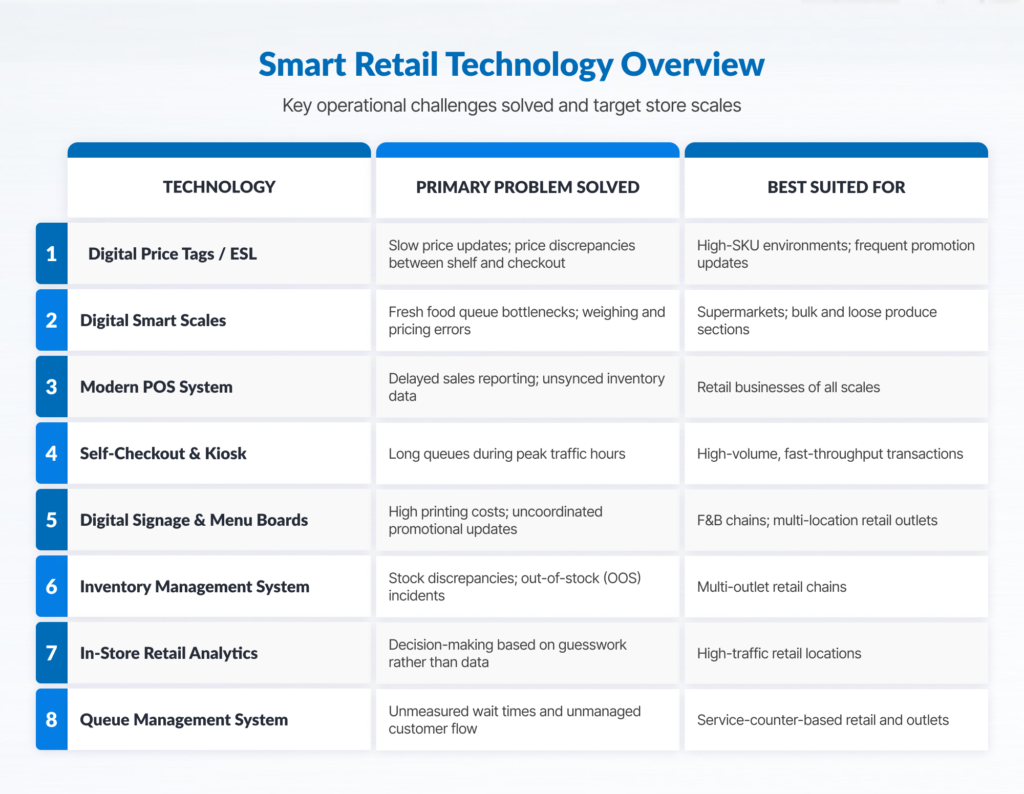
Retail technology comparison table showing scope of use and best options.
Key smart retail technologies connected to automate daily operations, eliminate pricing errors, and boost store ROI.

Electronic Shelf Labels (ESL)

Electronic Shelf Labels utilize low-power e-paper displays mounted on shelf rails to show pricing, product specifications, and promotional messages. Connected wirelessly to a central server, price updates made in the core database reflect instantaneously across thousands of shelf tags without manual intervention.

  • Core Pain Point Addressed: Eliminates manual paper re-labeling across thousands of SKUs, which is prone to human error. Therefore preventing price mismatches between shelf and checkout that undermine customer trust.
  • Target Environment: Supermarkets, hypermarkets, consumer electronics stores, pharmacies, and hardware chains with high SKU counts, frequent price adjustments, or dynamic pricing strategies.
  • Deployment Prerequisites: Enterprise integration between central inventory/POS databases and a robust wireless gateway infrastructure throughout the retail floor.

Digital Scales and Automated Labeling

Modern commercial digital scales integrate heavy-duty weighing mechanisms, real-time price calculation driven by master databases, and high-speed thermal barcode printing into a single workflow for fresh food and bulk sections.

  • Core Pain Point Addressed: Mitigates bottlenecks in fresh produce, meat, deli, and bakery sections while eliminating manual price calculation errors. Standardized barcode output ensures frictionless checkout scanning.
  • Target Environment: Grocery stores, supermarkets, specialty food retailers, and bulk goods stores managing variable-weight inventory.
  • Deployment Prerequisites: A clean, structured master product database featuring standardized Price Look-Up (PLU) codes synchronized across all weighing hardware.

Modern POS and Extended Transaction Points

Next-generation Point of Sale (POS) systems serve as the transactional engine of the store, connecting fixed registers, mobile tablets, and handheld devices directly to cloud-based or on-premises inventory control and financial reporting modules.

  • Core Pain Point Addressed: Resolves front-end congestion during peak hours and eliminates delayed sales reporting. Management gains real-time visibility into stock movement and revenue without waiting for end-of-day register reconciliation.
  • Target Environment: All retail formats, ranging from single boutique stores to multi-regional retail chains requiring real-time operational control.
  • Deployment Prerequisites: Stable internet connectivity, secure local networking, and peripheral hardware compatibility with modern payment standards (including credit cards, contactless payments, and QR code standards).

Self-Checkout and Self-Service Kiosks

Self-checkout lanes and self-ordering kiosks utilize interactive touchscreens, embedded barcode scanners, and integrated payment terminals to enable fully autonomous scanning, ordering, and payment.

  • Core Pain Point Addressed: Alleviates register lines during peak traffic and allows operators to reallocate staff from manual scanning to customer assistance, shelf replenishment, and store maintenance.
  • Target Environment: Urban convenience stores, quick-service food outlets, fast-casual dining, high-volume pharmacies, and transit-hub retail units.
  • Deployment Prerequisites: An intuitive, user-friendly UI/UX, stable payment gateway integrations, optimal floor layout design, and initial on-site staff facilitation for customer onboarding.

Digital Signage and Digital Menu Boards

Digital signage system utilizes commercial-grade visual displays managed via a centralized Content Management System (CMS). This system allows retailers to deploy dynamic promotional campaigns, high-definition promotional videos, and real-time menu updates across individual stores or nationwide networks.

  • Core Pain Point Addressed: Eliminates recurring design, printing, and distribution costs associated with static paper marketing materials, while preventing campaign execution delays by ensuring synchronized go-to-market messaging across all locations.
  • Target Environment: Quick-service restaurant (QSR) chains, fashion boutiques, cosmetics retailers, lifestyle stores, and multi-location retail brands running frequent seasonal promotions.
  • Deployment Prerequisites: High-quality visual media production, licensed CMS software, commercial displays, and sufficient network bandwidth for remote content distribution.

Inventory Management and Stock Traceability

Advanced inventory management systems combine rapid barcode scanning, enterprise mobile computers, and RFID technology to track inventory movement accurately from distribution centers to the backroom and sales floor.

  • Core Pain Point Addressed: Resolves inventory discrepancies, prevents lost revenue caused by stockouts, and minimizes working capital tied up in slow-moving inventory.
  • Target Environment: Value scales alongside store count, warehouse complexity, and SKU variance, making this critical for mid-to-large-scale retail operations.
  • Deployment Prerequisites: Strict operational discipline regarding scanning protocols during receiving, stock transfers, and shelf replenishment, backed by reliable ERP or WMS integration.

Store Analytics and Customer Traffic Monitoring

Retail analytics platforms utilize specialized traffic-counting sensors, optical cameras, and Wi-Fi signal tracking to collect quantitative data on shopper traffic patterns, dwell times, and queue lengths.

  • Core Pain Point Addressed: Replaces guesswork with empirical data. Store managers can optimize labor scheduling against footfall peaks, measure display conversion efficiency, and refine floor plan layouts.
  • Target Environment: Mid-to-large retail formats, department stores, flagship locations, and shopping mall units with high daily traffic.
  • Deployment Prerequisites: Well-defined analytical targets and Key Performance Indicators (KPIs) to transform raw traffic data into actionable operational improvements.

Queue and Customer Flow Management Systems

Digital queue management solutions organize customer waiting lines using automated ticket dispensers, directional digital displays, and audio announcements, particularly for service counters requiring consultation or customization.

  • Core Pain Point Addressed: Eliminates disorderly physical lines, minimizes perceived wait times, reduces shopper friction, and provides management with metrics on service speed per counter.
  • Target Environment: Retail formats featuring specialized service counters, including prescription pharmacies, telecom service centers, optical shops, and customer service desks.
  • Deployment Prerequisites: Clear counter segmentation, comfortable waiting areas, and prominent display screens visible across the waiting floor.

Summary Matrix: The Modern Retail Technology Landscape

Retail technologies: Every solution's scope of use, and best implementation option.
Each smart retail solution addresses distinct operational bottlenecks, allowing businesses to select tools that directly match their store scale and customer traffic demands.

System Integration: The Core Driver of Smart Retail ROI

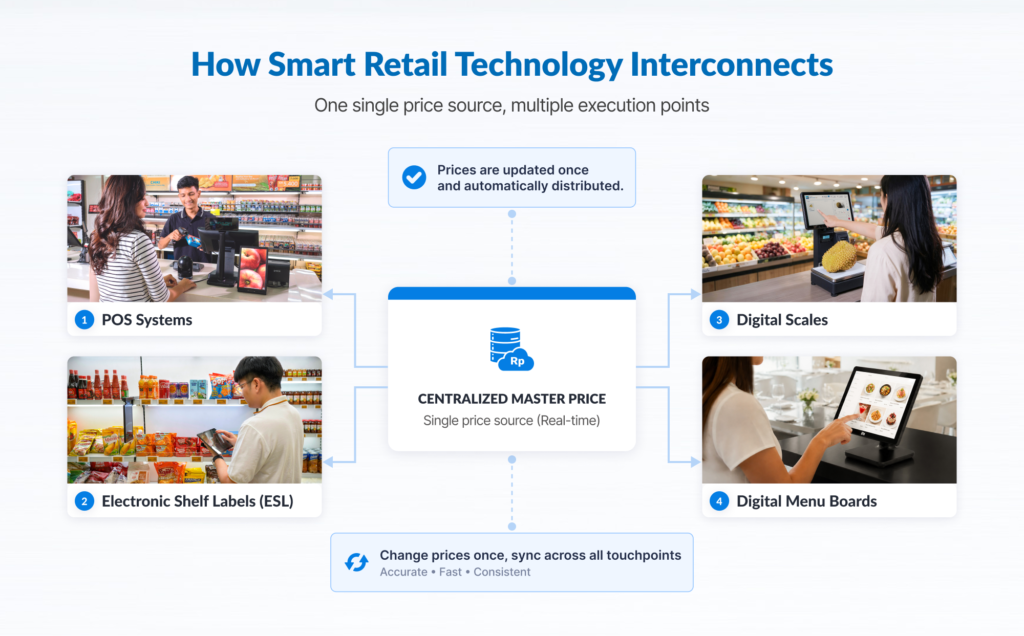
Flowchart showing smart retail system interconnectivity with master data.
Real-time price synchronization across digital hardware endpoints protects profit margins and creates a frictionless, reliable shopping experience across every store in your retail network.

The primary value of retail digitization lies not in deploying standalone hardware, but in establishing real-time interoperability across devices. Maximum ROI is achieved when peripheral hardware seamlessly exchanges data with backend enterprise systems.

With proper integration, a price adjustment executed in the central database propagates automatically to the POS, Electronic Shelf Labels, digital scales, and customer-facing digital signage simultaneously.

Ultimately, long-term success in smart retail depends on system interoperability rather than sheer hardware volume.

Selecting the Right Technology Roadmap

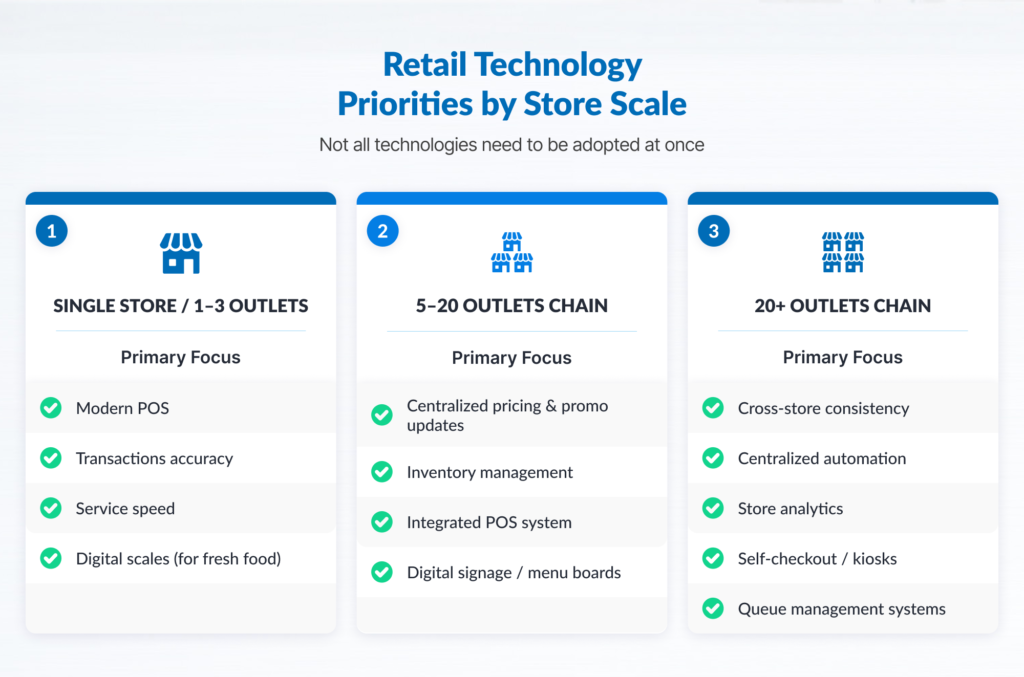
Retailers don’t and should not need to deploy all technologies simultaneously. Over-implementing complex systems without a solid foundation can disrupt daily operations. Scale technology adoption based on store count and operational complexity:

Illustration: Retail technology solutions categorized by business scale.
A phased approach to retail tech deployment aligns digital investment with business growth, allowing stores to solve critical bottlenecks as their footprint expands- without overhauling systems all at once.

1. Emerging Chains (1 to 3 Locations)

At this scale, centralized infrastructure management offers limited return. Capital expenditure should focus on tools that resolve immediate operational bottlenecks, accelerate checkout speed, and secure cash control:

  • Cloud-based modern POS supporting multi-payment options.
  • Integrated digital scales (essential for fresh produce or bulk formats).
  • Basic barcode scanning and stock-logging tools to mitigate shrinkage.

2. Growing Networks (5 to 20 Locations)

As the store footprint expands, manual price updates, localized promotional rollouts, and decentralized stock allocations become major operational drags:

  • Electronic Shelf Labels (ESL) to eliminate shelf-to-register pricing discrepancies across branches.
  • Centralized digital signage to maintain brand consistency while cutting print overhead.
  • Multi-location inventory management systems to streamline inter-store transfers and warehouse fulfillment.

3. Enterprise Retail Networks (20+ Locations)

For large-scale retail chains, labor optimization and operational consistency drive competitive advantage. Automation transitions from an operational preference to a core necessity:

  • Full-scale ESL deployment integrated with automated planogram compliance monitoring.
  • Self-checkout lanes and self-service kiosks to manage high transaction volumes efficiently.
  • Advanced store analytics (footfall counters and queue monitoring) to optimize labor allocation and maximize revenue per square meter.

A common industry pitfall is investing prematurely in complex peripheral systems before establishing clean master data. Always map operational bottlenecks prior to committing hardware capital.

Implementation Prerequisites for Smart Retail Deployments

Deploying digital solutions in physical stores is an operational transformation project rather than a routine IT procurement task. To ensure seamless execution and user adoption, build upon the following operational foundations:

  • Master Data Audit & Fixing: Electronic shelf labels, scales, kiosks, and POS systems rely entirely on data integrity. Standardize product names, SKUs, PLUs, price structures, and tax categories prior to system integration.
  • Standard Operating Procedure (SOP) Alignment: Technology accelerates well-defined processes, but amplifies operational disorder if workflows are unstructured. Document receiving, price override, return, and shelf-replenishment workflows before applying automation.
  • API and System Compatibility: Legacy POS or ERP systems must support seamless integration (via REST APIs or enterprise data connectors) to communicate with new hardware without requiring costly custom middleware.
  • Network Infrastructure & Power Stability: Wireless devices (including ESLs and mobile POS units) demand stable local connectivity. Conduct thorough site surveys for Wi-Fi and gateway coverage, and ensure hardware is backed by surge protection.
  • Comprehensive Workforce Training: Store personnel must be proficient in operating new equipment, troubleshooting basic technical issues, and guiding first-time customers through self-service interfaces.
  • Nationwide Technical Support & Service Level Agreements (SLAs): Retail hardware undergoes continuous operational strain. Partner with technology vendors offering nationwide field coverage and binding SLA commitments to ensure business continuity.

Many forward-thinking retailers adopt a phased implementation methodology: resolving immediate front-end friction before scaling capital expenditure into advanced automation.

Key market drivers accelerating this transition include:

  • Digital Payment Ubiquity: The rapid growth of digital wallets and unified QR payments has normalized fast, contactless checkout, creating ideal conditions for self-service kiosks and modern POS systems.
  • Rising Operational and Labor Costs: Margin pressure encourages retailers to automate manual tasks, such as re-tagging shelves and physical stock audits, allowing labor to be redirected toward high-touch customer service.
  • Omnichannel Consumer Expectations: Modern shoppers expect physical stores to offer the speed, pricing accuracy, and inventory visibility typical of e-commerce platforms.

Rather than attempting full store automation overnight, a modular approach empowers businesses to resolve their most pressing operational pain points first.

Frequently Asked Questions (FAQ)

Is smart retail technology only suitable for enterprise chains?

No. Single-store operators capture immediate value from foundational tools. Modern POS platforms and integrated digital scales significantly improve data accuracy and financial reconciliation regardless of scale.

Which technology should be implemented first?

Begin with a modern POS system and centralized inventory management. A structured master data architecture and robust POS ecosystem are essential prerequisites before introducing peripheral hardware like self-checkout kiosks or digital shelf labels.

Do all smart retail devices require uninterrupted internet connectivity?

Offline resilience depends on system architecture. Many enterprise POS systems and smart hardware support local offline modes, allowing continuous core processing over local networks before auto-synchronizing once connectivity is restored.

Does adopting smart retail require replacing legacy POS hardware?

Not necessarily. Most modern hardware peripherals can interface with legacy POS or ERP platforms via APIs or enterprise middleware, provided the existing backend supports structured data export.

What is the typical deployment timeline?

Timelines range from a few days for single-site hardware deployments to several months for phased multi-store rollouts requiring enterprise integration, network configuration, testing, and change management.

Will smart store technologies replace retail employees?

No. Smart retail technologies automate repetitive, low-value tasks (such as manual price updates and product weighing) reallocating staff toward customer engagement, sales assistance, and store presentation.

The Future of Physical Retail Starts at Every Integration Point

Modernizing physical retail is not a matter of acquiring hardware, it is about engineering an integrated ecosystem tailored to clear operational objectives. Long-term success relies on executing the correct deployment sequence, ensuring seamless system integration, and partnering with reliable technical support. A flexible digital foundation ensures your retail network remains operationally resilient and competitive.

Explore smart retail solutions for your enterprise here. From Electronic Shelf Labels and modern POS systems to self-service kiosks and digital signage, discover scalable technology solutions designed for your operational needs.

Manager reviewing the performance of several branches on screen

7 Common Operational Issues in Multi-Branch Businesses

manager reviewing the performance of several branches on screen

Expanding your branch network creates new growth opportunities, but multiplies operational challenges. As your footprint grows, maintaining consistent service standards, data visibility, staff efficiency, and operational control becomes increasingly difficult, and small friction points quickly turn into systemic bottlenecks.

Managing a multi-site network requires bridging the gap between local branch execution and central executive control. Drawing from field data across retail, banking, healthcare, and service sectors, businesses scaling beyond their initial footprint face seven predictable operational hurdles. Here is a breakdown of those challenges, their root causes, and how to address them effectively.  

Quick Overview: 7 Multi-Branch Operational Issues

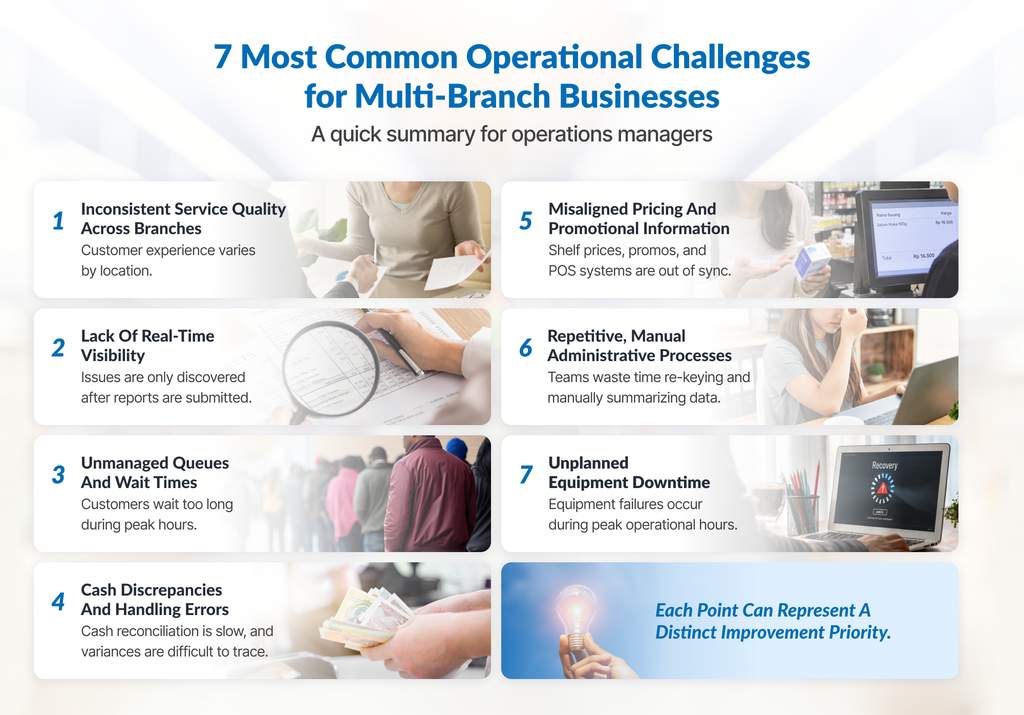
Quick Infographic of 7 common operational challenges for multi-branch businesses
  • Inconsistent service quality across different sites depending on frontline branch staff and local leadership.
  • Lack of real-time operational visibility due to delayed, manual reports that prevent proactive problem-solving.
  • Unmanaged queues and customer wait times during unexpected rush hours that lead to walkaways and lost branch revenue.
  • Cash handling discrepancies and errors from manual balancing that create audit gaps, long reconciliations, and staff friction.
  • Inconsistent pricing and promotional updates between store shelves and checkouts that frustrate buyers and leak profit margin.
  • Repetitive and manual administrative tasks that force branch staff to waste productive hours re-entering duplicate data across siloed tools.
  • Unexpected equipment downtime that derails branch throughput without clear repair Service Level Agreements for quick recovery.

1. Inconsistent Service Quality Across Locations

The Symptoms

Customers complain about vastly different experiences depending on which branch they visit. A service that feels seamless at your main city branch feels slow or disorganized at a suburban location, leading to uneven online ratings across your footprint.

The Root Cause

Standard Operating Procedures (SOPs) exist in central documentation folders, but they do not translate into daily frontline behavior. Onboarding relies heavily on local branch managers, leading to regional interpretations of service standards. Without a centralized monitoring system, your standard operating procedures can become inconsistent across branches over time.

The Impact

Inconsistency directly erodes overall brand equity. Modern consumers expect uniform quality regardless of physical location. When service predictability breaks down, opening new locations damages your reputation rather than strengthening your market position.

Strategic Direction

Standardize your service workflows and implement uniform mechanisms to capture customer feedback across all sites. Establishing clear benchmarks ensures operational standards remain constant, regardless of location.

Explore the unified frameworks for optimizing Customer Experience Solutions across your branch network.

2. Lack of Real-Time Operational Visibility

The Symptoms

Headquarters discovers operational failures long after they occur. Issues are typically revealed through monthly financial audits, end-of-week summary reports, or public customer complaints on social media.

The Root Cause

Branch data collection remains manual, fragmented, and delayed. Frontline managers compile performance metrics using separate messaging apps, spreadsheets, and physical logbooks. Compiling this fragmented information into executive summaries takes days or weeks.

The Impact

Leadership constantly manages through the rearview mirror. By the time regional managers spot a performance drop or operational anomaly, the financial loss, customer churn, or operational inefficiency has already impacted the bottom line.

Strategic Direction

Implement automated operational data aggregation that consolidates multi-site metrics into a central real-time dashboard. Centralized reporting provides management with immediate operational visibility, enabling proactive intervention before minor delays escalate into major losses.

Learn how centralized Queue Analytics and Dashboard Systems deliver real-time visibility into operational performance.

3. Unmanaged Queues and Customer Wait Times

The Symptoms

Severe customer congestion occurs unpredictably during peak operating hours. Service counters become overwhelmed, staff stress spikes, and visible lines deter incoming foot traffic, forcing potential buyers to leave without making a purchase.

The Root Cause

Staff scheduling and service point allocations rely on subjective estimates or broad historical averages rather than real-time arrival data. Without granular tracking of wait times and transaction durations, branch leaders cannot align staffing levels with actual customer flow.

The Impact

Unmanaged queues result in hidden revenue leakage. Customers who walk away due to long lines represent lost transactions that never appear in standard point-of-sale accounting, making the true cost of inefficient queuing invisible on basic income statements.

Strategic Direction

Deploy intelligent customer flow management systems that capture foot traffic trends, queue lengths, and service durations by site. Data-driven arrival tracking allows operations managers to optimize roster schedules and dynamic line management based on actual visitor volume.

Discover how smart Queue Management Systems balance customer flow and increase service throughput.

4. Cash Handling Discrepancies and Errors

The Symptoms

Small, routine cash discrepancies occur across multiple register tills. Daily reconciliation takes hours at closing, and tracing the origin of missing funds across multiple shifts and handovers becomes an administrative nightmare.

The Root Cause

Cash handling relies on manual counting at multiple points throughout the business day – from till preparation and shift handovers to daily balancing and safe drops – without automated, continuous audit tracking.

The Impact

Manual counting errors lead to financial losses, delayed bank deposits, and significant administrative overhead. More critically, recurring unaccounted discrepancies create internal distrust and tension between staff and management when accountability cannot be proven.

Strategic Direction

Automate cash processing using equipment that counts, validates, sorts, and logs transactions automatically. This mechanism secures cash instantly while generating a structured, easy-to-track audit trail.  

Streamline store operations and eliminate till errors with automated Cash Processing & Management Solutions.

5. Inconsistent Pricing and Promotional Updates

The Symptoms

Promotional campaigns launched by central marketing are applied late at local store shelves, or the price tag listed on the shelf does not match the price scanned at the checkout register.

The Root Cause

Price updates and promotional signage depend on manual execution by branch staff, who must print, locate, and replace physical paper tags across hundreds or thousands of shelf edge locations individually.

The Impact

Pricing mismatches generate immediate customer frustration and erode trust at checkout. Furthermore, delayed price adjustments lead to compliance risks, legal exposure, and margin leakage caused by selling items at outdated lower rates or unauthorized discounts.

Strategic Direction

Adopt centralized digital pricing infrastructure that links central point-of-sale databases directly with automated display updates across all locations simultaneously, guaranteeing complete price integrity across physical and digital touchpoints.

Modernize shelf management and eliminate pricing errors using Electronic Shelf Label Solutions.

6. Repetitive and Manual Administrative Tasks

The Symptoms

Branch staff and supervisors dedicate several hours each day to manual paperwork, re-entering sales figures into spreadsheets, filling out physical compliance checklists, and staying late to complete basic operational recaps.

The Root Cause

Core software applications operate in silos. Because inventory, scheduling, sales, and accounting systems are not directly integrated, administrative workloads increase alongside the risk of employee burnout.

The Impact

High-value human hours are diverted away from direct customer service, sales generation, and team coaching toward repetitive data entry. This increases operational labor costs, elevates human error rates, and accelerates staff burnout.

Strategic Direction

Streamline cross-system workflows by adopting administrative automation tools and establishing software integrations that eliminate duplicate data entry across your physical footprint.

Reduce administrative workloads and improve operational accuracy with the Robotic Process Automation Solutions.

7. Unplanned Downtime and Unclear Resolution Times

The Symptoms

Essential branch hardware – such as POS terminals, cash counters, self-service kiosks, or digital signage – fails during busy trading hours. Branch managers wait days for field technicians to arrive, with no clear timeline for resolution.

The Root Cause

Equipment maintenance is handled reactively rather than preventively. Furthermore, service agreements lack binding, regional-specific Service Level Agreements (SLAs) tailored to multi-site operational demands.

The Impact

Unplanned hardware downtime halts business operations, increases wait times, forces manual workarounds, and directly causes missed revenue for every hour system components remain unresponsive.

Strategic Direction

Shift from reactive repairs to structured, scheduled preventive maintenance programs supported by formal, enforceable SLAs that guarantee fast response times across all geographic branch locations.

Ensure maximum hardware uptime across all your sites with nationwide Maintenance & Support Services.

The Underlying Pattern Behind These Challenges

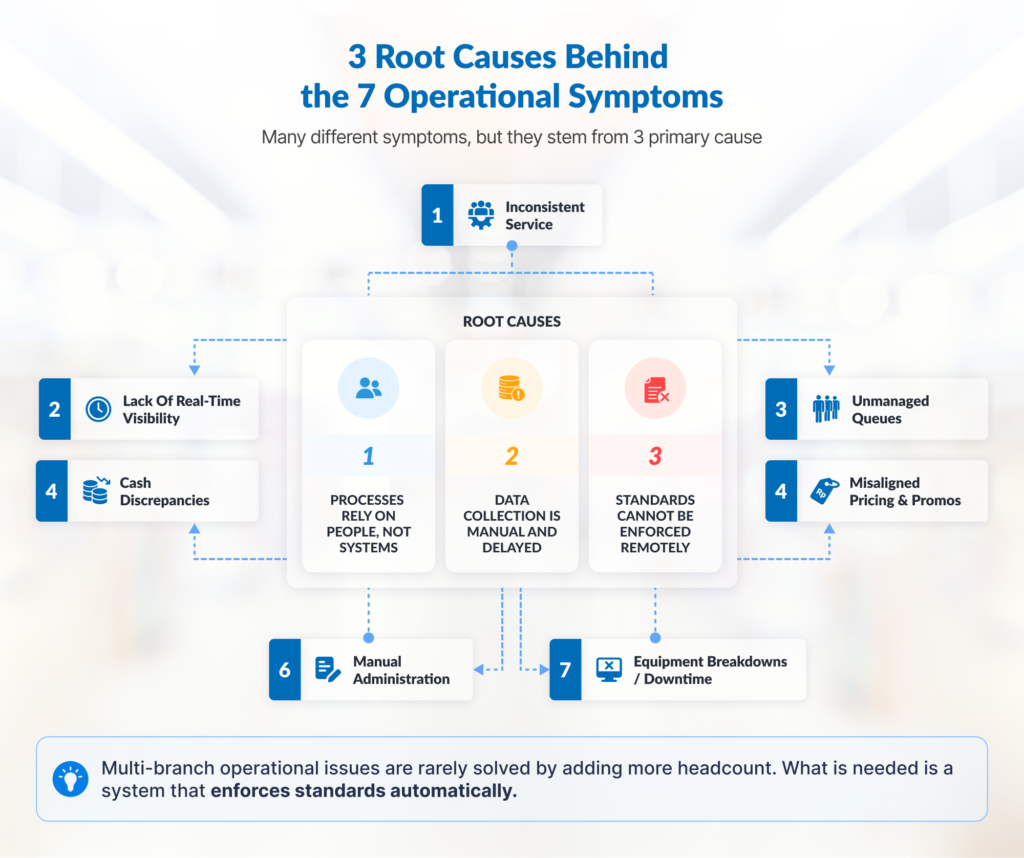
Diagram: 3 root causes connecting 7 operational symptoms in multi-branch businesses

While these seven operational obstacles manifest in different parts of daily branch activities, a closer analysis reveals that they stem from the exact same three core structural gaps:

  1. Processes rely on individual effort rather than systematic frameworks: When operational quality depends entirely on the memory or discipline of specific staff members, performance fluctuates wildly whenever shift schedules change or employee turnover occurs.
  2. Data collection is manual, fragmented, and delayed: When operational data is collected manually via spreadsheets or messaging tools, management receives feedback days or weeks after the event. By then, operational issues have already converted into financial losses.
  3. Standards cannot be enforced remotely without structured tools: As branch networks expand across regions, physical oversight becomes impossible. Without automated guardrails, compliance declines as distance from headquarters increases.

Adding layers of oversight is not always the only answer. In many cases, process improvement, data integration, automation, and centralized visibility can reduce reliance on manual supervision.

Prioritizing Which Operational Issues to Solve First

Attempting to resolve all seven challenges simultaneously can paralyze your organization and overwhelm store teams. To help you prioritize simply, you can use the following scoring framework:

Priority Score = Frequency × Impact × Wasted Time/Cost

Example:
Frequency: 1–5
Customer impact: 1–5
Operational/cost impact: 1–5
Total score: 1–125

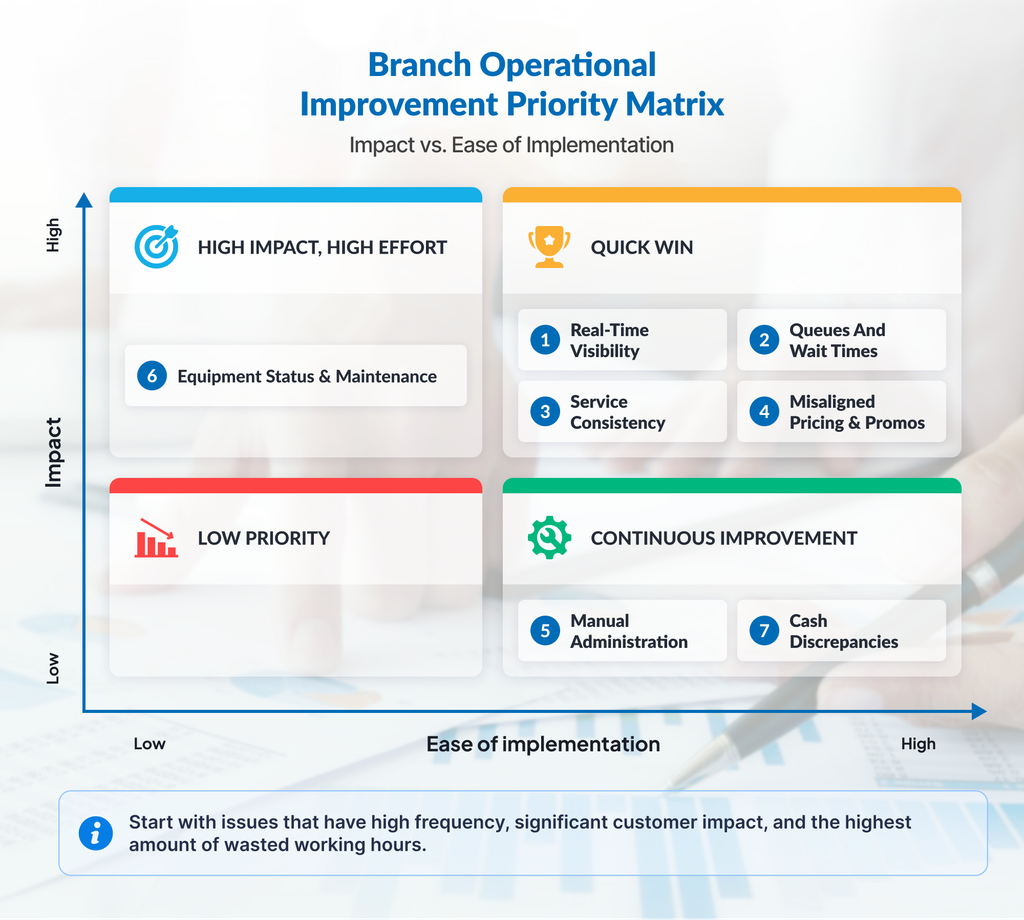
Operational Improvement Priority Matrix

2×2 Impact vs. Effort Matrix

When building your operational roadmap, always begin with Quick Win, the issues that deliver immediate financial recovery or customer satisfaction gains with minimal operational disruption. Tackling one clear bottleneck builds organizational momentum, proves return on investment (ROI), and prepares your team to take on larger strategic initiatives. 

Also Read:

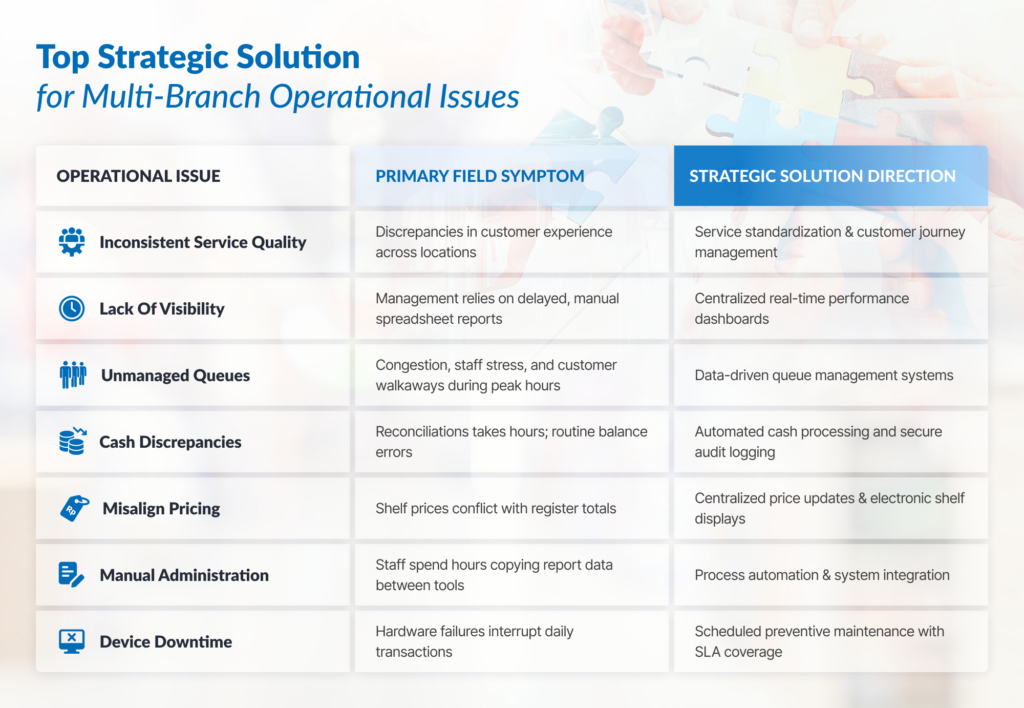
Summary: Operational Challenges vs. Systemic Solutions

Summary Table: Problem → Symptoms → Potential Solutions

Frequently Asked Questions

How many branches can a business manage manually before operations begin to break down?

There is no universal threshold for branch count. The need for a centralized system usually becomes apparent when direct supervision, report consolidation, and cross-location standardization begin to strain head office teams.

Are these operational issues unique to the retail sector?

No. While retail stores frequently struggle with pricing updates and cash handling errors, these exact operational bottlenecks affect healthcare clinics, pharmacy chains, bank branches, F&B franchises, and public service centers alike. Any business model that relies on multi-site physical service delivery faces identical challenges around standardization, visibility, and resource management.

Should we update our SOP documentation or adopt new technology first?

Ideally, business processes and operational targets should be clarified before implementing technology. Digitizing a chaotic workflow only accelerates operational inefficiency—it doesn’t solve it. Define your operational standards and service flows first, then deploy technology built to automate those standards.

How can operations managers monitor distant branches without hiring more supervisors?

Rather than adding costly layers of management, progressive operations teams implement centralized monitoring systems that capture branch data automatically. Real-time dashboards track key metrics and alert regional managers only when performance strays outside pre-set parameters, allowing targeted intervention without constant travel or micromanagement.

Does operational standardization reduce local branch flexibility?

Standardization protects foundational service quality, financial security, and compliance without restricting positive local engagement. Frontline employees remain free to personalize customer interactions and adapt to local market dynamics, while relying on structured back-end systems to execute routine administrative and transactional tasks smoothly.

How long does it take to see measurable results from operational improvements?

The required timeframe depends on problem complexity, number of sites, process maturity, degree of system integration, and deployment scale. Targeted operational improvements typically demonstrate early metrics faster than cross-branch transformations involving legacy or multi-platform systems.

Conclusion

Branch network growth almost always increases operational complexity. The challenge is ensuring that this complexity does not grow faster than the company’s ability to control processes, data, and service standards.

By identifying the most impactful issues, setting priorities, and selecting the right system, companies can expand their network without losing operational visibility and consistency.

Ready to Optimize Your Business Operations?

Explore integrated, ICT-based solutions designed to boost branch efficiency, eliminate queues, and automate enterprise data workflows here.

Cover image for cash recycler security features themed blog

Cash Recycler Security Features: The Key to Effectively Mitigating Fraud and Shrinkage

cover image for cash recycler security features themed blog

While cash recyclers are widely known as standard technology in banking, their operational benefits extend much further. As the world’s third-largest unbanked population, where physical currency still dominates daily retail and commercial transactions, businesses in Indonesia handle massive volumes of cash every single day.

Relying on manual processing might work for micro-enterprises, but high-volume sectors like large-scale retail and finance struggle to maintain efficiency using conventional methods. Manual workflows pose severe risks of financial loss and shrinkage, often driven by human error and internal fraud. The reality is simple: every time a banknote changes hands manually, a window of vulnerability opens.

To shut these windows permanently, forward-thinking organizations are shifting from passive cash storage to active cash automation. In this article, we will explore the core security features of modern cash recyclers and how integrating these devices into your operations serves as a definitive strategy for robust fraud prevention.

Why Security is the Ultimate Priority in Cash Management

For institutions managing high volumes of physical currency, cash management is far more than a routine operational task but a core discipline of risk management. The vulnerabilities inherent in legacy cash environments generally fall into three high-risk categories:

1. The Persistent Threat of Counterfeit Currency

As technology advances, counterfeiters adapt just as quickly, using sophisticated printing techniques to replicate intricate security threads, watermarks, and color-shifting inks. Once a counterfeit bill slips into your cash ecosystem, the financial loss is absolute. For banks and high-volume retailers, accepting counterfeit money results in immediate financial deficits, regulatory scrutiny, and long-term damage to brand reputation.

2. Internal Shrinkage and Unauthorized Access

While external threats like robberies dominate headlines, internal fraud represents a continuous, quiet drain on profitability. Internal shrinkage – whether through small, repeated thefts by staff or coordinated internal fraud – flourishes in environments with weak audit trails. Without strict segregation of duties and unalterable logging, pinpointing the source of missing cash becomes an operational nightmare.

3. Human Error and Cash Discrepancies

Miscounts, improper data entry, and misplaced physical currency account for a massive percentage of daily cash discrepancies. While not always malicious, these discrepancies require costly, time-consuming administrative reconciliation. Furthermore, a chaotic cash environment caused by frequent human error provides the perfect smokescreen for actual fraudulent activities to hide behind.

Core Cash Recycler Security Features You Shouldn’t Overlook

To mitigate these critical risks, modern cash recyclers combine high-grade physical engineering with advanced digital protocols. These devices go beyond traditional cash boxes by operating as smart, interconnected nodes within your financial architecture. Below are the primary protection features that transform these machines into unyielding security assets.

1. Advanced Counterfeit Detection

At the front line of fraud prevention is the machine’s validation engine. When a note is deposited, it passes through a multi-layered array of sensors designed for industrial-grade counterfeit detection. In high-volume cash landscapes, this validation is swift, highly accurate, and strictly aligned with central bank compliance standards.

  • Ultraviolet (UV) & Infrared (IR) Sensors: These check the unique chemical signatures of the paper and specialized, light-reactive inks that are entirely invisible to the naked eye.
  • Magnetic Sensors: These validate the magnetic ink patterns and metallic threads embedded within legitimate currency, ensuring high-coercivity elements match official mint standards.
  • Optical & Thickness Scanners: These analyze the exact physical dimensions, structural integrity, fitness level (sorting fit vs. unfit notes), and optical features of each banknote to catch high-quality “super-notes” instantly.

2. Heavy-Duty Certified Secure Vaults

A security system is only as good as its physical barrier. Cash recyclers house their recycling cassettes within high-grade, reinforced steel vaults. These enclosures typically carry international certifications such as UL (Underwriters Laboratories) or CEN standards. Engineered to resist mechanical drilling, thermal cutting, and physical leverage, these vaults ensure that cash remains protected even during off-hours when facilities are unstaffed.

3. Continuous Audit Trails & Automated Transaction Logging

In high-volume cash management, visibility means security. Every single interaction with a cash recycler – whether it is a routine deposit, a teller withdrawal, a cassette clearance, or a scheduled maintenance check by a technician – is recorded in real time.

This automated audit trail is anchored to the machine’s internal ledger and cannot be altered, bypassed, or deleted by local staff. By creating an immutable, timestamped digital footprint of your entire physical cash flow, the system simplifies compliance reporting and turns internal investigations from guesswork into an exact science.

4. Role-Based Access Controls (RBAC) & Biometrics

Eliminating universal access is a foundational pillar of internal risk mitigation. Cash recyclers enforce strict user login protocols to ensure absolute accountability. Through unique PINs, encrypted smart cards, or advanced biometric integration (such as fingerprint scanning), the system verifies the exact identity of the operator before a single shutter opens.

Furthermore, management can assign granular, role-based permissions. For example, a retail cashier or bank teller may only be permitted to process standard deposits and limited cash dispensations. Meanwhile, higher-tier actions, like clearing internal cassettes, modifying device settings, or accessing the vault interior, are strictly reserved for authorized vault managers or CIT (Cash-in-Transit) partners.

5. Data Encryption & Cybersecurity Hardening

Modern cash recyclers are Internet of Things (IoT) devices seamlessly connected to broader banking cores, ERP systems, or centralized monitoring networks. While this connectivity enables powerful data management, it also introduces a potential digital attack surface that must be secured.

To prevent malicious actors from intercepting financial data or injecting fraudulent operational commands, all data transmissions are protected by enterprise-grade encryption protocols (such as AES-256). Additionally, the onboard operating systems are structurally hardened against external malware, network intrusions, and unauthorized physical USB inputs, ensuring complete digital resilience.

6. Automated Reconciliation & Discrepancy Elimination

Manual end-of-day balancing is notoriously susceptible to manipulation, accidental arithmetic errors, and intentional administrative masking. Cash recyclers automatically count, validate, and balance the ledger with every transaction. By maintaining a continuous, real-time balance of exactly what is inside the vault, the machine effectively eliminates the structural windows where manual cash discrepancies usually occur.

How Cash Recyclers Actively Prevent Fraud in Your Organization

Understanding individual security features is only half the equation; the real value lies in how these systems work together to neutralize threats across your daily workflows.

1. Neutralizing Internal Fraud

Internal theft thrives on opportunity and lack of accountability. A cash recycler systematically removes both factors:

  • Zero Open-Cash Exposure: Because cash is immediately fed into the machine and validated, it spends almost no time sitting exposed in open drawers.
  • Absolute Accountability: If a discrepancy occurs somewhere in the branch, the compliance officer can immediately cross-reference the digital audit logs. Because access is tied to biometric or unique user logins, employees know that any unauthorized attempt to access or manipulate the cash will be instantly flagged and attributed to them. This total lack of anonymity acts as a powerful psychological deterrent against internal fraud.

2. Blocking External Fraud and Counterfeits

Manual cash inspection by tellers or retail clerks is inherently flawed, especially during rush hours when long lines pressure staff to move quickly. A cash recycler doesn’t get tired, distracted, or stressed by a busy lobby. It tackles this problem directly through two key functions:

  • Instant Rejection: Every single bill is scanned with consistent accuracy. If the machine detects a counterfeit note, it rejects it on the spot, before it can be credited to an account or mixed into your daily cash float.
  • A Clean Ecosystem: Since the machine recycles accepted cash for future withdrawals, it ensures the money handed back out to your customers is 100% authentic, keeping your business’s reputation completely secure.

3. Mitigating Human Error to Enhance Compliance

When manual counting mistakes constantly mess up your cash ledger, spotting actual fraud is almost impossible. A cash recycler fixes this by taking over the counting, sorting, and verification entirely. When your daily cash balances perfectly without any manual discrepancies, your risk and compliance team doesn’t have to waste hours chasing down simple clerical errors, they can actually focus on finding real anomalies.

The Strategic ROI of Secure Cash Automation

Investing in cash recyclers with advanced security features is a proactive risk-mitigation strategy that delivers measurable financial returns.

By automating the validation, storage, and auditing of your cash assets, your organization establishes a multi-layered defense system against both internal and external threats. The results are clear: minimized shrinkage, absolute protection against counterfeit currency, streamlined compliance audits, and an operational framework rooted in absolute transparency.

Introducing PT Murni: Your Trusted Digital Business Transformation Enabler

PT Murni Solusindo Nusantara (PT Murni) is a trusted digital business transformation enabler with over 34 years of experience in delivering best-in-class solutions specifically tailored to meet the needs of every industry. We are highly trusted by the central Bank of Indonesia, various leading commercial banking institutions, and cross-sector corporations to manage nationwide strategic projects.

Do not let your business efficiency be hindered by inaccurate manual processes. Upgrade your transaction points with safer, faster, and more reliable solutions that perfectly align with your business needs. Contact us today for a free consultation to find the ideal solution for your operational requirements and budget.

Cover image for blog with the theme of money counting machine and cash recycler

Money Counting Machine & Cash Recycler: Understanding the Key Differences Before Investing

cover image for blog with the theme of money counting machine and cash recycler

As Indonesia remains one of the top 10 countries most reliant on cash, technologies like money counting machines and cash recyclers are highly relevant for daily business operations. Whether you run a bustling retail chain, a fast-casual F&B franchise, or a financial institution handling high-volume cash every single day, relying on conventional methods is labor-intensive, time-consuming, and prone to costly errors.

Think about the hours your team spends at the end of every shift: manually sorting through stacks of banknotes, recounting discrepancies, double-checking for counterfeits, and preparing bank deposits. Beyond the sheer exhaustion of manual processing, the risk of human error is a constant threat to your bottom line. A single miscount or an undetected counterfeit bill directly impacts your profit margins.

These operational pain points are driving businesses to shift away from manual processing toward sophisticated cash-handling technologies. But what exactly is the difference between a money counter and a cash recycler? While both handle cash, they serve completely different operational needs.

Let’s break down the capabilities of each technology so you can choose the most efficient solution for your business.

What is a Money Counting Machine?

When businesses decide to move away from manual cash handling, their first investment is usually a standard money counter. But to make the right choice, we first need to understand what a money counting machine is and how it fits into your basic workflow.

Definition & How It Works

A money counting machine is a straightforward, hardware-driven device designed to count a bulk stack of banknotes quickly and accurately. The user simply places a stack of cash into the hopper, and the machine feeds the bills through internal sensors one by one, displaying the total count – and, in more advanced models, the total monetary value – on a digital screen.

Modern units do more than just count numbers. A reliable commercial-grade machine generally offers three primary functions:

  • High-Speed Counting: Processing hundreds or even thousands of bills per minute, drastically reducing closing times.
  • Counterfeit Detection: Utilizing ultraviolet (UV), magnetic (MG), and infrared (IR) sensors to flag fake currency instantly.
  • Basic Sorting: As a practical currency sorter, advanced multi-currency counters can separate bills by denomination or orientation, turning mixed stacks into neat piles.

Pros & Cons of Implementing a Money Counting Machine

Before deciding to invest, it is important to understand the advantages and disadvantages of using a money counting machine:

Pros: The Ideal Solution for Growing Businesses

Affordable Upfront Cost

Requires a relatively low initial investment, making it highly accessible for small to medium enterprises.

Compact & Portable

Fits easily on a standard back-office desk or right next to a cash register without taking up much space.

User-Friendly

Highly practical and requires virtually zero training for your staff to operate it smoothly and effectively.

Cons: Operational Boundaries to Keep in Mind

One-Way Workflow

The machine only counts incoming cash brought to the back office. It cannot store cash securely for long periods or dispense it back out automatically for daily operations.

Manual Steps Remain Needed

Your staff must still manually take the counted cash, secure it in a separate safe, or physically transport it to the bank for deposit.

What is a Cash Recycler?

If a standard money counter handles a single step in the cash cycle, a cash recycler manages the entire loop. To understand its value, we must look at what a cash recycler is from a holistic operational perspective.

Definition & How It Works

A cash recycler is an intelligent, high-security system that automates the entire lifecycle of cash within your business. It acts as a smart, automated vault. When cash is deposited into the machine, the system counts the money, authenticates it, validates the denominations, and stores it securely in internal cassettes.

The “recycling” magic happens because the exact same cash deposited by one cashier can be immediately and automatically dispensed to another cashier as their starting till or change for a shift.

This advanced technology delivers several core functions:

  • Closed-Loop Cash Management: Handles both cash acceptance and cash dispensing seamlessly, eliminating the hassle of manual till preparation.
  • Real-Time Reconciliation: Integrates directly with your Point of Sale (POS) or ERP system to monitor every dollar coming in and out. The system creates an unalterable digital audit trail, so you always know exactly how much cash is inside the machine at any given second.
  • Advanced Counterfeit & Fitness Sorting: Utilizes high-grade banking sensors to reject counterfeits and can even separate fit (clean/crisp) bills from unfit (damaged/worn) bills.

Pros & Cons of Implementing a Cash Recycler

To avoid taking the wrong step in your automation strategy, here are the advantages and disadvantages of implementing a cash recycler for your business:

Pros: Maximizing Business Operational Efficiency

Drastic Labor and Time Savings

Eliminates the need for managers to manually prepare cash drawers, audit individual cashiers, or spend hours on tedious end-of-shift reconciliation.

Maximum Security

The machine functions as a heavy-duty safe. Cash is never exposed in the open air, minimizing the risk of internal shrinkage and potential external theft.

Optimized CIT (Cash-in-Transit) Operations

Because the machine recycles money internally for daily use, you do not need frequent bank deposits or armored car pickups, which ultimately slashes monthly operational fees.

Cons: Initial Investment and Space Requirements

Higher Initial Investment

Given the advanced technology, software integration, and physical security features offered, this system carries a more premium upfront cost compared to basic counters.

Large Physical Footprint

Due to the robust vault and complex internal mechanisms, these units are larger and heavier, requiring a dedicated space in a secure back office or cash room.

Comparison: Money Counting Machine vs. Cash Recycler

To help you better visualize this cash machine comparison, here is a side-by-side breakdown of their core features:

FeatureMoney Counting MachineCash Recycler
Primary FunctionHigh-speed counting, basic sorting, and counterfeit checking.Automated acceptance, secure storage, dispensing, and systemized reconciliation.
Workflow DirectionOne-way (Inbound counting only).Closed-Loop (Inbound deposit and outbound dispensing).
Security LevelLow to Moderate (Cash must be manually moved to a separate safe).High (Functions directly as a certified, robust safe).
Software & AuditingStandalone operation with basic data display on the screen.Deep integration with POS/ERP for real-time digital auditing.
Price PointBudget-friendly initial hardware investment cost.Premium initial investment with high long-term ROI.
Best Suited ForBusinesses looking to speed up manual cash counting at the end of the day.Enterprises aiming to fully automate the cash lifecycle and eliminate human error.

Which Is More Efficient for Your Business?

Choosing between these two systems is not about finding the absolute “better” machine, but finding the right match for your operational reality. Here is a guide to evaluate the most efficient option:

1. Based on Business Scale & Transaction Volume

  • Small to Medium Retail / F&B: If you manage a boutique, a local café, or a business with only one or two cash registers, having a high-quality automated money counter is more than enough to meet your needs. It speeds up your daily closing process without overcomplicating the workflow.
  • Large Retail, Hypermarkets, & Banking: If your business handles heavy cash volumes across multiple cash drawers or shifts daily, a cash recycler is the ultimate game-changer. The time saved from preparing dozens of cash drawers every morning and reconciling them at night will directly offset the investment cost.

2. Based on Budget vs. Long-Term ROI

  • Short-Term Budget Focus: If you need a fast, affordable fix to reduce manual counting errors today, partnering with a trusted money counting machine vendor will deliver instant results with a low upfront cost.
  • Long-Term Efficiency Focus: If you view cash management as a systemic operational cost that must be minimized, a cash recycler offers a tangible Return on Investment (ROI). This technology eliminates cash discrepancies, reduces valuable labor hours wasted on cash administration, and lowers bank processing fees over time.

Find the Right Partner for Your Cash Automation Journey

Improving the efficiency of your cash workflow requires the right technology backed by reliable support. When you are ready to implement this solution, choosing an experienced cash counter machine distributor ensures that you do not just get hardware, but also the preventative maintenance, software support, and staff training needed for a successful transition.

Take a moment to re-evaluate your current daily cash management processes. If your team is spending more time counting stacks of cash than serving customers, it is time to let automation handle the heavy lifting.

Introducing PT Murni: Your Trusted Digital Business Transformation Enabler

PT Murni Solusindo Nusantara (PT Murni) is a trusted digital business transformation enabler with over 34 years of experience in delivering best-in-class solutions specifically tailored to meet the needs of every industry. We are highly trusted by the central Bank of Indonesia, various leading commercial banking institutions, and cross-sector corporations to manage nationwide strategic projects.

Do not let your business efficiency be hindered by inaccurate manual processes. Upgrade your transaction points with safer, faster, and more reliable solutions that perfectly align with your business needs. Contact us today for a free consultation to find the ideal solution for your operational requirements and budget.

Cover image for blog with indoor and outdoor public information display

A Comprehensive Guide to Indoor and Outdoor Public Information Display

cover image for blog with indoor and outdoor public information display

Public information displays have become an inseparable part of our daily lives. From digital billboards along busy streets to interactive signage at the mall and digital menu boards at your favorite quick-service restaurants, this technology is practically everywhere for your eyes to see. The driving force behind this shift? Businesses are massively transitioning away from conventional print to digital alternatives for their unmatched convenience, cost-efficiency, and sustainability value.

Thinking about switching to digital signage or looking to expand your brand’s reach? Follow this comprehensive guide to discover how public information displays work and how to choose the perfect solution for your premises, whether indoors or outdoors.

What is a Public Information Display?

Simply put, a Public Information Display (PID) is a digital communication medium in the form of an electronic screen installed in public areas. Its function goes beyond just running advertisements; it is built to deliver critical, real-time information to passersby.

Compared to conventional banners or printed boards, PIDs are massively superior because the content can be updated anytime with just a few clicks through a centralized Content Management System (CMS).

Indoor vs Outdoor Public Information Display: What’s The Difference?

As PIDs serve primarily as a communication medium for brands, they must be able to convey messages and visuals flawlessly, no matter the environment. While public information displays for indoor and outdoor use might look identical on the surface, they actually require vastly different technical specifications to perform effectively.

1. Brightness Level

Ambient light dictates how bright your screen needs to be. Indoor screens sit in controlled environments and typically run beautifully at 350 to 500 nits. Outdoor displays, however, have to compete directly with daylight. Without a heavy-duty brightness capacity of 2,000 to 5,000 nits, your outdoor content will look completely washed out under the sun.

2. Durability & Protection

Indoor displays are housed in climate-controlled environments, meaning they focus on sleek, thin designs with standard ventilation. Outdoor displays are battle-tested units. They feature industrial-grade enclosures with IP65 or IP66 weatherproofing to lock out rain and dust, paired with active internal cooling fans or built-in HVAC systems to handle intense solar heat.

3. Resolution & Pixel Pitch

Because indoor viewers stand up close (like reading a digital menu board or an interactive mall directory), indoor screens feature a tight pixel pitch (the distance between individual pixels, usually P1.5 to P2.5) for crisp, close-up resolution. Outdoor viewers are usually much further away, walking past or driving by, meaning outdoor displays use a wider pixel pitch (P4 to P10). The resolution looks seamless from a distance, which keeps the hardware practical and efficient.

4. Cost Structure

Indoor displays generally offer a lower initial hardware cost because they do not require specialized weatherproofing or advanced thermal cooling systems. Outdoor setups require a larger upfront investment due to their ruggedized, high-brightness engineering and specialized installation demands. However, they offset this with massive visual reach and long-term durability in harsh conditions.

FeatureIndoor DisplaysOutdoor Displays
Ideal Brightness350 – 500 nits2,000 – 5,000+ nits
Weather ProtectionStandard enclosure (No IP rating needed)Ruggedized housing (IP65 / IP66 rated)
Pixel Pitch (Resolution)Fine (P1.5 – P2.5) for close-range viewingCoarse (P4 – P10) for long-range viewing
Cooling RequirementsPassive ventilation / Standard building ACActive internal cooling fans or built-in HVAC
Upfront InvestmentCost-effectivePremium hardware & installation costs
At-a-glance comparison of indoor and outdoor PIDs technical requirements.

Right Screen, Right Place: Different Choice to Match Your Needs

​Installing a public information display might affect the way people interact with your brand. If you want to maximize your investment, you need to match the specific use case with the right hardware layout.

​Here are the industry-best implementation strategies for both environments.

​1. Indoor Implementations: Best for Driving Engagement & Sales

​In indoor environments, your audience is usually stationary or walking slowly. They are close to the screen, meaning you have their attention for a longer period.

​Digital Menu Boards (Quick-Service Restaurants)

Use seamless, horizontally aligned commercial LCD displays right above the ordering counter. Because customers stand close, look for screens with high color accuracy and fine resolution so your food items look appetizing and text is perfectly legible.

Interactive Wayfinding Kiosks (Malls & Large Corporate Offices)

Go for vertical, freestanding touchscreen totems. Since users will physically interact with them, implement anti-fingerprint coating and ensure the display height is accessible to everyone, including individuals in wheelchairs.

Storefront Window Displays

This is a unique hybrid. The screen sits indoors but faces outside to catch street traffic. Do not use a standard indoor screen here; you need a specialized high-brightness window display (around 1,000 to 2,500 nits) to fight off afternoon window reflections.

​2. Outdoor Implementations: Require High Impact & High Durability

​Outdoor displays target people on the move, whether they are walking briskly past a storefront or driving down a highway. You only have 2 to 3 seconds to breach their attention threshold.

​Drive-Thru Digital Menus

Place ruggedized, IP65-rated enclosures directly at the ordering lane. These screens must feature automatic dimming sensors. They need to hit 2,500+ nits during high noon so drivers can read the combos, but dim down at night to avoid blinding customers and wasting energy.

​Digital Billboards & Landmark Signage

Use large-format Direct View LED (dvLED) panels mounted high on walls or pillars. Because the viewing distance is long, you can use a larger pixel pitch (like P6 or P10), which is more cost-effective for large scales while still looking completely sharp from a distance.

​Smart City Transit Shelters

Implement ultra-reliable ePaper or high-brightness LCD displays built directly into bus or train shelters. Since these are prone to public contact, ensure they feature shatterproof laminated glass and heavy-duty steel enclosures to prevent vandalism.

Partner with the Experts

​To ensure a seamless implementation and maximize your business impact, you need an experienced partner who understands the ins and outs of corporate digital solutions.

​PT Murni Solusindo Nusantara (PT Murni) provides a comprehensive digital signage ecosystem tailored to your unique business needs. From high-quality indoor and outdoor hardware to intuitive content management software (CMS) and reliable after-sales support, we handle the complexities so you can focus on growing your brand.

​With over 33 years of experience driving digital transformation across various industries, PT Murni is ready to help you optimize operational efficiency, streamline your communications, and elevate your overall professional image.

Transform Your Brand’s Communication Strategy with Us

Ready to find the perfect display for your business? Contact our team today to discover tailored solutions that match your unique needs.