Featured image: Procurement and IT teams reviewing vendor evaluation documents

Electronic Shelf Label (ESL) Vendor Evaluation Checklist for Multi-Store Retail

Featured image: Procurement and IT teams reviewing vendor evaluation documents.

When evaluating Electronic Shelf Label (ESL) solutions, procurement and retail IT teams often receive vendor proposals with completely different structures. Some vendors highlight low per-label costs while others emphasize software features, and the quotation structure for each vendor tends to differ, making it difficult to compare them on an apples-to-apples basis.

However, an ESL implementation is not a simple hardware purchase; it is a multi-year operational commitment. Over a five-year lifecycle, system reliability, network coverage, and post-implementation support carry far more weight than the initial purchase price.

This guide provides an objective evaluation framework, including specific questions and red flags, designed to help you build your Request for Proposal (RFP) or internal vendor scoring matrix. As a leading retail technology integration partner in Indonesia, PT Murni Solusindo Nusantara encourages retail teams to submit these exact questions to every vendor under consideration – including us.

Key Evaluation Criteria at a Glance

  • Vendor viability assesses a provider’s local track record and operational continuity to ensure lasting hardware support.
  • Service networks and SLAs guarantee field support speed across multi-store locations to prevent costly operational downtime.
  • Integration capabilities check POS and ERP software compatibility to sync digital shelf prices with checkout counters.
  • Hardware lifecycle and quality evaluate overall build durability and battery integrity to reduce long-term replacement costs.
  • TCO transparency uncovers all recurring, maintenance, and hidden fees to prevent unexpected budget surprises.
  • Phased deployment support uses pilot testing and staged rollouts to minimize operational implementation risks.
  • Data security and governance demand strict compliance with international security standards to protect core pricing databases.
  • Exit strategy and data ownership secure data portability to avoid long-term vendor lock-in risks.

Why Evaluating ESL Vendors Differs from Standard Hardware Procurement

Procuring Electronic Shelf Labels differs fundamentally from buying static store fixtures or standalone hardware. Once installed, ESL systems become deeply embedded into daily store operations and core pricing workflows.

Because of these factors, procurement decisions must prioritize long-term operational capabilities over short-term price discounts.

Eight Essential Evaluation Criteria for ESL Vendors
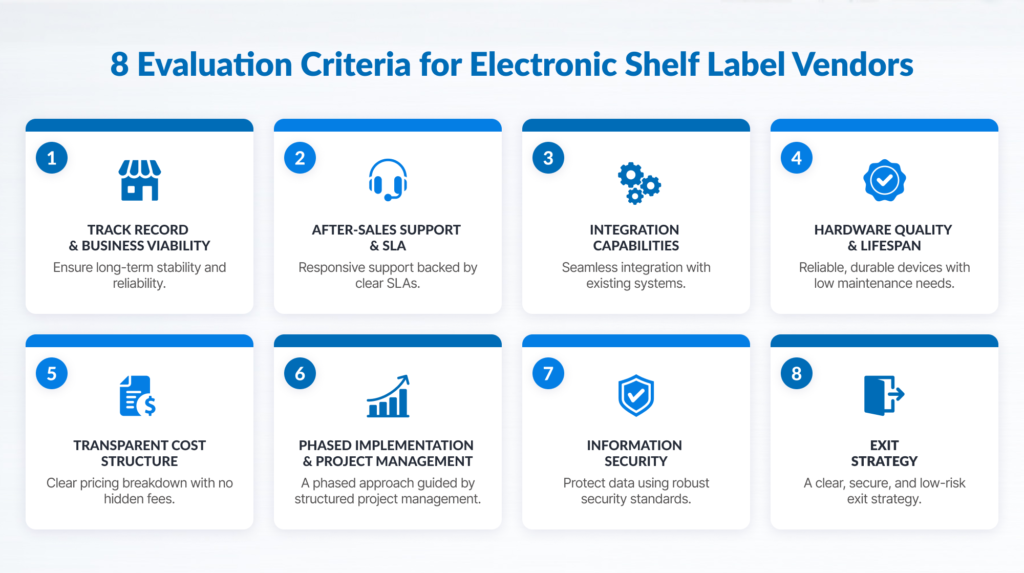
Infographic: 8 Essential Criteria for Evaluating Electronic Shelf Label Vendors

Each section below outlines why the criterion matters, what specific questions to ask, and the warning signs to watch for during vendor evaluations.

1. Vendor Track Record and Business Continuity

Why it matters: ESL hardware has an extended operational life. If a technology partner exits the market or discontinues support, your retail network is left with unsupported infrastructure and unreplaceable components.

Questions to Ask:

  • How long has your organization provided retail technology solutions in Indonesia?
  • How many active ESL deployments are you currently supporting locally?
  • Can you provide client references operating a store network of similar scale?

Red Flags:

  • Inability or reluctance to provide verifiable local client references.
  • Operational track record based entirely on overseas deployments without direct local infrastructure.

2. Post-Sales Service Coverage and SLA Commitments

Why it matters: For multi-store retail networks across different cities, service resolution speed dictates whether store pricing operations run smoothly or suffer long downtime periods.

Questions to Ask:

  • How many direct service points do you operate, and in which cities are your field engineers located?
  • What are your guaranteed response and resolution Service Level Agreements (SLAs), and are they explicitly defined in the contract?
  • How are support tickets handled for regional stores outside major metropolitan areas?

Red Flags:

  • SLAs stated verbally during sales presentations but omitted from legal contracts.
  • Technical support concentrated in a single city despite claiming national coverage.
  • Vague responses regarding field support response times for non-capital locations.

3. Integration Capabilities with Existing Infrastructure

Why it matters: Integration is a critical area in ESL implementation projects, as the system is required to sync price data across POS, ERP, and other data sources used by the retailer. The software platform must sync smoothly with your existing pricing databases, POS platforms, and ERP systems.

Questions to Ask:

  • What integration methods (APIs, middleware, direct database connectors) does your software platform support?
  • Has your technical team successfully integrated with our specific POS or ERP system in past projects?
  • Who manages and maintains the integration middleware after system go-live?
  • Is comprehensive API and technical documentation available for internal audit?

Red Flags:

  • Claims of universal “plug-and-play” compatibility without requesting technical specifications of your current IT architecture.
  • Failure to provide technical documentation or API specifications upon request.

4. Hardware Quality and Component Lifespan

Why it matters: Replacement costs at the end of hardware life significantly impact the Total Cost of Ownership. Labels must withstand varied retail environments, from standard ambient shelves to high-humidity or cold-storage zones.

Questions to Ask:

  • What testing standards determine the estimated operational lifecycle of your display labels?
  • How do your labels perform in cold, humid, or high-traffic store environments?
  • What is the guaranteed availability period for spare parts and replacement labels?
  • What specific conditions are covered under your standard and extended hardware warranties?

Red Flags:

  • Lifespan claims made without contextual data (such as daily update frequency or operating temperature assumptions).
  • Lack of structural clarity regarding long-term spare part availability.

5. Transparent Cost Structure
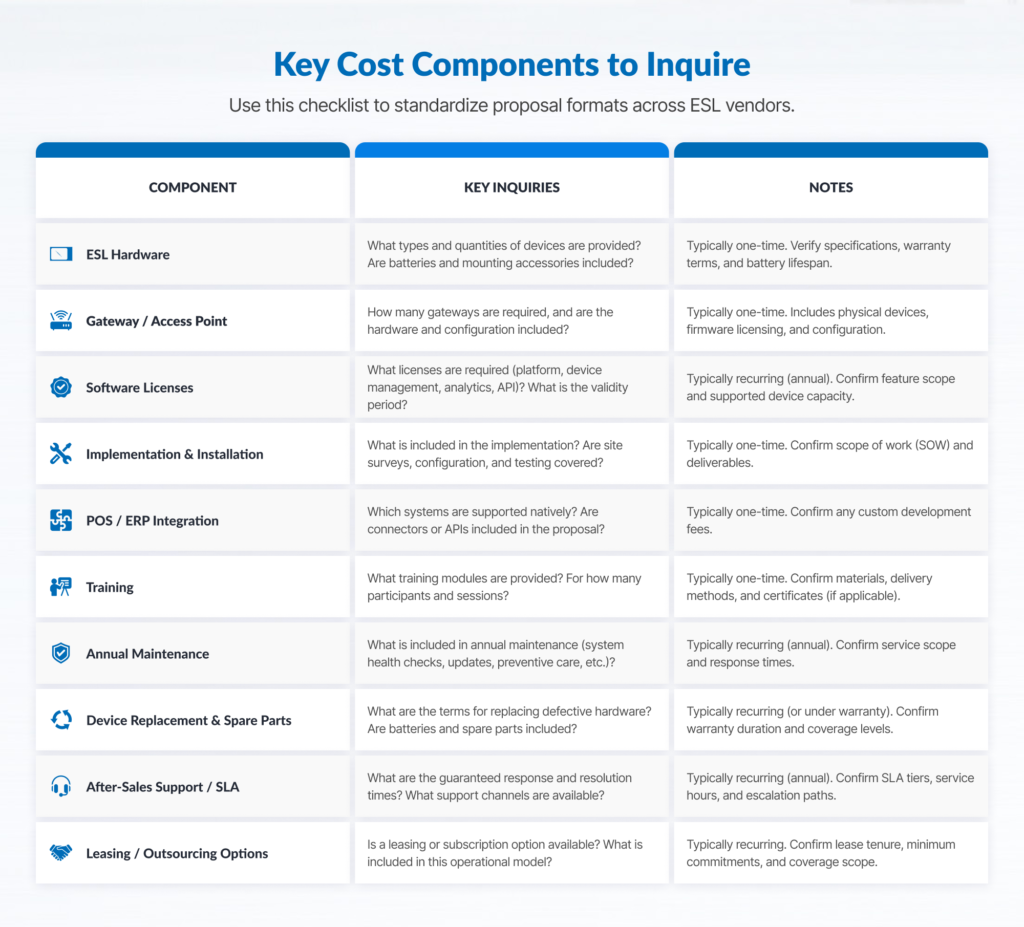
Table: Essential cost components for ESL vendor evaluation

Why it matters: Initial proposals often highlight per-unit label costs while omitting infrastructure, software licensing, or ongoing maintenance expenses. Evaluating proposals requires standardizing all cost components across vendors.

Questions to Ask:

  • What components make up the total implementation cost (hardware, access points/gateways, software licenses, installation, integration, training)?
  • Are software licensing fees fixed, per-label, or subscription-based?
  • What are the recurring annual maintenance and support costs post-warranty?
  • Do you offer capital expenditure (CapEx) purchase options as well as leasing or operational expenditure (OpEx) models?

Red Flags:

  • Proposals providing only a line-item price per label while deferring software or service costs to later stages.
  • Unclear recurring software or infrastructure maintenance fees.

Vendor Cost Structure Checklist

Use this framework to standardize cost components across incoming vendor proposals:

Cost ComponentIncluded Upfront? (Yes/No)Pricing Structure (Fixed / Recurring)Notes / Dependencies
ESL Hardware (Displays)Per UnitSize, screen type, mounting accessories
Wireless Gateways / APsPer UnitBased on store coverage and layout
Central Management SoftwarePerpetual / SubscriptionOn-premise vs. Cloud hosting
POS / ERP IntegrationOne-time / Service FeeCustom connector vs. standard API
On-Site Installation & SetupProject FeeStore count, labor, after-hours rates
Store Admin & Staff TrainingProject FeeAdministrative & store-level training
Annual Maintenance (SLA)Recurring AnnualCoverage level and response time tiers
Out-of-Warranty ReplacementRate CardSpare parts catalog pricing

6. Phased Rollout Support and Project Management

Why it matters: Deploying hardware across tens or hundreds of retail locations simultaneously carries high operational risk. A structured, phased rollout minimizes business disruption.

Questions to Ask:

  • Do you support a structured pilot implementation in a single store before full network commitment?
  • Will a dedicated project manager be assigned to oversee system deployment?
  • What is the projected rollout timeline per store wave, and what factors determine that schedule?
  • What contingency protocols exist if deployment schedules face delays?

Red Flags:

  • Vendors pushing for immediate, full-network rollouts while discouraging pilot store testing.
  • Absence of a named project management team or documented deployment methodology.

7. Information Security and Data Governance

Why it matters: ESL management software connects to core operational databases and updates live product pricing across physical stores. Insecure management platforms introduce operational vulnerabilities.

Questions to Ask:

  • What standards or security certifications do the vendor, ESL platform, and hosting infrastructure hold?
  • What data elements does the ESL platform access, and where is that data stored or processed?
  • How are remote technical support access and administrative credentials controlled and audited?
  • What are your documented procedures in the event of a security incident or system outage?

Red Flags:

  • Unable to provide verifiable proof of security controls, including relevant certifications, third-party assessment results, or security control documentation.
  • Lack of documented protocols regarding access control and technical support auditing.

8. Clear Exit Strategy and System Portability

Why it matters: An often-overlooked criterion during initial procurement is how easily your organization can transition if operational requirements change years down the line.

Questions to Ask:

  • Upon contract termination, how is operational data exported and transitioned back to our IT team?
  • Are display labels bound strictly to your proprietary management software, or can hardware run on open standards?
  • What options exist for adding stores independently in the future?

Red Flags:

  • Dismissive responses regarding contract exit terms or data transition procedures.
  • Rigid proprietary structures designed to limit future system flexibility.

Vendor Evaluation Scoring Matrix

To ensure a fair and defensible selection process, use a weighted scoring model. Combine inputs from Procurement, Retail Operations, and IT departments.

Evaluation CriterionRecommended WeightVendor Score (1–5)Weighted Score
Post-Sales Service Network & SLA20%
System Integration Capability20%
Total Cost of Ownership (TCO)15%
Vendor Viability & Track Record15%
Hardware Lifespan & Build Quality10%
Phased Implementation Support10%
Information Security & Governance5%
Exit Strategy & Data Ownership5%
Total Score100%

Note: Weighting percentages serve as a baseline model. Multi-store networks with widespread geographic footprints should consider increasing the weight for Service Network & SLA, while organizations with legacy enterprise IT environments may increase the weight for System Integration Capability.

Why Comparing ESL Quotations Directly Is Challenging

When reviewing financial proposals from multiple suppliers, procurement teams often find that pricing structures vary significantly. Understanding why proposals differ helps avoid unexpected long-term costs.
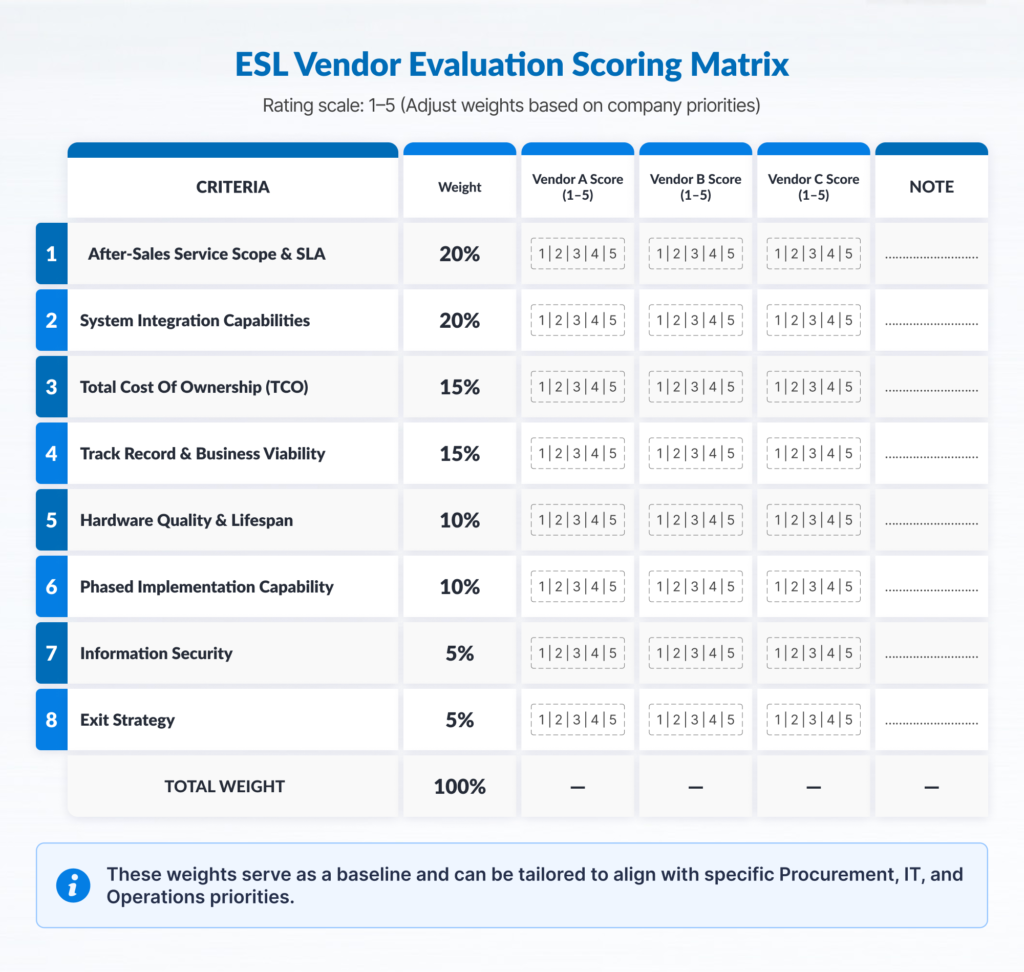
Table: ESL vendor scoring matrix and criteria weights

Practical Recommendation: Require all participating vendors to complete a standardized cost component matrix (such as the table provided in Criterion 5). Evaluate proposals over a projected 5-year operational lifecycle rather than comparing initial CapEx quotes alone.

Evaluation Red Flags Summary
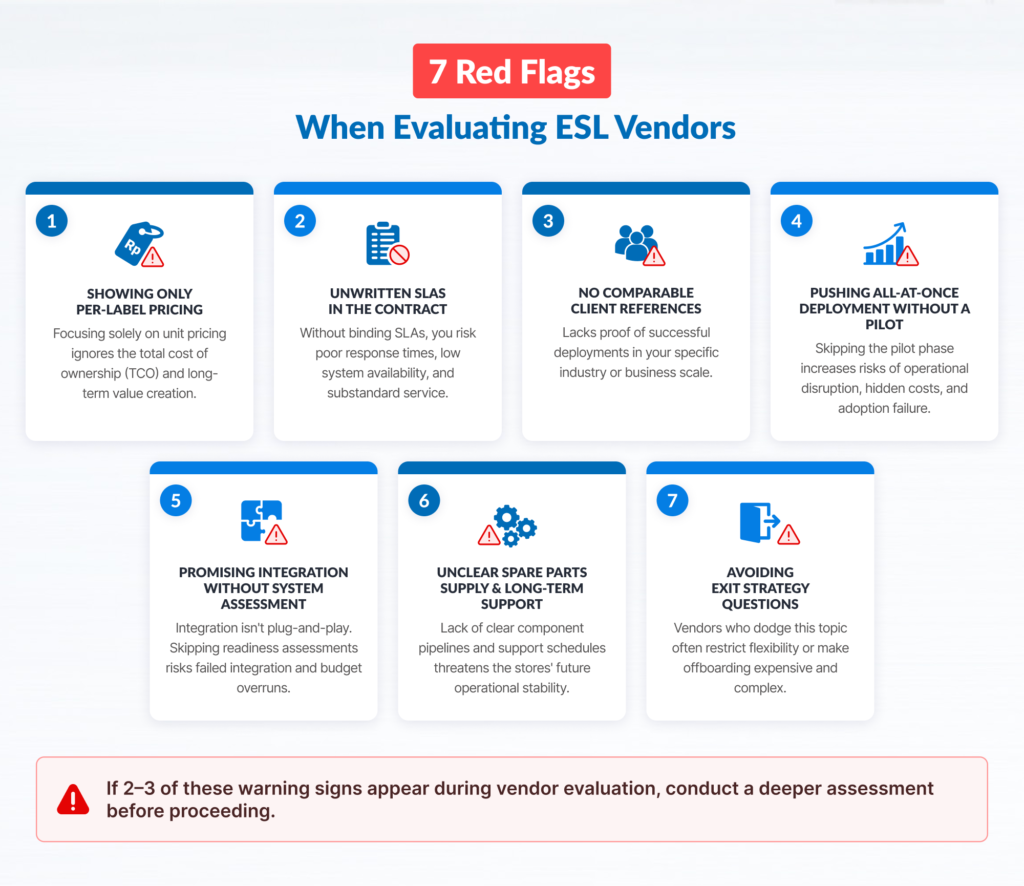
Visualization: Seven critical red flags during ESL vendor selection

Keep this quick-reference warning list accessible during vendor presentation rounds:

  • Incomplete Financial Quotes: Proposals providing per-label prices without explicit installation, middleware, or service costs.
  • Unwritten SLA Terms: Service level guarantees communicated verbally but missing from contractual terms.
  • Lack of Scaled References: Inability to provide reference clients with comparable store counts and geographic distribution.
  • Bypassing the Pilot Stage: Pushing for immediate multi-store commitment while discouraging a pilot store trial.
  • Vague Integration Plans: Promising seamless connectivity without reviewing existing POS or ERP system documentation.
  • Unclear Component Availability: Lack of written guarantees regarding spare label availability over time.
  • Evasive Exit Terms: Reluctance to define data ownership and system transition protocols upon contract completion.

Final Verification Steps Before Contract Awarding

Before finalizing a contract with your selected vendor, execute these final verification steps:

  1. Deploy a Stress-Test Pilot: Conduct a pilot deployment in your most operationally challenging store location (e.g., high-volume turnover, difficult wireless environment, or cold-storage areas) rather than your easiest location.
  2. Test Failure Scenarios: Evaluate how the vendor’s software handles disconnected network nodes, power disruptions, and bulk price updates during high-traffic periods.
  3. Contact Client References Directly: Reach out directly to past implementation references. Ask specifically about post-sales SLA compliance, field service responsiveness, and hardware failure rates over time.
  4. Contractualize Operational Commitments: Ensure all verbal commitments – especially regarding support SLAs, spare part availability timelines, and integration responsibilities – are explicitly incorporated into the final master service agreement.
  5. Define Clear Project Acceptance Metrics: Establish written criteria for operational sign-off prior to beginning multi-store deployment.

Frequently Asked Questions

How many vendors should we evaluate in an ESL procurement process?

Evaluating three to four qualified vendors provides a balanced view of market capabilities without overwhelming your evaluation team. Ensure all vendors complete the same standardized technical and cost framework to keep comparison straightforward.

Should multi-store retailers prioritize local or global vendors?

The origin of the vendor matters less than their local field infrastructure. Global software platforms require strong local system integration and field engineer support to manage multi-store operations across Indonesian cities effectively.

Can per-label hardware cost be used as the primary selection metric?

No. Per-label costs represent only a portion of the total investment. Infrastructure, integration, central software, and long-term maintenance impact the operational budget far more over a multi-year deployment lifecycle.

Is a pilot store implementation strictly necessary?

Yes. A pilot store trial validates wireless coverage, integration stability with your POS/ERP, and operational workflows under real retail conditions, preventing costly adjustments during full network deployment.

What specific terms must be defined in an ESL Service Level Agreement (SLA)?

An effective SLA specifies clear response and resolution times categorized by ticket severity, rules for on-site engineer dispatch across regional stores, hardware replacement terms, and maintenance window schedules.

How should we evaluate a vendor that lacks experience in our specific retail segment?

Focus on their underlying technical capability, software flexibility, security standards, and field support footprint. Require a pilot implementation to verify that their team can meet your specific operational workflows.

Is it better to purchase ESL infrastructure outright or lease it?

Both models are viable. Outright purchase (CapEx) lowers long-term costs if capital is available. Leasing or managed service options (OpEx) preserve initial capital and combine hardware, software, and maintenance into a single predictable operational cost.

Select Your ESL Partner with Confidence

Choosing an ESL vendor is an investment in your retail network’s operational infrastructure for years to come. Focus your evaluation on long-term system stability, integration quality, and nationwide service coverage rather than short-term price discounts.

We invite you to apply the criteria, questions, and scoring frameworks in this checklist to every vendor you consider – including PT Murni Solusindo Nusantara.

Established in 1992, PT Murni brings over 34 years of experience as an enterprise technology solution provider in Indonesia. Supported by 700+ employees, 300+ field engineers, and over 100 service points nationwide, we provide robust technical architecture, centralized SLA-backed support, and flexible procurement models (CapEx and leasing).

Our operations adhere to strict international standards, backed by ISO 9001:2015, ISO 27001 (Information Security Management), ISO 27701 (Privacy Information Management), and ISO 22301 (Business Continuity Management) certifications.

Ready to evaluate your options?

Schedule a Vendor Consultation with our retail technology specialists to review your evaluation checklist, or Book a Live System Demo to test our ESL integration capabilities firsthand.

Featured image: Electronic shelf label vs paper price tags

Electronic Shelf Labels vs Paper Tags: The Efficient Choice For Your Retail Store

Featured image: Electronic shelf label vs paper price tags

Electronic Shelf Label (ESL) systems serve as a modern alternative to traditional paper-based tags for in-store price management. This technology enables centralized and consistent price updates across retail networks. While paper-based labels require a lower initial investment and follow a simple, familiar process for the store staff, this option creates significant operational bottlenecks; including labor-intensive price updates, the risk of POS checkout discrepancies, and substantial material waste.

In contrast, ESL technology synchronizes pricing instantly across all store branches, integrates seamlessly with legacy POS/ERP systems, and reallocates staff from manual tagging to customer service. Despite requiring higher initial capital expenditure, ongoing technical support, and routine SKU & inventory data updates, digital shelf tags enable agile dynamic pricing, display live inventory levels or QR codes, and eliminate pricing discrepancies.

To achieve optimal operational efficiency, you need to evaluate several key factors before deciding whether to adopt ESL or stay with paper tags, including total SKU volume, price update frequency, and overall store count.

the use of price labels on supermarket shelves, an illustration
Evaluating whether to stick with paper or adopt electronic shelf labels depends on balancing operational overhead, labor allocation, and long-term efficiency.

Paper Tags vs. Electronic Shelf Labels: What Differentiates Them?

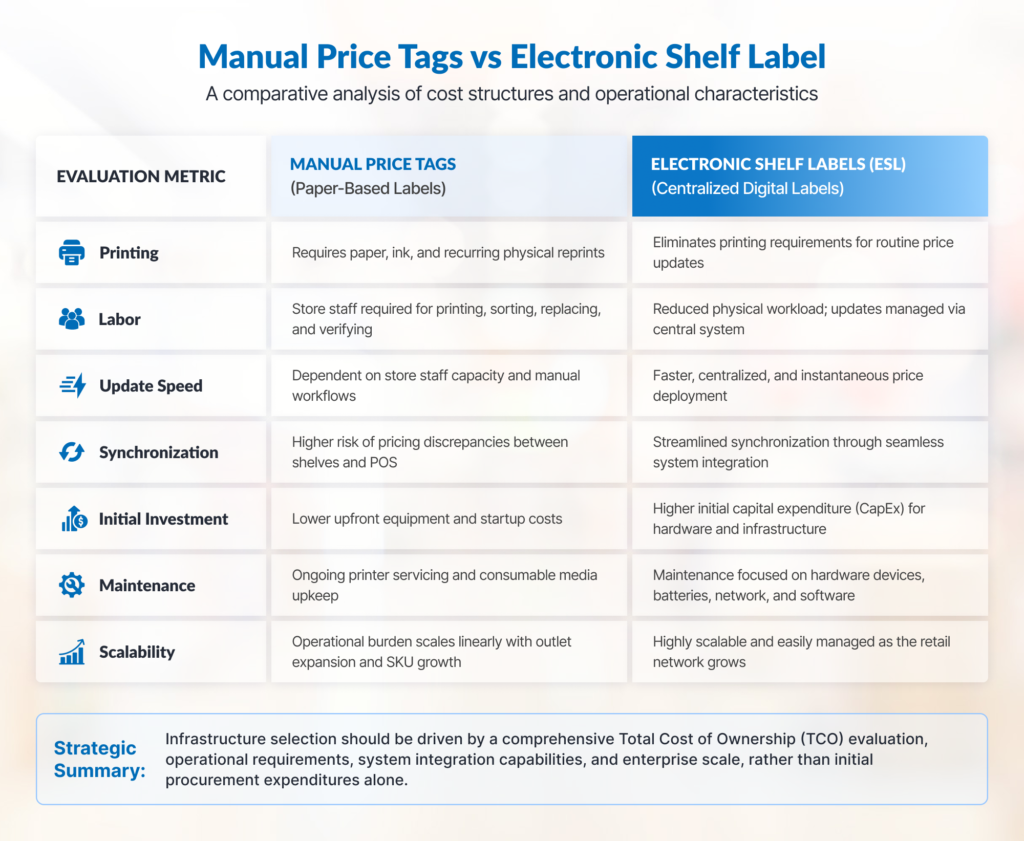
To analyze how paper price tags compare against digital alternatives, retail executives must look beyond unit hardware costs and assess the entire operational lifecycle. The table below outlines key functional differences across critical retail management criteria.

Evaluation CriteriaPaper Price TagsElectronic Shelf Labels (ESL)
Initial Capital ExpenditureExtremely low (standard printers and paper stock)High (display units, wireless access gateways, infrastructure, integration)
Ongoing Operational CostsRecurring: paper stock, ink/toner, and continuous labor hours per updateLow: limited primarily to hardware maintenance and end-of-life battery replacement
Price Update VelocityDependent on staff capacity; full-store updates can take hours or daysCentralized and automated; price updates can be executed from a single point and automatically pushed across all devices, depending on system capabilities.
Shelf-to-Register Discrepancy RiskModerate to high (lag between database updates and physical tag replacement)Very low (when integrated with the central POS master data)
Chain-Wide Price ConsistencyVaries by individual store execution, staff discipline, and local oversightUniform across all branches via centralized enterprise management
Physical DurabilityProne to fading, tearing, falling off, or moisture damage in cold zonesOffers higher durability compared to paper labels, built with casing tailored to withstand retail operations.
Dependence on Technical SupportMinimal to noneHigh; requires active network support, clear SLAs, and accessible field service
System Integration NeedsNoneRequires direct integration with existing POS and ERP software
Dynamic Promotional FlexibilityLow; restricted by print preparation cycles and manual placementHigh; supports real-time promotional updates, flash sales, and timed discounts
Scalability Across Multiple StoresLabor and material costs scale linearly with every new store openedOperational efficiency increases with scale without proportional labor growth

Choosing Electronic Shelf Labels: The Advantages and Disadvantages

the implementation of electronic shelf label (ESL) in retail chains
For high-turnover product categories, electronic shelf labels provide instant price synchronization and dynamic promotional agility; eliminating the heavy labor overhead and error risks associated with frequent manual updates.

An honest commercial investigation requires examining technology limitations alongside prospective operational gains. Retail decision-makers must weigh implementation friction prior to committing capital.

Disadvantages & ChallengesOperational Advantages
High initial capital investment (CapEx) for hardware, gateways, and installation.Eliminates recurring long-term operational costs (OpEx) for paper, ink, and staff labor hours.
Heavily reliant on master data accuracy; data errors immediately show on shelves.Eliminates shelf vs. checkout price discrepancies through unified POS/ERP integration.
Requires initial POS/ERP integration, SOP adjustments, and staff training.Frees staff from manual label updates, allowing them to focus on customer service.
Highly dependent on technical infrastructure and reliable vendor support (SLAs).Guarantees simultaneous chain-wide price synchronization within minutes.
Limited hardware lifespan (batteries/components) requiring long-term refresh planning.Enables dynamic promotions and flash sales with zero additional labor overhead.
Vulnerable to physical damage and potential wireless network interference.Remains at risk of damage from physical impact, improper installation, or specific environmental conditions.

Disadvantages and Implementation Considerations

  1. High Initial Capital Outlay (CapEx): Replacing paper tags requires significant upfront investment in display hardware, wireless access points, mounting hardware, and professional installation services.
  2. Demands High Central Master Data Accuracy: Automated shelf labels display data exactly as stored in your central repository. If master data contains pricing errors, the ESL platform will immediately broadcast those inaccuracies across your entire store network.
  3. System Integration Dependencies & SOP Adjustments: ESL platforms require stable data pipelines connected to POS and ERP systems. Additionally, store staff must adopt updated operational workflows for binding SKUs, managing shelf planograms, and operating the system.
  4. Dependence on Technical Support and SLAs: Digital displays rely heavily on network controllers and background software engines. If a gateway drops offline or hardware suffers physical damage, having accessible technical support backed by strong SLAs becomes critical to prevent operational downtime.
  5. Hardware Lifecycle Management: Batteries and electronic components operate within defined lifespans, requiring retail leadership to factor periodic hardware refreshes into their long-term financial modeling.
  6. Risk of Physical Damage and Infrastructure Interference: As electronic devices deployed in high-traffic customer areas, ESL units are exposed to physical bumps and wireless signal disruptions, requiring specialized hardware handling and maintenance policies.

Core Operational Advantages

  1. Long-Term Operational Cost Efficiency (OpEx): Curbs ongoing, recurring expenses for printed paper labels, ink ribbons, and thousands of cumulative manual labor hours across store shifts.
  2. Elimination of Shelf-to-Register Price Discrepancies: Automated updates synchronize shelf pricing directly with the POS database from a single source of truth, protecting store profit margins while preventing customer disputes at checkout.
  3. Reallocation of Staff Hours toward Value Creation: Store personnel no longer spend hours printing, cutting, and placing labels manually, allowing management to redirect labor focus toward shelf restock and customer engagement.
  4. Instant Chain-Wide Price Synchronization: Enterprise-level price adjustments push out simultaneously to every connected branch store within minutes directly from corporate headquarters.
  5. Support for Dynamic Pricing and Agile Promotions: Provides complete operational agility to run targeted promotional campaigns, flash sales, happy-hour discounts, or instant price-matching strategies without extra labor costs.
  6. Waste Reduction and Omnichannel Support: Eliminates single-use paper and plastic consumption to advance green retail sustainability goals, while unlocking rich shelf-edge data displays like stock inventory levels and customer-facing QR codes.

When Paper Price Tags Remain a Practical Choice

a female store clerk in a bicycle shop
In single-store or low-turnover environments like a local bikel shop, operational complexity may not yet demand ESL automation, making traditional paper tags a reliable baseline.

Adopting digital shelf technology is not an absolute necessity for every retail business model. In several operational scenarios, paper tags remain a practical and cost-effective approach:

  • Single-Store or Small Networks (1–3 Locations): Operations with limited floor space and a small SKU catalog can manage price changes manually without incurring heavy administrative overhead.
  • Low Price Fluctuation Frequency: Retailers with infrequent price update needs – such as niche boutiques or hardlines businesses with relatively slow inventory turnover – rarely face the labor constraints typical of grocery stores.
  • No Centralized POS/ERP Infrastructure: When pricing data is managed in silos without a primary data source, deploying ESL first requires dedicated integration efforts.
  • Unstructured Master Data: Installing digital displays on top of fragmented or inconsistent inventory data will simply automate the display of pricing errors. The underlying data structure must be cleaned first.
  • Higher Immediate Capital Allocation Priorities: When annual capital budgets are strictly prioritized for fleet expansion, cold-chain refrigeration, or structural renovations, paper tags can reliably bridge the gap.

Replacing paper tags should never be viewed as an arbitrary badge of modernization. Choosing when to transition depends on matching your retail store’s operational complexity with the appropriate tool.

The Tipping Point: Identifying When Efficiency Shifts

For growing retail networks, manual paper tagging eventually reaches a threshold where labor costs, pricing errors, and operational delays outweigh the capital cost of digital automation. Rather than relying on generic payback assumptions, retail directors should evaluate whether their stores exhibit these operational triggers:

  1. Large Update Batches Exceed Shift Capacity: When promotional catalog updates contain thousands of SKUs, manual tag replacements bleed across multiple work shifts, leaving shelves in an inconsistent state for hours.
  2. Promotional Cadence Outpaces Execution: Marketing demands daily, weekly, or dynamic pricing, but store operations teams can no longer keep pace with printing and placing physical tags on time.
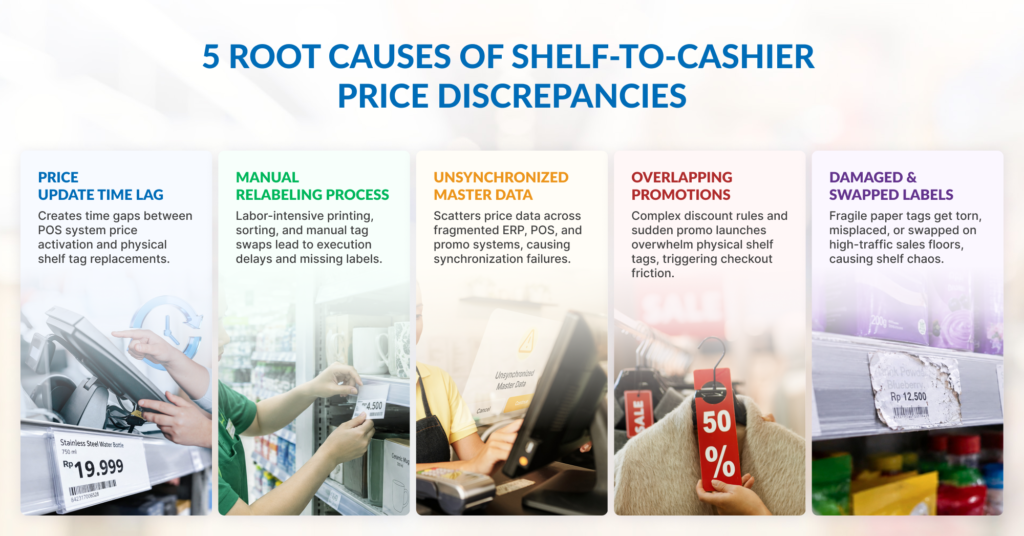
  3. Recurring Shelf-to-Register Discrepancies: Audit logs reveal regular discrepancies between shelf tags and checkout scanners, resulting in price-override adjustments and lost margin at the register. Learn more about structural causes in our detailed breakdown of 5 Causes of Shelf and Register Price Discrepancies.
  4. Inconsistent Price Execution Across Networked Stores: Expanding from a few stores to regional networks makes manual audit control difficult, leading to pricing variance between locations.
  5. Measurable Labor Loss on Shelf Maintenance: Time-motion studies reveal that store personnel dedicate substantial weekly hours purely to printing, tearing, locating, and replacing paper tags. Review the financial impact in our analysis of The Hidden Costs of Manual Price Tags.
  6. Scalability Constraints: Opening new retail locations adds a proportional labor burden for ongoing shelf management, increasing operational overhead in every added store. For broader evaluation methodologies, see our guide on Retail Automation vs. Staff Expansion.

The more these conditions occur simultaneously, the stronger the business case becomes to evaluate ESL as an alternative to manual label updates.

How to Calculate Efficiency Using Your Own Store Data

To determine financial feasibility accurately, retail management must build a comparison model using their specific operational metrics rather than industry averages.

Follow this five-step framework to evaluate your true cost baseline:

  1. Quantify Update Frequency and SKU Volume: Determine the average number of price changes performed monthly across your regular pricing, weekly promotions, and seasonal campaigns.
  2. Measure Actual Labor Hours: Conduct an audit in representative store formats to measure total labor hours consumed per update cycle. Include time spent auditing price lists, printing sheets, cutting tags, walking aisles, replacing old labels, and resolving shelf errors.
  3. Sum Recurring Paper Material Expenses: Calculate ongoing expenditures for specialized paper stock, plastic shelf rails, print consumables, printer maintenance contracts, and waste disposal.
  4. Structure Total Cost of Ownership (TCO) for Digital Labels: Detail all costs across the expected lifespan of an ESL solution, including display units, mounting accessories, wireless gateways, server software licensing, integration services, staff training, and ongoing technical support.
  5. Evaluate Long-Term Total Cost of Ownership (TCO): Set a multi-year assessment period based on expected device lifespan and company investment guidelines.

Operational Insight: Device leasing models can help reduce upfront capital expenditure and align technology costs with monthly operational budgets, depending on contract structures and vendor financing options.

Frequently Overlooked Factors: Technical Support and Data Readiness

When evaluating electronic shelf label solutions, hardware specifications like screen contrast and battery life often receive the most attention. However, post-deployment success usually depends on two less visible operational elements: field support coverage and data infrastructure readiness.

Technical Support Infrastructure and SLAs

Unlike paper tags, which function without technology infrastructure, digital labels depend on wireless management systems, local networks, and background software engines. If an access point disconnects or hardware suffers physical damage in high-traffic aisles, response speed determines whether store operations continue smoothly.

When evaluating vendors, retail directors should prioritize service coverage over base hardware pricing. Key criteria include:

  • Geographic distribution of certified field technicians across all store territories.
  • Contractually binding Service Level Agreements (SLAs) covering replacement unit dispatch and repair response times.
  • Centralized helpdesk support to assist store managers during peak operational shifts.

For enterprise retail chains operating across Indonesia, a vendor’s service reach directly impacts system uptime. For nationwide retail networks, technical support coverage is a critical factor when selecting a technology partner. PT Murni Solusindo Nusantara, for example, operates over 100 service points to support implementation requirements and technical services across various regions in Indonesia.

This demonstrates why service coverage, Service Level Agreements (SLAs), and field response capabilities must be evaluated beyond mere hardware pricing.

Data and Integration Readiness

Electronic shelf labels display data provided by host software systems. If enterprise pricing data is fragmented across disconnected systems, digital labels will simply broadcast pricing discrepancies faster.

Prior to deploying digital shelf tags, retail organizations must:

  • Audit master data to ensure a single, authoritative database governs store pricing.
  • Establish reliable API or middleware connections between POS, ERP, and the ESL management software.
  • Update store SOPs to define how staff reassign displays when resetting shelf planograms.

Frequently Asked Questions

Is an electronic shelf label system cost-effective for small store chains?

Yes, provided the store experiences high pricing update frequency, manages complex promotional campaigns, or faces local labor shortages. For small store networks with stable pricing and low SKU counts, paper tags may remain more practical until store scale or operational complexity increases.

Do we need to replace our existing Point of Sale (POS) system to use ESLs?

No. Modern electronic shelf label platforms integrate with existing POS and ERP databases using middleware, APIs, or automated file transfers. As long as your POS system maintains clean master price data, full hardware replacement is unnecessary.

What is the typical operational lifespan of an electronic shelf label display?

Most enterprise-grade e-paper displays operate for 5 to 10 years, depending on update frequency, screen refresh cycles, and ambient operating temperatures. Displays placed in cold-storage or freezer zones utilize specialized low-temperature batteries designed for those environments.

What happens if an ESL unit loses wireless connectivity or experiences hardware failure?

If a display loses connection to its wireless gateway, it continues showing the last successfully updated price, preventing blank screens on the shelf. Network monitoring software alerts store managers to connectivity drops or low battery levels so field technicians can address issues under contractual SLAs.

Can electronic shelf labels be deployed in phases rather than all at once?

Yes. Many retailers deploy ESL systems in phases; starting with high-frequency pricing categories such as fresh produce, dairy, or promotional endcaps, before expanding the system across all store aisles over time.

Are ESL systems available through operational leasing or subscription models?

Yes. Many technology providers offer hardware leasing and managed service programs. This allows retail organizations to finance display hardware, gateways, and software integration through recurring operational expenses (OpEx) rather than a single capital outlay (CapEx).

Do stores completely eliminate paper tags after adopting ESLs?

While digital tags replace standard price markers, paper may still be used occasionally for specialized point-of-sale marketing banners, seasonal clearance tags, or temporary structural displays. However, routine pricing updates transition entirely to the automated digital network.

Strategic Evaluation: Next Steps for Retail Leadership

Choosing between paper tags and electronic shelf labels is a calculated decision based on operational complexity, expansion goals, and customer service priorities.

Paper tags remain a simple choice for small footprints with stable pricing. However, for growing retail networks managing thousands of SKUs and frequent promotional shifts, manual tagging often becomes an operational bottleneck that limits agility and drains labor resources.

To evaluate your readiness, consider these immediate next steps:

  1. Audit internal labor metrics to measure the true cost of manual price updates across your store network.
  2. Assess technical readiness, focusing on master data quality and POS/ERP integration paths.
  3. Evaluate total operational costs, including field support reach, network SLAs, and flexible financing options such as leasing.

To test your calculations against real store data, request an ESL needs assessment with our retail technology team. We will analyze your store metrics and existing technological infrastructure to build an accurate efficiency evaluation for your retail footprint.

Featured image: retail store shelf with electronic shelf label

What Is an Electronic Shelf Label and How Does It Work?

featured image: retail store shelf with electronic shelf label

An electronic shelf label (ESL) system transforms how brick-and-mortar stores manage pricing by replacing traditional paper tags with automated digital displays.

Imagine a busy grocery store preparing for a massive weekend promotion. Floor staff spend late hours into the night manually swapping hundreds of small paper tags across rows of shelves. Despite their best efforts, several items are missed – leading to frustrated customers and pricing disputes at checkout the following morning.

This scenario highlights the primary vulnerability of legacy retail setups: manual paper pricing is slow, labor-intensive, and prone to human error. Digitalizing price management solves this issue at its root. In this guide, you will learn what electronic shelf labels are, how the underlying technology operates, core system components, key business benefits, and critical considerations before adopting ESL technology in your retail infrastructure.

What Is an Electronic Shelf Label (ESL)?

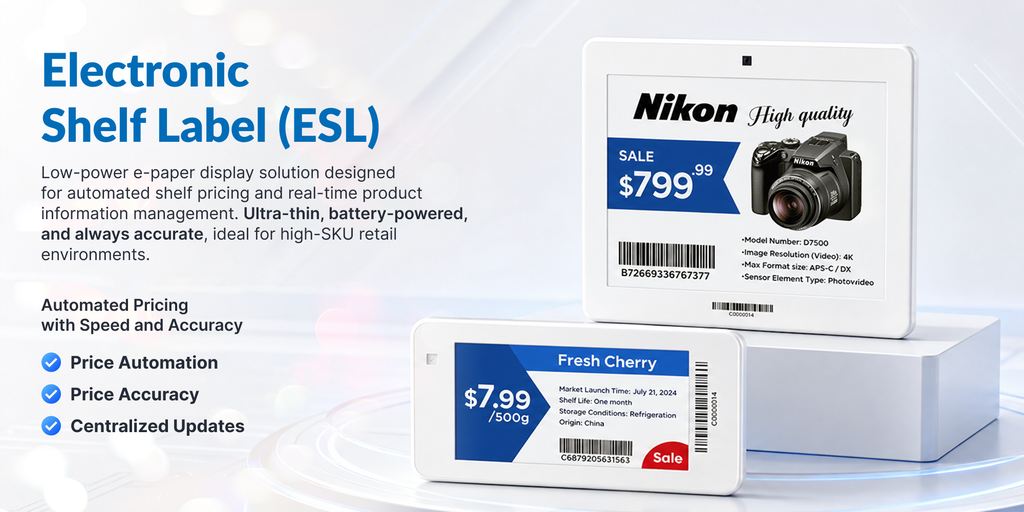
An electronic shelf label (ESL) is a battery-powered digital display unit attached to retail shelves. It automatically updates product prices and merchandise information in real time via a wireless network connected to a store’s central Point of Sale (POS) or enterprise database.

To visualize how it works on the shop floor, think of an ESL as a small e-paper screen mounted right where your product sits. Just as an e-reader displays crisp text without harsh backlighting, an ESL renders prices, barcodes, and product details clearly under bright store lighting.

An at-a-glance look at modern Electronic Shelf Label (ESL) technology
An at-a-glance look at modern Electronic Shelf Label (ESL) technology in retail.

First popularized in Europe during the 1990s, ESL technology was adopted by grocery giants seeking to cut label printing costs. Early iterations relied on basic liquid crystal displays (LCDs) with narrow viewing angles and short battery life. Today, modern systems feature advanced Electronic Ink (E-Ink) micro-displays paired with secure wireless protocols. As commercial retail networks across Southeast Asia rapidly expand, ESL adoption has evolved from an experimental luxury into an essential operational standard.

Beyond the Shelf Edge: Modern Applications of ESL Technology in Retail

Understanding where each digital display technology fits into your retail infrastructure requires evaluating its primary role, optimal placement, and operational impact across different store zones.

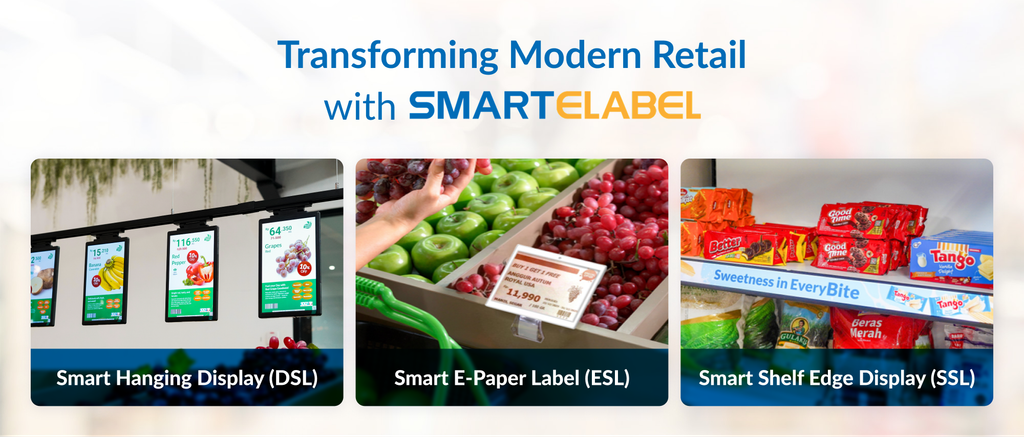
Types of electronic shelf label for various retail needs
ESL technology now extends across the entire store layout. Solutions like hanging displays, digital price tags, and smart shelf-edge displays adapt to varied operational needs and marketing strategies.

Electronic Shelf Label (ESL)

The core concept of the Electronic Shelf Label focuses on high-volume price automation. Installed across standard product shelf edges throughout all main aisles, ESL tags serve as the operational workhorse for storewide price management. By replacing manual paper tag swapping with automated wireless updates, this technology eliminates pricing errors, reclaims hundreds of labor hours every month, and guarantees complete price synchronization between the physical shelf and the POS system in real time.

Digital Price Display / LCD Price Tag

Unlike standard E-Ink ESL tags, Digital Price Displays leverage high-resolution, full-color LCD screens to drive dynamic pricing alongside eye-catching visual promotions. These displays are best deployed on featured product racks, endcaps, and high-value merchandise sections where visual impact directly drives conversion. Their bright screens capture shopper attention instantly, allowing retailers to execute time-sensitive price changes (such as hourly flash sales or promotional discounts) while significantly boosting product appeal right at the shelf edge.

Smart Shelf Edge Display (SSL) / Digital Shelf Display

Smart Shelf Edge Displays function as continuous digital media strips built for interactive brand communication and rich in-store messaging. Installed along high-visibility promotional shelf strips and featured category rows, these displays transform basic shelf rails into high-impact digital advertising space. By rendering motion video advertisements, animated promotional banners, and detailed product specs right at the point of purchase, SSL technology actively engages shoppers to drive cross-selling and upselling opportunities.

A Quick Comparison of the Retail Display Technologies

SolutionPrimary RolePrimary Fit / Placement
Electronic Shelf Label (ESL)High-volume price automationStandard retail aisles across high-density SKUs
Digital Price DisplayDynamic pricing & visual promotionEndcaps, featured product racks, and high-value sections
Smart Shelf Edge Display (SSL)In-store digital media & brand engagementHigh-visibility promotional shelf strips and category leads

Core Components of an ESL System

An electronic shelf label system operates as an integrated ecosystem comprising hardware, wireless communications, and central software management.

  1. ESL Tag / Label: The physical tag mounted on the shelf edge features an ultra-low-power Electronic Paper (E-Paper) screen. Powered by long-lasting industrial coin cell batteries, these tags operate for 5 to 10 years without replacement. Displays range from compact 1.6-inch tags for small cosmetics or pharmacy items up to large 7.5-inch displays for electronics or produce sections. Color options include classic black-and-white, three-color (black, white, red/yellow), and full-color displays.
  1. Wireless Gateway / Access Point: The gateway acts as the communication bridge between central server software and thousands of active shelf tags. Installed on store ceilings or structural beams, a single gateway uses radio frequencies (typically 2.4 GHz RF, sub-GHz, or specialized optical signals) to transmit pricing instructions across hundreds of square meters.
  2. Software Management System: This central interface manages price templates, schedules promotional updates, monitors tag battery levels, and tracks display connectivity. Store managers can update thousands of product prices across multiple branches simultaneously using a central dashboard.
  3. POS / ERP Integration: The Point of Sale (POS) or Enterprise Resource Planning (ERP) database serves as the ultimate source of truth for pricing. When pricing analysts alter a product price in the central database, the ESL software ingests this change automatically to ensure complete pricing consistency.
  4. Network Infrastructure: Local Area Networks (LAN) or secure Wi-Fi connections handle data transfer between local store gateways and central cloud or on-premise servers.

How Does an Electronic Shelf Label Work?

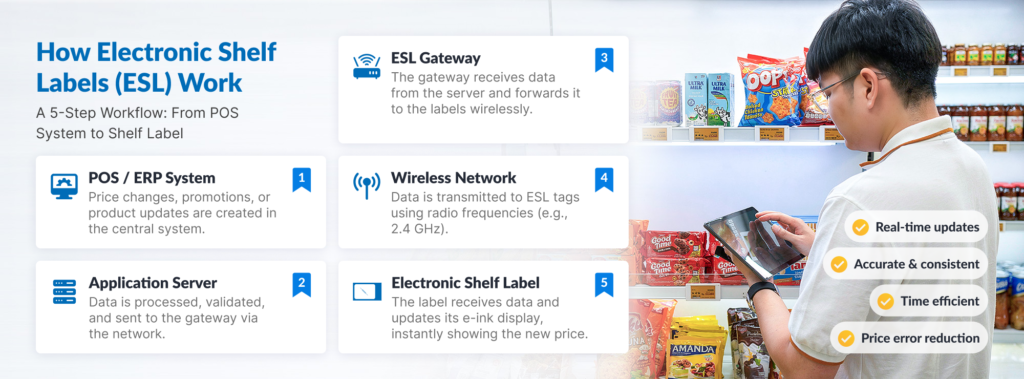
infographic: 5-steps workflow from POS-Gateway-Label

The journey of a price update from corporate headquarters down to an individual shelf edge follows five automated steps:

  1. Price Change Entry: A merchandiser or manager updates a product price inside the main POS or ERP database.
  2. Data Transfer to Middleware: Updated price data pushes automatically through an API integration into the ESL management software.
  3. Instruction Dispatch: The ESL software identifies the specific tag ID assigned to that SKU and routes update instructions to the corresponding store gateway.
  4. Wireless Broadcast: The ceiling-mounted gateway broadcasts an encrypted wireless signal carrying the updated graphic array to the target tag.
  5. Screen Refresh & Sleep Mode: The physical tag receives the data packet, alters its electronic ink micro-capsules to show the new layout, sends a receipt confirmation back to the gateway, and immediately reverts to low-power sleep mode.

Core Technical FAQ: How ESL Functions on the Shop Floor

Why use E-Ink displays instead of standard LCD screens?

Electronic Ink mimics real paper. Unlike traditional smartphone screens that constantly emit light and drain battery power, E-Ink uses micro-capsules suspended in liquid. Electrical charges move colored pigments to the surface, creating crisp, non-glare text and images.

Operational Impact: Line-of-sight visibility remains sharp under harsh store lighting from wide angles, and the display draws zero electrical current except during the exact second the screen image changes.

How long does the price update process take?

Updating an individual tag takes mere seconds. Transmitting pricing across thousands of SKUs takes anywhere from a few seconds to a few minutes, depending on network capacity and transmission frequency.

Operational Impact: Store teams can execute flash sales, daily dynamic price changes, or storewide overhauls in minutes, replacing a manual process that typically takes hours or days.

Does an ESL system require a constant internet connection?

No. Physical shelf tags rely on direct radio signals from local store gateways rather than an external internet connection. However, the central gateway requires stable Local Area Network (LAN) access to ingest database updates from your management software.

Operational Impact: If external internet connectivity drops temporarily, your shelf tags continue displaying accurate current pricing without interruption.

Key Benefits of Electronic Shelf Labels

Transitioning to automated digital shelf labels delivers measurable advantages across daily retail operations:

  • Operational Efficiency: Manual price changes require staff to print paper sheets, cut individual labels, walk store aisles, locate SKUs, pull old tags, and insert new ones (averaging 30 to 50 paper tags per hour). ESL systems update thousands of tags automatically in seconds – reclaiming hundreds of labor hours per store every month for customer service, restocking, and store maintenance.
  • Price Accuracy & Reduced Dispute Costs: Discrepancies between shelf prices and cash register scanners create customer distrust and potential regulatory fines. ESL updates guarantee that the price shown on the shelf matches the POS database at all times, reducing manual checkout overrides and long cashier queues.
  • Dynamic Pricing Agility: Modern omnichannel retail demands flexible pricing strategies – such as lowering prices on fresh produce late in the evening to reduce food waste, matching competitor online pricing instantly, or running flash sales. ESL allows instant response to market trends without waiting for physical label distribution.
  • Environmental Sustainability: A medium-sized supermarket burns through 30,000 to 100,000 paper tags, plastic holders, and adhesive stickers annually. Adopting ESL eliminates recurring paper and ink consumption, supporting eco-friendly corporate initiatives while cutting recurring consumable costs.
  • Enhanced Omnichannel Operations: Modern multi-segment ESL displays show more than retail prices; they display live stock levels, reorder alerts, planogram locations, and QR codes for shoppers to scan for detailed product specs. E-commerce fulfillment staff can pick orders directly from retail shelves faster and with higher accuracy.

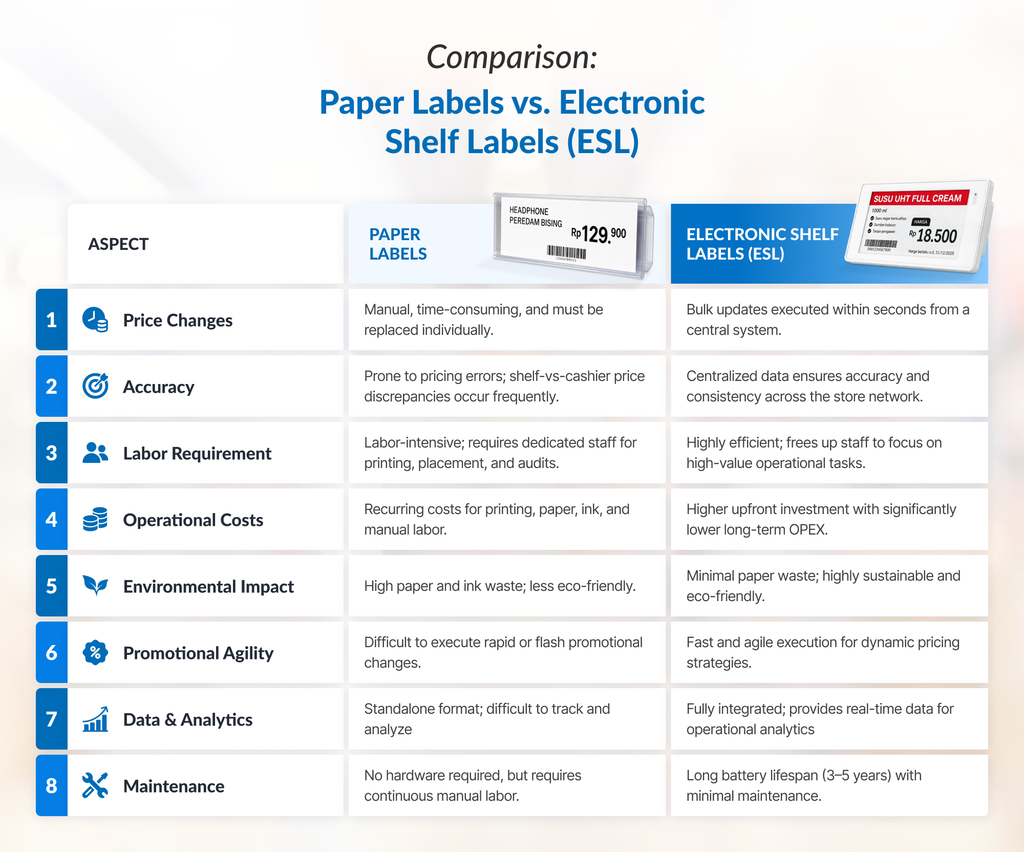
Paper Labels vs. Electronic Shelf Labels

comparison table: Paper Labels vs. Electronic Shelf Labels

Types of Businesses Best Suited for ESL

While any retail business benefits from price automation, specific retail sectors experience the highest return on investment:

  • Supermarkets & Hypermarkets: High SKU counts, frequent promotional rotations, and perishable items requiring rapid pricing updates benefit immediately.
  • Chain Convenience Stores: High outlet counts with lean store staff make manual updates inefficient; central ESL management ensures network-wide compliance instantly.
  • Pharmacies & Beauty Stores: Small items packed tightly on shelves make manual labeling tedious; small-format ESL tags fit compact shelf edges cleanly while displaying detailed unit pricing.
  • Electronics & Appliance Outlets: High-value items with fluctuating market prices require detailed spec listings and QR code links to product sheets that large-format ESL displays present clearly.
  • Hardware & Building Supply Centers: Fast-changing commodity rates for construction materials require quick pricing adjustments across large floor spaces.
  • Warehouses & Logistics Hubs: Digital tags attached to storage racks streamline inventory picking, display live stock counts, and update bin locations dynamically.

Key Considerations Before Adopting ESL

Implementing ESL technology requires strategic upfront planning to maximize long-term efficiency:

  • Initial Investment vs. Long-Term ROI: While digital tags carry higher upfront capital expenditure than paper stock, focus your evaluation on Total Cost of Ownership (TCO). Labor cost savings, waste elimination, and improved pricing accuracy typically deliver positive financial returns within 12 to 24 months.
  • SKU Count and Store Layout: The physical dimensions of your store network and total active SKUs dictate network architecture. High ceilings or multi-level floors require strategic placement of wireless access points to eliminate signal dead zones.
  • Existing POS/ERP Integration: Your current POS database must support data output via modern APIs or database connectors. Ensuring your software setup interfaces cleanly with ESL management middleware is a critical early step during vendor evaluations.
  • Staff Training & Change Management: Floor staff must learn basic operational workflows – such as pairing new tags to SKUs using mobile handheld scanners, replacing mounting clips, and reading diagnostic tag indicators.
  • Technical Support & Warranties: Select vendors offering commercial warranties covering tag battery operational lifespans alongside reliable local technical support to ensure uninterrupted performance.

Frequently Asked Questions (FAQ)

How long does an ESL battery last?

Most commercial ESL tags operate for 5 to 10 years on standard industrial coin cell batteries. Overall lifespan depends on display size, operating environment temperature, and frequency of daily screen updates (typically calculated at 3 to 4 refreshes per day).

Can ESL be integrated with an existing POS system?

Yes. Modern ESL management software connects directly with leading POS and ERP databases using standardized API connections, CSV transfers, or database middleware. This structure ensures that any price updated in your core POS system pushes across your physical shelf displays automatically.

Are ESL tags waterproof and cold-resistant for freezers?

Specialized freezer-rated ESL models exist specifically for cold storage environments. Standard tags operate between 0°C and 40°C, while freezer tags utilize specialized low-temperature batteries and sealed IP65/IP67 water-resistant casings that function reliably down to -25°C without screen fogging or battery failure.

Can ESL displays render QR codes and promotional graphics?

Yes. Modern E-Ink tags feature multi-segment layout customizable templates. Retailers can render high-contrast black-and-white or three-color (black, white, red/yellow) QR codes, stock numbers, unit pricing, planogram codes, promotional icons, and discount badges directly on the tag face.

How many labels can a single gateway manage?

A single industrial ESL wireless gateway manages between 2,000 and 10,000 individual tag displays, depending on store layout, physical barrier interference, ceiling height, and vendor hardware specifications. Larger retail spaces simply add extra gateways across the ceiling grid.

Is ESL suitable for small stores with only 1–2 outlets?

Yes. While enterprise chains gain massive centralized efficiencies, independent stores operating high SKU volumes or frequent price updates still benefit significantly. Small retailers can deploy simplified plug-and-play ESL starter setups with a single access point to lower labor pressure on small floor teams.

Conclusion

Electronic shelf label systems represent far more than a visual upgrade for store shelf edges, but a foundational infrastructure for modern automated retail management. By replacing manual paper processes with real-time wireless digital displays, retail businesses reduce operational overhead, eliminate costly cashier pricing errors, and achieve the agility needed for dynamic pricing strategies.

As customer expectations evolve toward seamless omnichannel experiences, maintaining accurate, flexible pricing across physical store shelves is essential. Adopting digital shelf automation helps ensure your retail operations remain scalable, efficient, and competitive in a digital-first marketplace.

Want to take your store operations to the next level? Explore how Electronic Shelf Labels (ESL) boost efficiency and agility, or consult our specialist team today to find the right solution for your retail network.

Retail management team planning store digitalization agenda

The First 6 Months of Retail Store Digitalization: A Practical Roadmap

Retail management team planning store digitalization agenda

Many retail store chains begin their digitalization journey by purchasing hardware or software, only to hit roadblocks within months. This momentum stall is often caused by unintegrated operational data, store staff struggling to adapt to new workflows, and managers unable to prove tangible financial or operational impact to top leadership.

The root cause of retail digital transformation failures rarely lies in the technology – it lies in the order of execution. Buying technology without mapping operational baselines only accelerates chaos and wastes budget. To sustainably transform a multi-outlet chain, you need a structured approach that builds credibility, aligns internal stakeholders, and delivers measurable value from day one.

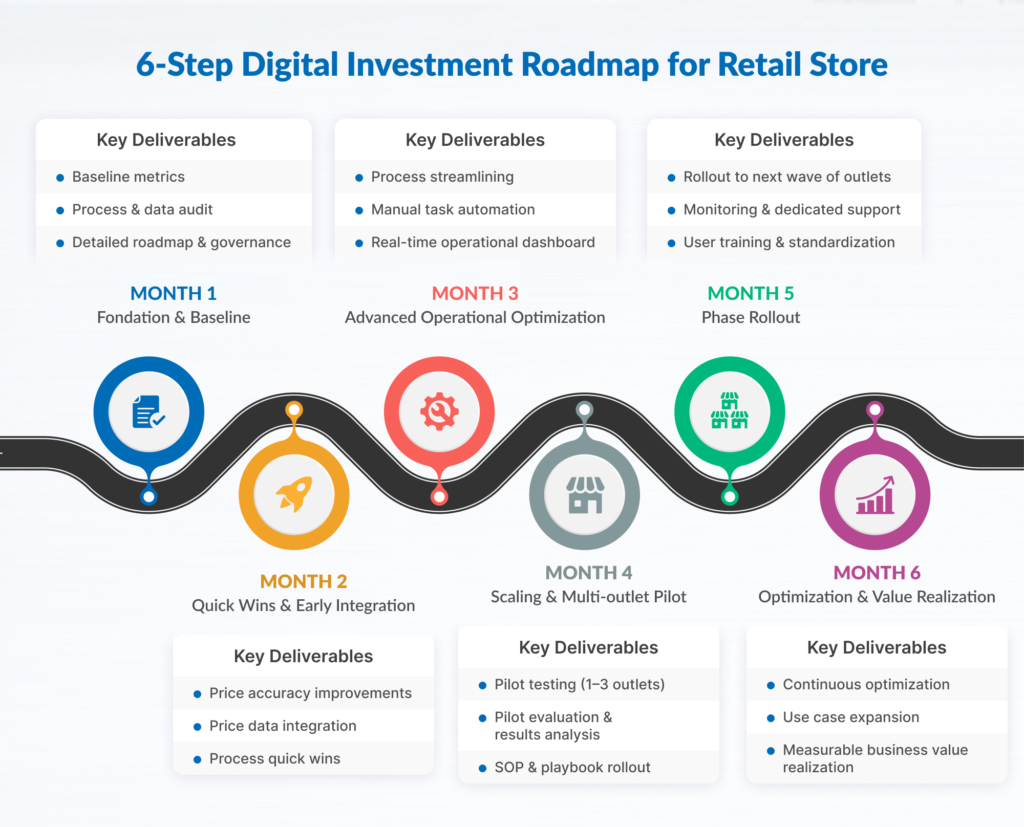
This article presents a practical, phased 6-month retail store digitalization roadmap to guide your team from the initial process audit to a wide-scale rollout across 5 to 100+ outlets.

Why Retail Store Digitalization Often Fails Mid-Way

Building a sustainable retail technology initiative requires a deep understanding of why previous projects failed. Before allocating budget to a new system, you must anticipate these four primary traps:

  • Automating Broken Processes: Implementing technology on top of unstandardized workflows only accelerates operational misalignment. If price update or goods receiving workflows at the store level are still disorganized, software will not solve the underlying issue.
  • Attempting Full Transformation at Once: Replacing Point of Sale (POS) systems, inventory management, planograms, and loyalty programs simultaneously drains operational capacity and overwhelms IT bandwidth.
  • Bypassing Master Data Readiness: Duplicated SKU data, inconsistent price synchronization, and incomplete product attributes corrupt system integration and trigger errors during checkout.
  • Lacking Early Proof of Results (Quick Wins): Without measurable quick wins within the first 90 days, executive sponsorship risks fading, and budget allocations may be redirected to other initiatives.

A successful digital transformation strategy consistently focuses on maintaining internal momentum through phased execution, rather than high-risk, sweeping overhauls.

The Six Phases of Retail Store Digitalization

Before diving into the monthly breakdown, here is a high-level overview of the 6-month phased retail technology implementation roadmap:

6-phase horizontal timeline showing the monthly output of the retail store digitalization initiative.

Month 1: Process Audit and Baseline Collection

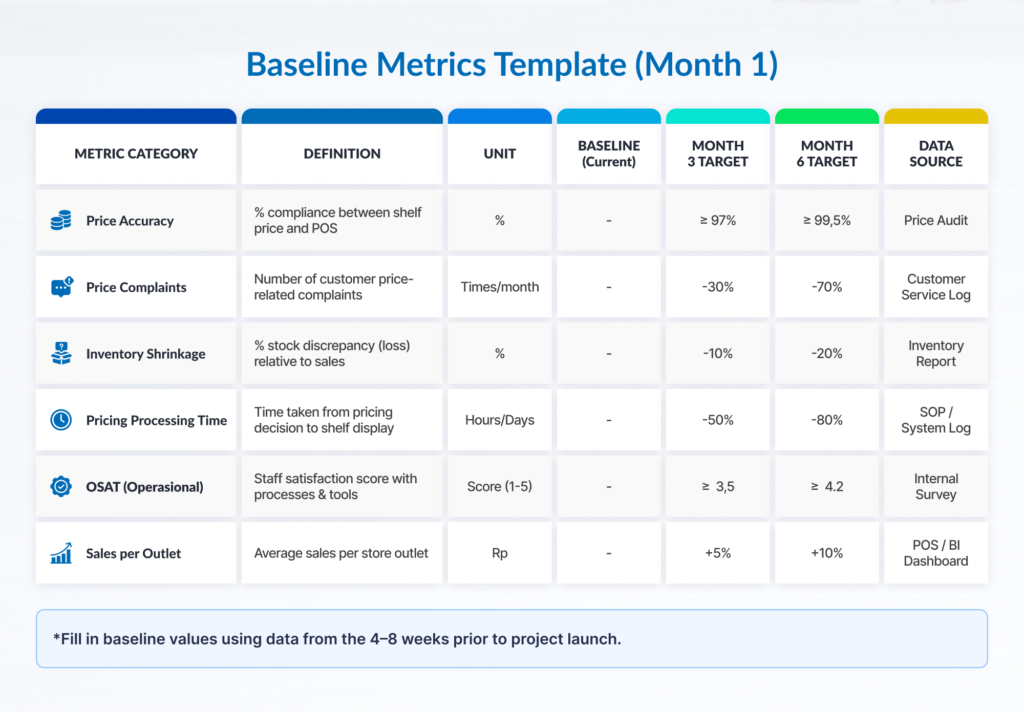
The primary objective of Month 1 is to establish clear baselines for store operations, inventory management, and pricing accuracy. Without baseline data, calculating Return on Investment (ROI) or validating project success is virtually impossible.

A baseline metrics template designed to track Month 1 performance indicators and initial benchmarks.

Key Activities:

  • Workflow Mapping: Map time-consuming daily processes, such as shelf price tag changes, promotional execution, stock audits, goods receiving, and cashier transaction speed.
  • Labor Hour Analysis: Measure the actual time staff spend on repetitive, manual tasks.
  • Master Data Audit: Check SKU cleanliness, price consistency between central ERP and local POS, and planogram compliance.
  • Infrastructure Inventory: Document local network specifications, bandwidth, port availability, and in-store POS hardware limitations.
  • Owner: Retail Transformation Manager
  • Contributors: Store Managers, Floor Staff, Retail IT Specialists, Operations Analysts

Output

A comprehensive Process Map document paired with a quantified Baseline Metrics Table.

Success Criteria

For Example, every operational bottleneck has a measurable figure attached (e.g., “Price changes require 14.5 hours per store each week with a 2.8% error rate,” rather than “Price changes take too long”).

Common Pitfall

Skipping the audit phase under the assumption that you “already know the problems.” Without precise baseline numbers, the Month 2 business case will lack credibility with the finance team.

Month 2: Prioritization and Business Case Development

Month 2 focuses on analyzing audit data, setting realistic technology priorities, and securing formal budget approval from top management.

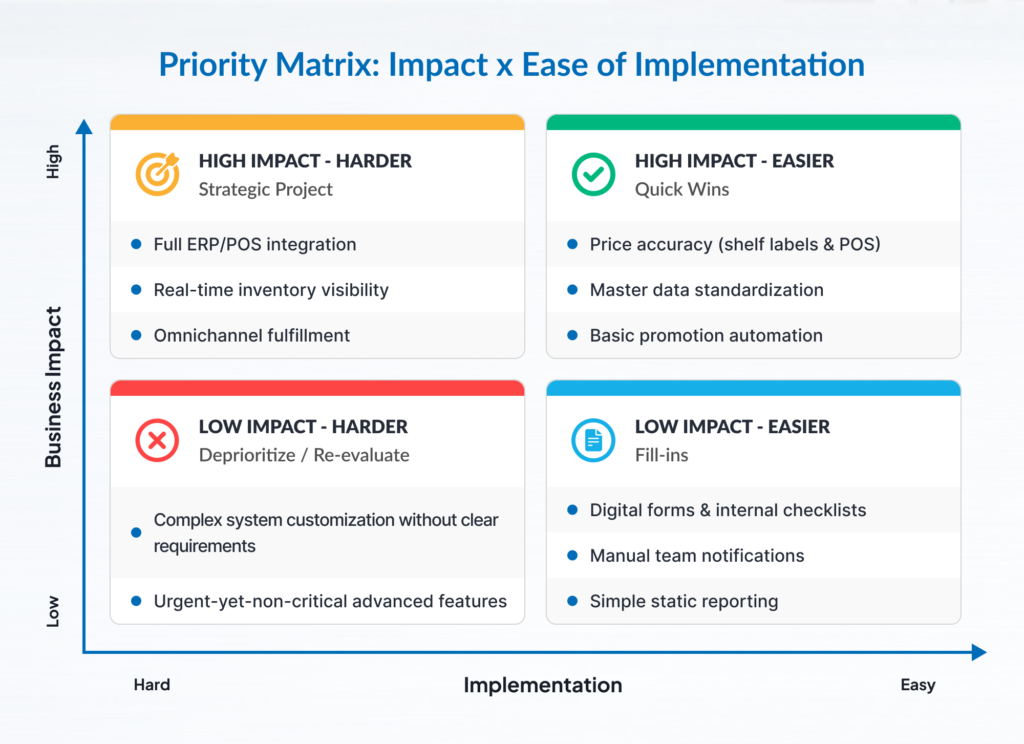
Prioritization Framework: Impact vs. Ease of Implementation

Map all potential technology initiatives onto a 2×2 matrix:

  1. High Impact / High Ease (Quick Wins): Prioritize for immediate execution in Month 3.
  2. High Impact / Low Ease (Pilot Projects): Schedule for a controlled pilot phase in Month 4 (e.g., Electronic Shelf Label/ESL integration or automated stock tracking).
  3. Low Impact / High Ease: Reserve for a secondary efficiency phase.
  4. Low Impact / Low Ease: Explicitly defer or eliminate from the plan.

Building a Realistic Business Case

Avoid inflated ROI claims from vendors. Base calculations on conservative assumptions:

Estimated Savings=(Manual Hours SavedHourly Wage)+Shrinkage Reduction

Include a full Total Cost of Ownership (TCO) analysis covering software licensing, hardware procurement, network infrastructure upgrades, and staff training costs.

  • Owner: Retail Transformation Manager
  • Contributors: Chief Financial Officer (CFO), Chief Operating Officer (COO), IT Infrastructure Manager

Output

A 2×2 Priority Matrix document and a formal Business Case Proposal detailing resource allocation, timelines, and projected financial returns.

Success Criteria

Formal sign-off from C-Level sponsors and budget allocation secured for Months 3 through 6.

Common Pitfall

Building a business case based on vendor marketing brochures rather than real operational data collected from stores in Month 1.

Month 3: Quick-Win Execution

The goal of Month 3 is to execute low-risk operational improvements that deliver immediate impact, building trust among store staff and leadership alike.

Impact versus ease of implementation priority matrix with quick-win technology project examples.

Characteristics of a True Quick Win:

  • Execution completed within approximately 30 days.
  • Low technical dependency (no custom coding or complex ERP integrations required).
  • Minimal risk of disrupting daily store operations.
  • Direct, tangible impact felt by floor staff or customers.

Examples of Quick Win Initiatives:

  • Master Data Cleanup: Deactivating obsolete SKUs and aligning pricing data between central ERP and store cash registers.
  • Digital Operational Checklists: Replacing paper opening/closing forms with simple mobile forms to improve operational compliance.
  • Price Change SOP Standardization: Optimizing workflows and schedules for manual price tag printing to reduce staff overtime.
  • Owner: Store Operations Lead
  • Contributors: Transformation Manager, Store Managers, Data Admin Team

Output

A 30-Day Quick Win Performance Report comparing pre- and post-execution metrics.

Success Criteria

Achieving a measurable performance lift on target metrics within 30 days (e.g., a 40% reduction in promo prep time at trial stores).

Common Pitfall

Selecting a quick win that requires complex software integration, causing the timeline to stretch for months and killing momentum.

Month 4: Pilot Project in 1–2 Outlets

In Month 4, core technology initiatives are introduced in a controlled environment across 1 to 2 carefully selected retail outlets.

Pilot Outlet Selection Criteria

Select locations that reflect typical operating conditions across your chain. Avoid choosing flagship stores (which have the best facilities) or underperforming locations.

  • Average transaction volume.
  • Standard network infrastructure setup.
  • Cooperative Store Manager with stable staff retention.

Key Execution Focus Areas

  • Hardware installation and POS/ERP system integration.
  • Intensive floor staff training before system go-live.
  • Establishing clear roll-back criteria (a contingency plan in case of critical failure).
  • Daily issue logging to capture technical and operational hurdles.

Change Management

Communicate clearly that technology is introduced to simplify work, not replace roles. Appoint floor champions to assist peers in adapting to the new system.

  • Owner: Retail Transformation Manager & IT Project Manager
  • Contributors: Pilot Store Managers, System Integrators/Vendors, Floor Staff

Output

A Pilot Evaluation Log documenting system uptime, transaction logs, staff feedback, and metric performance versus Month 1 baselines.

Success Criteria

≥99.x%  of pre-defined pilot success criteria met during the 4-week trial period (e.g., 0% POS integration error rate, target reduction in price update duration).

Common Pitfall

Providing extra technical support from central headquarters that cannot be replicated during mass rollout, leading to artificially positive pilot results that fail at scale.

Month 5: Evaluation, Standardization, and Playbook Creation

Month 5 centers on analyzing pilot outcomes, refining workflows, and establishing standardized implementation documentation in preparation for multi-store scaling.

Developing the Rollout Playbook

Document solutions for every obstacle encountered during the pilot into a standardized Rollout Playbook, including:

  • Location infrastructure and network readiness checklists.
  • Technical hardware installation and configuration guides.
  • Role-based staff training modules.
  • Troubleshooting matrices and escalation pathways.

Refining Financial Models

Update initial business case projections using verified data from the pilot phase. Validated figures from live store environments are far more persuasive to executive leadership when approving full rollout budgets.

  • Owner: Transformation Manager & Operations Excellence Lead
  • Contributors: IT Systems Administrator, Operations Training Manager

Output

A validated Retail Rollout Playbook and a Multi-Outlet Rollout Budget Proposal backed by actual pilot data.

Success Criteria

Store teams at new locations can independently execute pre-implementation prep using the playbook without requiring direct onsite support from central IT.

Common Pitfall

Expanding across all stores without standardizing SOPs, turning every new branch into an isolated project with ballooning support costs.

Month 6: Phased Rollout and Governance

Month 6 marks the transition from controlled testing to phased implementation across the entire target store network.

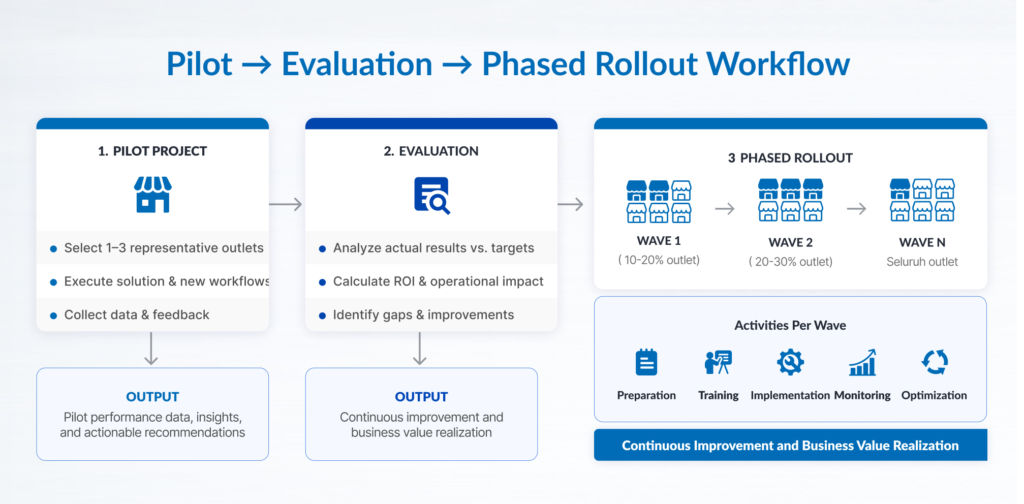
Flowchart diagram illustrating the workflow from a pilot project agenda to a phased rollout, detailing key activities and expected outputs.

Wave-Based Rollout Strategy

Group remaining outlets into implementation waves based on infrastructure readiness, geographic location, and team capacity – rather than arbitrary regional sequences:

  • Wave 1: Outlets with modern infrastructure and stable staff.
  • Wave 2: Standard outlets requiring minor network upgrades prior to installation.
  • Wave 3: Outlets with physical constraints or remote locations requiring custom handling.

Set a realistic execution throughput (e.g., 3 to 5 stores per week) aligned with IT and vendor capacities.

Long-Term Governance Framework

Establish operational governance structures before closing out the project:

  • Assign formal system owners within both Operations and IT divisions.
  • Define technical Service Level Agreements (SLAs) with technology vendors.
  • Schedule monthly operational metric reviews to ensure long-term compliance.

Owner: Head of Retail Operations & IT Director

Contributors: Transformation Manager, Regional Managers, Field Engineers

Output

A Multi-Store Wave Rollout Schedule accompanied by a Governance Charter and Vendor SLA Agreements.

Success Criteria

Rollout proceeds on schedule without disrupting daily store operations, while newly onboarded outlets hit target efficiency metrics.

Common Pitfall

Treating the project as complete once hardware is installed. Without ongoing governance, staff will gradually revert to legacy manual processes.

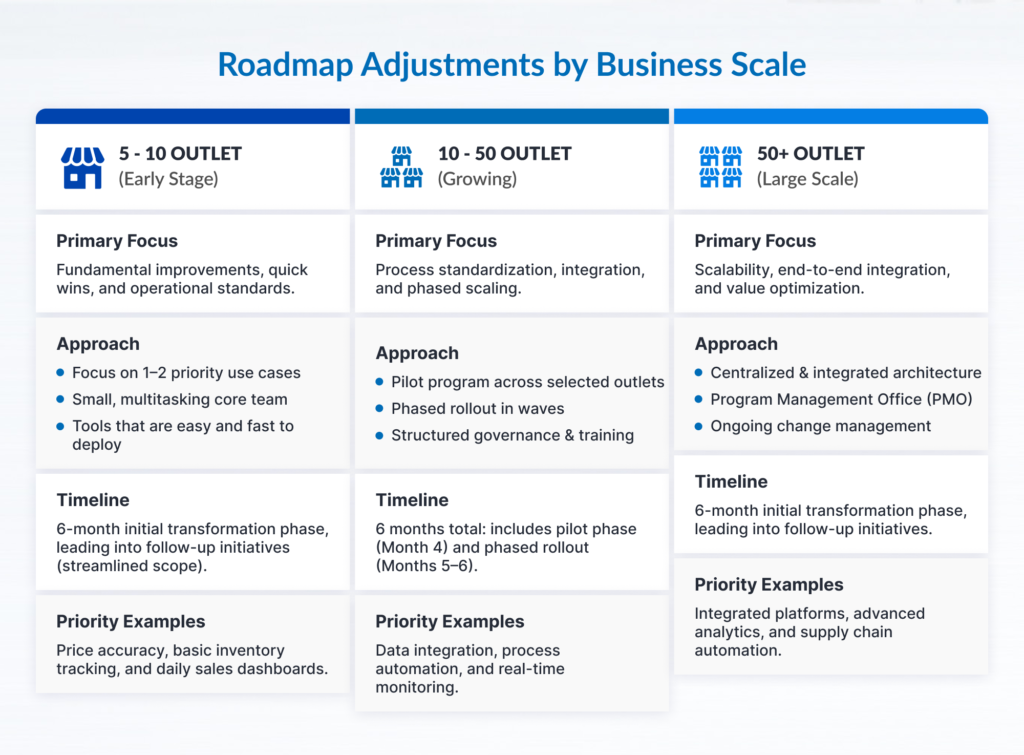
Tailoring the Roadmap to Your Business Scale

visual illustration on roadmap adjustments by business scale

Implementation strategies must scale according to your network size and internal resources:

5–10 Outlets:

  • Compressed Timeline: Total duration can be condensed from 6 months to 3–4 months.
  • Merged Phases: Combine the Pilot (Month 4) and Standardization (Month 5) phases into a single sequence.
  • Core Focus: Prioritize basic POS integration and core inventory automation to establish a flexible foundation.

10–50 Outlets:

  • Standard Execution: Follow the full 6-month roadmap as outlined.
  • Critical Phase: Month 5 (Playbook Creation) is vital to prevent operational friction during expansion.
  • Core Focus: Maintain strict wave execution to keep support workloads manageable.

50+ Outlets:

  • Dedicated Team: Form a dedicated deployment team separate from daily IT support staff.
  • Extended Schedule: Expand Month 6 into a multi-quarter rollout divided into sub-waves.
  • Core Focus: Enforce strict data governance and automated device provisioning before launching mass deployment.

Most Common 6-Month Execution Pitfalls

Use this self-evaluation checklist to detect execution risks throughout your project:

[ ] Procuring hardware before establishing a baseline risks allocating technology budgets without clear operational cost references.

[ ] Running pilot projects without defined success criteria leads to trial phases operating without explicit quantitative targets.

[ ] Skipping master data cleanup causes systems to integrate using duplicate or invalid SKU data.

[ ] Ignoring store staff input yields workflow designs disconnected from store managers’ operational reality.

[ ] Selecting non-representative pilot outlets produces trial results that succeed in flagship stores but fail in standard locations.

[ ] Executing rollouts without a standardized playbook leads to expansion without documented SOPs or troubleshooting steps.

[ ] Failing to assign post-implementation owners leaves operational processes without designated process owners after technical project sign-off.

Retail Store Digitalization FAQ

How long does it take to digitalize a single retail store?

Implementation timelines in retail stores can vary, ranging from a few days to several months per store wave (wave rollout). This duration is heavily influenced by the complexity of the technology architecture, hardware types, master data readiness, logistics efficiency for delivery, and field staff training.

Which technology should be prioritized first?

Prioritize technology that immediately cleans master data and eliminates manual labor hours. For many retailers, operational technologies such as automated price updates, inventory tracking, and POS synchronization can offer more measurable early returns, particularly when baseline data show significant labor, pricing, or inventory inefficiencies.

Does digitalization require replacing the existing POS system?

Not necessarily. Modern retail technology integrates with existing POS systems via Application Programming Interfaces (APIs) or middleware, allowing you to upgrade operational capability without a disruptive core transaction system overhaul.

How do I convince management to approve a digitalization budget?

Build your business case around cost efficiency rather than revenue projections. Use hard data from Month 1 audits to show tangible savings from labor hour reductions, pricing error elimination, and inventory shrinkage prevention.

What is the ideal number of outlets for a pilot project?

For networks of 10–50 stores, select 1 to 2 representative outlets. For larger chains exceeding 100 stores, run pilots across 3 to 5 outlets to test variations in store layout and infrastructure conditions.

What prerequisites are needed before retail technology implementation?

Primary prerequisites include clean SKU master data, stable in-store local networks with sufficient port capacity, secure power supply, and integration access to your POS database, approved integration access to the POS system, such as APIs, middleware, or other supported data interfaces.

Build a Strategic Foundation for Long-Term Digital Retail

The success of retail store digitalization depends on execution order, not just software capability. By starting with a transparent process audit, executing quick wins to build momentum, validating assumptions through pilot projects, and standardizing procedures in a playbook, you can modernize store operations while controlling risk.

Once this 6-month foundation stabilizes, your store network will be positioned to adopt advanced technology layers – from Electronic Shelf Labels (ESL) and AI-powered visitor analytics to unified omnichannel fulfillment models.

Consult Your Retail Digitalization Roadmap

Planning a digital transformation across your retail network? Schedule a free consultation session with our expert team. We are ready to help map your current store operations, identify high-impact quick wins, and establish the right priority sequence for a more profitable technology investment.

Featured Image: A staff manually replaces paper based price labels on a store shelf

Retail Insight: Uncovering The Hidden Cost of Manual Price Labels

Featured Image: A staff manually replaces paper-based price labels on a store shelf

The costs of manual price tagging extend far beyond paper and ink. Beneath the surface lies a lengthy operational workflow that consumes valuable personnel hours alongside hidden cost components that frequently escape standard financial audits.

As enterprise SKU counts, store footprints, and promotional frequencies scale, the labor burden and systemic risks multiply – ranging from price discrepancies between shelf displays and Point of Sale (POS) terminals to delayed promotional rollouts and the mounting overhead of supervisory oversight.

Consequently, the core strategic question for modern retail leadership is no longer “What is the cost of printing a single label?” but rather “What are the total resources required to manage pricing updates across the entire retail network?”

This article examines a practical framework for quantifying these expenses across five primary operational pillars:

  • Material & Printing Costs include consumables such as paper, ink, stickers, printer usage, and reprints due to damage.
  • Labor Costs cover staff working hours for sorting, distribution, installation, and label verification.
  • Price Discrepancy Exposure represents the financial risk resulting from variances between shelf labels and POS systems.
  • Opportunity Cost represents potential lost revenue due to delayed promotional execution or price changes.
  • Management Overhead involves supervisor time allocation for audits, incident handling, and quality control.

The objective is not to establish a single generalized benchmark for all retail environments, but rather to provide a structured methodology for calculating tailored cost estimates using your internal enterprise data.

Why Do Manual Price Tags Appear Deceptively Inexpensive?

Manual price tagging appears deceptively low in cost because expenditures are often evaluated strictly by visible physical materials. Consumables like paper, ink, toner, and adhesive tags are easily tracked through routine purchase invoices and general ledgers.

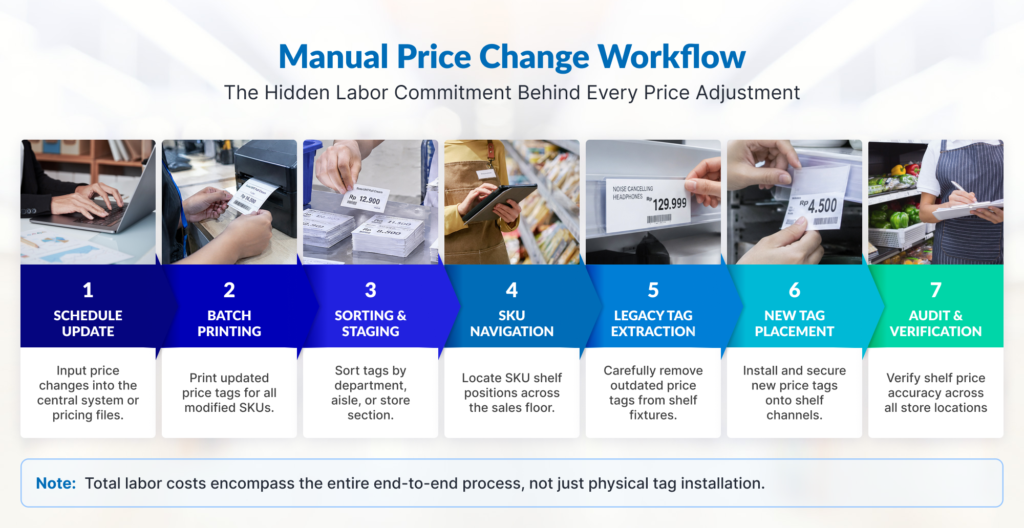
However, price management does not conclude when a label exits the printer tray. Every price modification initiates an extensive, multi-stage workflow across the store floor, leaving the organization vulnerable to operational risks driven by manual processes that consume staff time and effort.

Infographic: Manual price change workflow
While simple in concept, the price-label change routine involves an extensive, time-consuming workflow that is prone to operational errors and hidden costs.

In short: Printing expenses represent only one of five core cost components involved in managing price updates.

Let us examine the operational breakdown and calculation methodologies for each component.

The 5 Cost Components of Manual Price Tagging

To determine the true financial impact of manual price tag management, retail organizations must evaluate five operational areas independently. Each component relies on distinct operational variables and calculation methods.

1. Material and Printing Costs

Material expenses represent the most readily identifiable component because they are recorded directly in procurement ledgers. Nonetheless, evaluating pricing overhead solely through the cost of paper and stickers leads to a severe underestimation.

Beyond primary consumables, auxiliary operational components must be accounted for, including toner or ink consumption, error-driven reprints, label degradation, and hardware maintenance.

Variables Required:

  • Active Label Volume: Total unique labels replaced per execution cycle.
  • Update Frequency: The number of pricing update cycles executed monthly.
  • Unit Material Cost: Combined expense of physical media and printing per label.
  • Reprint Rate: Estimated percentage of secondary printing required due to operator errors or damaged tags.
  • Outlet Footprint: Total retail units executing the pricing workflow.
  • Hardware Amortization: Equipment depreciation expenses (if unbundled from per-label metrics).

Note: Calculations must reflect the volume of labels actively modified, rather than total active SKU catalogs. For instance, an 8,000-SKU enterprise store may only require price adjustments across 3,000 SKUs during a standard promotional transition.

Calculation Formulas

To accurately estimate material expenditures, apply a two-step mathematical model:

  1. Annual Base Printing Cost =

Label per Cycle × Cycles per Month × Cost per label × 12 months × Outlets

  1. Total Annual Material Cost (Inclusive of Reprint Rate) =

Base Printing Cost × (1 + Reprint Rate) 

Cost Simulation

Assume a regional retail network operating under the following parameters:

  • Outlet Footprint: 20 stores
  • Modified Labels per Cycle: 3,000 labels per store
  • Update Cadence: 2 cycles per month
  • Material & Print Cost per Unit: Rp100
  • Reprint Waste Rate: 15%

Execution Steps:

1. Base Printing Cost:

3.000 labels × 2 cycles × Rp100 × 12 months × 20 outlets = Rp144.000.000 per year

2. Reprint Waste Allocation: 

Rp144,000,000 × 15% = Rp21,600,000

Total Estimated Material & Printing Expenditure: Rp165,600,000 per year

Note: Actual field expenditures frequently exceed this baseline when unallocated printer servicing, thermal printhead replacements, and device depreciation are factored into operational models.

However, keep in mind that this figure represents only the physical printing cost estimation and does not yet account for the complete store-level operational workflow.

2. Staff Labor Costs: The Largest Hidden Expenditure

Although manual tag replacement appears straightforward at a glance, the execution workflow involves extensive operational overhead. The complete sequence encompasses several distinct stages:

  1. Receiving and reviewing scheduled price change rosters
  2. Batch printing required tag media at administrative stations
  3. Segmenting labels by merchandising department or category
  4. Navigating store aisles to locate specific SKU positions
  5. Extracting legacy tags manually from shelf channels
  6. Applying replacement labels with precision
  7. Conducting secondary verification of shelf-level pricing

Because these responsibilities are included in the standard daily staff schedules, associated labor expenditures rarely surface as dedicated line items in financial reports. Yet every minute of personnel time allocated to physical tagging carries tangible economic value.

Utilize Time Studies, Not Assumptions

The most effective approach for establishing accurate labor costs involves conducting direct empirical time studies in active retail environments.

As an illustration, if field measurements establish an overall median execution benchmark of 2 minutes per label, processing 3,000 labels requires:

3,000 labels × 2 minutes = 6,000 minutes

This equates to 100 working hours per outlet for a single price change cycle.

Granular Activity Distribution Model

Breakdown of the 100 working hours by operational activity:

Operational ActivityEstimated Time AllocationWorkflow Proportion
Schedule staging & batch printing10 hours10%
Departmental sorting & staging15 hours15%
SKU shelf-locating & navigation25 hours25%
Legacy tag extraction20 hours20%
New tag placement & securing20 hours20%
Compliance verification10 hours10%
Total Cycle Labor100 hours100%

Note: This time distribution serves as an illustrative benchmark. Actual enterprise results should be derived from direct operational time studies conducted across respective store formats.

Translating Labor Hours into Financial Impact

Applying standard enterprise operational parameters:

  • Cycle Labor Investment: 100 hours per cycle per outlet
  • Update Frequency: 2 cycles per month (24 annually)
  • Network Scale: 20 outlets
  • Fully Loaded Labor Rate: Rp50,000 per hour (inclusive of base remuneration, statutory benefits, and payroll overhead)

Calculation Model:

  1. Total Annual Network Working Hours: 

100 hours × 2 cycles × 12 months × 20 outlet = 48.000 working hours per year

  1. Estimated Annual Labor Expenditure:

48,000 hours × Rp50,000 = Rp2,400,000,000 per year

Why Does This Component Tend to be Overlooked?

Labor expenditures remain obscured because they are absorbed into standard payroll ledgers rather than recognized as direct process waste. Consequently, this time drain generates a substantial opportunity cost.

Rather than being tied down by manual tagging routines, valuable staff hours can be redirected toward revenue-generating and customer-centric activities, such as:

  • Providing direct customer assistance and consultative selling
  • Accelerating product replenishment across sales shelves
  • Executing advanced visual merchandising strategies
  • Maintaining store cleanliness and product presentation standards

Optimizing staff working hour allocation represents a primary lever in total cost of ownership (TCO) management.

3. Price Discrepancy Exposure (Shelf vs. POS Variance)

Price discrepancies occurred when shelf-displayed tags unmatched from centralized POS database pricing due to update delays, human execution errors, or data synchronization failures. These variances generally split into two operational scenarios:

  • Shelf Price Lower than POS: Triggers customer dissatisfaction at checkouts, queue bottlenecks, transaction interruptions, and mandatory manual supervisor overrides.
  • Shelf Price Higher than POS: Risks immediate purchase cancellations on the sales floor or severe brand erosion and margin leakage.

Financial and reputational exposure scales in direct proportion to detection lag, the duration an error persists before identification. High-velocity retail categories face amplified risk, as dozens to hundreds of transactions can process against erroneous pricing before automated or manual audits flag the variance.

Why Retailers Must Monitor This Risk

Beyond direct financial risk, pricing discrepancies expose retail brands to regulatory penalties. In Indonesia, this is governed under Law No. 8 of 1999 on Consumer Protection (UU No. 8/1999), which mandates that business entities present product and pricing information accurately, honestly, and without misleading elements. Furthermore, Ministry of Trade Regulation No. 35/M-DAG/PER/7/2013 explicitly dictates that if a variance arises between shelf displays and electronic cash registers (POS), retailers are legally obligated to honor the lowest displayed price.

Modeling Financial Risk Exposure Due to Price Discrepancies

To measure the financial impact of pricing mismatch, your team will need the key variables below:

  • Error Rate: Average pricing errors occurring per store cycle.
  • Transaction Exposure: Average transactions processed prior to error detection.
  • Price Variance: Average monetary deviation between shelf tags and POS records.
  • Update Cadence: Number of price update cycles executed annually.
  • Operational Scale: Total outlets executing label updates.

Calculation Formula

Annual Mismatch Exposure = Errors Exposed × Transactions  × Average Variance × Cycles per Month× 12 Months × Outlets

Cost Simulation

  • Error Incidence: 25 incidents per cycle per outlet
  • Transaction Velocity: 4 transactions impacted per incident prior to detection
  • Average Variance Value: Rp10,000 deviation
  • Update Cadence: 2 cycles per month
  • Operational Scale: 20 outlets

Execution Model:

25 incidents × 4 transactions × Rp10,000 × 2 cycles × 12 months × 20 outlets = Rp480,000,000 per year

Note: This figure models potential financial risk exposure rather than confirmed cash losses. Organizations maintaining empirical historical telemetry regarding refunds, POS price corrections, customer compensation, or discrepancy logs should substitute assumptions with internal audit data.

4. Promotional Opportunity Cost From Delayed Commercial Execution

Delays in manual price execution frequently restrict corporate headquarters from launching commercial strategies swiftly, such as flash sales, timed rollouts, or dynamic markdowns. These operational bottlenecks generate measurable opportunity costs: the unrealized revenue that fails to materialize according to commercial projections.

Simulation Methodology

Opportunity Cost = Sales Volume during Delay Window × Estimated Impact Coefficient

Cost Simulation

  • Impacted Category Turnover: Rp20,000,000 per hour per outlet
  • Execution Latency: 6 hours per promotional event
  • Campaign Frequency: 1 event monthly (12 annually)
  • Operational Scale: 20 outlets
  • Conservative Impact Factor: 5% lost sales realization during lag windows

Execution Model:

1. Gross Revenue During Latency Windows

Rp20,000,000 × 6 hours × 12 months × 20 outlets = Rp28,800,000,000

2. Potential Annual Opportunity Cost (5%)

Rp28,800,000,000 × 5% = Rp1,440,000,000 per year

This metric represents an estimate of potential commercial value lost due to execution delays rather than direct cash write-offs. Because variables depend heavily on transaction volumes, category elasticity, and shopper behavior, opportunity costs should be reported separately from direct operating expenses.

5. Management Overhead and Staff Turnover Impact

Beyond frontline labor allocations, repetitive manual tagging routines contribute to staff fatigue and dissatisfaction, elevating store-level employee turnover. This introduces secondary operational costs, including recruitment, onboarding, and training expenses for replacement personnel.

Additionally, store supervisors must allocate structured working hours toward:

  • Inspecting pricing accuracy and conducting shelf sampling audits
  • Resolving price dispute escalations at checkout registers
  • Re-executing failed price updates and filing incident reports to headquarters

Supervisory Overhead Variables

  • Supervision Allocation: Total oversight hours per month per outlet
  • Fully Loaded Supervisor Wage: Hourly cost rate for supervisory staff
  • Operational Scale & Frequency: Total outlets and update cycles

Cost Simulation

  • Supervision Allocation: 5 hours per month per outlet
  • Supervisor Wage Rate: Rp75,000 per hour
  • Operational Scale: 20 outlets across 12 months

Execution Model:

5 hours × Rp75,000 × 12 months × 20 outlets = Rp90,000,000 per year

Note: This calculation captures direct store-level supervision time only, excluding regional audit oversight or central pricing desk support.

Staff Turnover: Should It Be Calculated?

Repetitive manual tasks, promotional workload surges, and irregular shifts can negatively affect staff retention. However, a direct causal link between manual label management and employee turnover should not be assumed without robust internal telemetry.

When organizations incorporate turnover variables into TCO analyses, empirical internal metrics must be applied, such as:

  • Departmental turnover rates and exit interview findings
  • Recruitment and onboarding expenditures
  • Overtime compensation and temporary staffing costs

Turnover impact should only be integrated into financial models when supported by verifiable internal data.

Avoid Miscalculation: Categorizing Cost Components Proportionally

A frequent error in manual pricing evaluations involves treating all financial metrics as homogeneous expense types. To ensure precision, financial controllers should categorize expenditures into three core pillars:

1. Direct Operating Cost

Direct cash expenditures consuming operational resources that remain relatively simple to measure, including:

  • Material and printing expenses
  • Staff working hour wages
  • Supervisor oversight time
  • Printer maintenance and upkeep

2. Financial Risk Exposure

Potential monetary values carrying exposure to loss resulting from field operational errors:

  • Price variances between shelves and POS databases
  • Cashier transaction corrections
  • Customer refunds and compensation payouts
  • Undetected pricing errors

3. Opportunity Cost

Economic value potentially lost or unrealized due to operational delays and manual workflow limitations:

  • Delayed promotional rollouts
  • Extended price change execution windows
  • Friction in executing time-sensitive commercial strategies (such as flash sales)

Important Note: These three categories are highly effective when analyzed in tandem to comprehend Total Cost of Ownership (TCO). However, they must not be raw-summed without structural context and claimed as total net company losses.

Case Study Summary: 20-Outlet Retail Network Model

To understand how expenses accumulate across a regional retail network, consider the following simulation for an enterprise operating 20 outlets:

1. Direct Operating Cost (OpEx)

  • Material & Printing: Rp165,600,000
  • Store Staff Labor: Rp2,400,000,000
  • Supervisory Oversight: Rp90,000,000

Total Direct Operating Expenditure: Rp2,655,600,000 per year

2. Financial Risk Exposure

Estimated Price Discrepancy Risk: Rp480,000,000 per year

Combined Operating Expenditure & Risk:

Rp2.655.600.000 + Rp480.000.000 = Rp3.135.600.000 per year

3. Opportunity Cost (Reported Separately)

Potential Delayed Revenue: Rp1,440,000,000 per year

Operational Expense Composition

Comparing operating expenditures against risk exposure reveals a striking distribution:

  • Store Staff Labor: ±77%
  • Price Discrepancy Exposure: ±15%
  • Material & Printing: ±5%
  • Supervisor Oversight: ±3%

What Insight Is Derived From This Telemetry?

Paper and ink consumables account for a mere 5% of total expenditures. Hence, evaluating pricing overhead solely through procurement invoices introduces a 95% blind spot regarding true operational burdens.

Optimize Your Retail Investment Through Empirical Operational Data

Every retail enterprise maintains a unique cost structure, SKU volume, promotional frequency, and baseline productivity level. Consequently, the simulations within this analysis function as a calculation framework rather than a fixed operational benchmark.

Enterprise operations and finance teams can evaluate custom TCO estimates using internal corporate data via the following resource:

Get Access to The TCO Calculation Worksheet

Tips for Obtaining An Accurate Time Study Data

To achieve analytical precision, operational teams should execute direct in-store measurements across five structured steps:

1. Select a Representative Label Sample

Measure a minimum of 20 SKUs across diverse floor zones (standard shelving, promotional endcaps, high-density categories). Track total elapsed time across the complete workflow; from schedule receipt, batch printing, sorting, floor navigation, extraction, insertion, to final verification.

2. Utilize Median Values (Do Not Average Numbers)

Arithmetic averages skew heavily toward operational outliers (e.g., misplaced stock or hard-to-reach fixtures). Median benchmarks establish a statistically stable baseline.

3. Segment Operational Baselines

Separate standard operating days from promotional periods. Peak promotional events exhibit severe volume spikes, complex sorting matrices, and heightened overtime exposure.

4. Integrate ERP & POS Master Data

Cross-reference physical findings with historical enterprise data, tracking actual price change volumes, overtime trends, register overrides, and refund logs.

5. Audit Mismatch Rates

Apply standard operational auditing formulas:

Price Error Rate = Verified Price Discrepancies / Total Shelf Prices Audited

Track detection lag durations to model enterprise financial exposure accurately.

Cost Structure Comparison: Manual Paper Tags vs. Electronic Shelf Labels (ESL)

Transitioning to an Electronic Shelf Label (ESL) infrastructure does not completely eliminate operational overhead; rather, it restructures financial commitments from recurring, labor-heavy operational expenditures (OpEx) to centralized capital investments (CapEx).

Side by side comparison table of Manual Label vs Electronic Shelf Label cost structures
Each price management strategy possesses distinct characteristics and operational advantages tailored to specific retail business models.

Prior to vendor selection, retailers should execute a Total Cost of Ownership (TCO) assessment to identify the optimal long-term solution over a 3-to-5-year period, moving beyond initial capital expenditures.

Enterprise Diagnostic: Is Manual Pricing Limiting Your Growth?

Assess organizational readiness for infrastructure modernization by auditing the following operational indicators:

[ ] Routine price updates consistently trigger store-level overtime or scheduled shift extensions.

[ ] Commercial promotional campaigns experience frequent launch delays due to labeling backlogs.

[ ] Store personnel allocate excessive weekly hours to administrative printing and tag placement.

[ ] Shelf-to-POS price discrepancies generate recurring customer service friction at checkouts.

[ ] Store managers and supervisors report heavy time commitments dedicated to pricing audits.

[ ] Central headquarters struggles to enforce synchronized price updates across geographically dispersed outlets.

[ ] Price change volumes scale upward alongside enterprise SKU expansion and new store openings.

[ ] Time-sensitive dynamic pricing or happy-hour markdowns remain operationally unfeasible.

[ ] New store integration introduces disproportionate administrative burdens on pricing management.

[ ] Enterprise systems lack real-time network visibility into store-level price update compliance.

If your organization validates 3 or more of these operational friction points, your current pricing infrastructure warrants an immediate TCO-based evaluation.

Frequently Asked Questions (FAQ)

How long does it take to replace a single price tag?

There is no single absolute baseline that applies to all retail store in general. The exact duration depends heavily on store layout, SKU location, tag type, printing workflow, physical distance between sections, and verification procedures.

In this article’s calculation model, we use a median benchmark of 2 minutes per label as a reference point. The best approach to determine your store’s baseline is to conduct a time study across a sample of at least 20 labels on the sales floor, using the median result as your operational baseline.

What are the hidden cost components in manual price management?

Beyond direct physical expenditures for paper and ink, enterprises must account for key hidden cost elements, including:

  • Floor staff labor allocation
  • Reprint rates driven by damaged or misprinted tags
  • Supervisor audit and oversight hours
  • Checkout line price overrides and discrepancy adjustments
  • Overtime wage expenditures
  • Delayed promotional execution (opportunity cost)

Note: Because not all items represent direct cash outlays, costs should be categorized into Direct Operating Costs, Financial Risk Exposure, and Opportunity Costs.

How do you calculate the total labor cost for price tag replacement?

Labor expenditures are calculated using a two-step formula framework:

1. Total Labor Hours Calculation:

Total Hours= ( Total Labels × Median Duration (minutes) ) / 60

2. Total Annual Labor Cost Calculation:

Total Labor Cost = Total Labor Hours × Fully-Loaded Hourly Staff Rate

Note: The fully-loaded hourly rate should reflect the true, fully burdened cost per staff working hour (including baseline salary, benefits, allowances, and statutory insurance), rather than basic compensation alone.

How can a retailer measure the financial impact of price discrepancies?

Replace generalized assumptions with actual enterprise internal data, specifically:

  • Total historical frequency of price discrepancy incidents
  • Average transaction volume occurring prior to error detection (detection lag)
  • Average price variance between shelf labels and POS registers
  • Historical refund logs and cashier override records

The more complete your historical baseline data, the higher the precision of your financial risk calculations.

Do manual tagging costs scale linearly with store network expansion?

In manual physical processes, expanding the store footprint generally drives a proportional increase in overall operational workload; however, cost scaling is rarely strictly linear.

Variations in staff productivity, SKU density, store formats, promotional cadence, and labor allocation differ across locations. Therefore, expansion-driven cost escalation should be evaluated on a per-format operational profile basis.

When should an enterprise evaluate Electronic Shelf Labels (ESL)?

An ESL infrastructure investment is highly compelling when several operational indicators emerge concurrently, such as:

  • High volume and frequency of price updates and promotional cycles
  • Rapid store network and geographic footprint expansion
  • Escalating labor cost allocation dedicated to shelf-level price updates
  • Centralized pricing synchronization becoming a strategic priority
  • Operational constraints in executing manual dynamic pricing strategies

Ultimately, any capital allocation decision should be anchored in a comparative Total Cost of Ownership (TCO) evaluation, system integration compatibility, and estimated ROI payback period.

Conclusion: Establish Your Enterprise Operational Baseline

Manual price tags maintain a superficial illusion of economy simply because consumable procurement invoices are easily tracked. In reality, enterprise capital is heavily drained by wasted labor hours, supervisory oversight overhead, margin leakage from price variances, and delayed commercial execution.

Before committing to infrastructure modernization, enterprise leadership must accurately measure their current store-level operational baseline. Consolidating empirical data regarding true labor allocation, print waste, supervisory audits, and discrepancy frequencies provides the foundational clarity required to optimize enterprise retail operations.

Optimize Your Retail Efficiency with a Tailored Operational Model

Want to uncover hidden pricing costs across your store network? Contact our team today with your store footprint, estimated SKU volumes, and promotional cadence to receive a customized TCO operational analysis for your business.

Featured image: A store clerk and customer reviewing a price discrepancy on a product label at a retail checkout area

5 Main Causes of Price Discrepancies Between Shelves and Cash Registers in Retail Stores

Featured image: A store clerk and customer reviewing a price discrepancy on a product label at a retail checkout area

Price discrepancies between shelf labels and cash registers remain one of the most persistent operational challenges in the retail industry, especially across multi-branch chains.

Consider a scene familiar to every store manager: a customer arrives at the checkout counter, only to discover that the price scan on the register screen is higher than the tag on the shelf. The cashier checks the system, only to find that the price on the POS does not match the one displayed on the shelf. This issue goes far beyond customer inconvenience. Price discrepancies can also slow down checkout lines, cause purchase cancellations, reduce potential sales, and, over time, erode customer trust in the brand.

Infographic: 5 main causes of price discrepancies in retail stores

Crucially, these price mismatches rarely result from staff negligence. Instead, they stem from inherent time lags in price updates, manual processes, and unsynchronized systems.

Here are the 5 main causes of price discrepancies in retail stores:

  1. Time lag between system price updates and physical shelf label replacement.
  2. Manual label replacement processes prone to human oversight.
  3. Unsynchronized price master data across systems and store locations.
  4. Overlapping promotional programs and complex pricing rules.
  5. Damaged, misplaced, or swapped shelf labels.

Read on to explore why each of these issues occurs and how to address them at the root cause.

1. Time Lag Between System Price Updates and Physical Shelf Label Replacement

Visual diagram: the delay between digital price updates in the system and manual shelf-tag replacement
Manual shelf-tag replacement speeds cannot keep pace with instant digital updates pushed across store POS systems, resulting in costly opportunity losses driven by pricing discrepancies and delayed promotional rollouts

How It Happens

Price changes are usually scheduled in the central database to take effect at a specific time, such as midnight (00:00 AM). However, store staff can only physically replace the shelf labels once their shift begins the following morning. During this interval, the POS system charges the new price while the shelf displays the old one.

Why It Is Hard to Avoid

As a store expands its Stock Keeping Unit (SKU) catalog and increases promotional frequency, the window of discrepancy grows wider. Replacing hundreds of paper tags across multiple aisles requires hours of manual labor that cannot happen instantaneously.

Visible Symptoms

Timing delays trigger heavy checkout friction during opening hours. Price mismatches spike as early morning shoppers pick up items before staff finish replacing shelf tags. This creates immediate customer disputes on campaign launch days, especially for fast-moving items and daily promotional deals.

Aggravating Factors

Last-minute flash sales and sudden promo changes worsen this operational delay. Without advance warning from central teams, store associates are forced into rushed, reactive relabeling on an active sales floor, directly leading to price disputes at the register.

2. Manual Label Replacement Processes Prone to Human Oversight

How It Happens

Store staff print batches of price change lists and walk the floor to swap paper tags individually. Labels are easily missed when an item is temporarily out of stock, hidden behind merchandising displays, or when price update lists are too long to complete in a single shift.

Why It Is Not the Staff’s Fault

Manual relabeling is a high-volume task executed on the floor while staff actively assist shoppers. Without an automated verification mechanism, missing a label among thousands of SKUs is a natural outcome of process design, not a lack of effort.

Visible Symptoms

These issues usually show up as unpredictable price errors across unrelated aisles, rather than following a clean pattern. Often, it’s shoppers who catch these mismatches at checkout instead of store audits, creating friction right at the register. 

Aggravating Factors

Manual relabeling errors surge under operational pressure. High employee turnover, frequent shift rotations, and constant customer interruptions make missed aisles and misplaced price tags almost inevitable.

3. Unsynchronized Price Master Data Across Systems and Store Locations

Comparing pricing data architecture: Decentralized vs centralized master data in retail networks
Fragmented, unsynchronized data sources frequently trigger store-wide pricing errors that erode profit margins and customer trust, while wasting valuable staff hours on reactive, last-minute corrections.

How It Happens

Retailers often manage pricing across disconnected platforms: enterprise resource planning (ERP) databases, local POS databases, and separate promotional files. When these platforms fail to sync properly, the register pulls data from one source while the printed label reflects another.

Why It Is Hard to Avoid

Keeping pricing synchronized across multiple store locations is a constant challenge. Complex regional pricing, local inventory markdowns, and store-specific loyalty deals create endless opportunities for errors. Worse, temporary network drops or cloud outages at local branches can silently block price updates from applying, leaving store teams unaware that their tags are displaying outdated prices.

Visible Symptoms

Data synchronization failures typically manifest as localized anomalies rather than chain-wide outages. Pricing discrepancies often cluster within specific branches or isolate particular vendor lines due to failed database batch updates.

Aggravating Factors

The real danger of unsynchronized master data is its hidden nature. Because these errors stem from deep back-office database pipelines, floor staff have no way of knowing a shelf tag is wrong until checkout.

4. Overlapping Promotional Programs and Complex Pricing Rules

How It Happens

A single SKU may qualify for multiple simultaneous campaigns, such as a seasonal discount, a quantity bundle, a membership tier price, and a payment gateway cashback. Shelf labels typically display only one static figure, while the POS engine calculates complex multi-tiered logic at checkout.

Why It Is Hard to Avoid

High promotion volume only works if your shelf tags can keep up. When marketing teams launch overlapping discounts without coordinating with the operational crew, physical shelf labels quickly fall out of sync with the complex pricing rules running in your central database.

Visible Symptoms

Major sales events like weekend flash promos often trigger a wave of checkout price disputes. Cashiers spend excessive time manually double-checking promotional terms and overriding register prices to fix customer confusion.

The Floor Reality

From an IT and system perspective, the cash register calculation is technically accurate based on active promotion rules. However, from the shopper’s perspective, a legitimate price mismatch has occurred because the number printed on the shelf tag did not convey the specific conditions required to trigger that final price. This disconnect erodes customer trust at the exact moment a promotion was intended to build loyalty.

5. Damaged, Misplaced, or Swapped Shelf Labels

How It Happens

Paper price tags are inherently fragile and vulnerable to physical wear. They frequently tear, fade under bright retail lighting, fall out of shelf channel strips, or become displaced during routine stocking. Furthermore, high customer interaction – such as shoppers picking up products, comparing options, and returning items to incorrect shelf positions – often leads to tags being accidentally covered, knocked loose, or swapped entirely.

Why It Is Hard to Avoid

In high-volume stores, heavy foot traffic, rapid restocking, and harsh conditions (such as freezer temperatures or high humidity) quickly wear down paper tags. Without constant manual audits, keeping thousands of paper labels clear and intact becomes nearly impossible.

Visible Symptoms

These issues cause frequent price complaints, especially in high-traffic zones like produce, frozen goods, and clearance bins. Damaged or missing tags lead to shelf chaos, mismatched prices, and confused shoppers at the point of purchase.

Aggravating Factors

When management treats shelf-tag maintenance as a secondary or low-priority operational task, minor visual defects compound rapidly. Leaving damaged or misplaced tags uncorrected erodes store presentation, leads to customer frustration at checkout, and consumes valuable staff time resolving preventable pricing disputes.

Why Price Discrepancies Cost More Than the Price Difference

The financial impact of a pricing error extends far beyond absorbing a small price difference at the register. The true cost impacts operational health across four layers:

  1. Customer Trust: Shoppers who experience a price discrepancy are far more likely to double-check their receipts on future visits or choose a competitor altogether. Data on consumer behavior shows that trust in pricing accuracy is a fundamental driver of customer retention.
  2. Staff Productivity: Every checkout discrepancy halts the payment queue, requiring cashier explanations, price verification walks, and supervisor intervention.
  3. Margin Erosion: When store policy dictates honoring the lower displayed price for the customer, the unrecorded difference reduces item gross margins.
  4. Regulatory Compliance: According to Indonesian consumer protection regulations (UU No. 8/1999), business operators are required to provide accurate information regarding the terms and prices of goods offered, ensuring that charges match advertised prices.

Disclaimer: This article provides operational insights for retail management and does not constitute formal legal advice. Store policies should be aligned with applicable local regulatory guidelines.

How to Prevent Price Discrepancies: Process, Control, and Automation

Addressing price discrepancies requires a structured, multi-tiered approach that scales from basic operational discipline to technology adoption.

LevelFocus AreaActionable Steps
Level 1: Process Improvement (Immediate, No Cost)Operational Discipline• Establish a single source of truth for pricing master data.
• Schedule paper tag updates before price changes activate on POS.
• Prioritize fast-moving goods and promotional SKUs during tag swaps.
• Implement daily random spot checks covering 10–20 SKUs.
• Set a clear cashier resolution policy to handle mismatches instantly.
Level 2: Control & Audit (Systematic Tracking)Verification & Metrics• Log every pricing error by store, SKU, time, and root cause.
• Review promo calendars weekly to catch conflicting discount rules.
• Conduct category-level price audits on a rotating basis.
Level 3: Process Automation (Structural Resolution)Integrated Infrastructure• Deploy centralized price management systems that push updates to all shelf display points simultaneously, eliminating time lags.
• Integrate shelf display systems directly with central POS data layers.

While automated shelf display solutions structurally eliminate time lags and manual relabeling errors, technology alone cannot fix underlying master data inconsistencies or poor promotional planning. Operational discipline remains essential at every scale.

Table: A three-level framework for preventing price discrepancies through process alignment, quality control, and system automation
Addressing price discrepancies requires more than corrective action; it demands a multi-layered preventive strategy built for long-term value, driven by the active participation of all staff and management.

Frequently Asked Questions

If the shelf price differs from the register price, which price should apply?

Industry best practice and consumer protection standards dictate honoring the lower price displayed on the shelf. Doing so preserves customer trust, prevents checkout friction, and ensures compliance with transparent pricing disclosure rules. Retailers should establish clear, storewide Standard Operating Procedures (SOPs) to handle these discrepancies consistently.

Is a retail store legally required to give the lower price to the customer?

Under Indonesian Consumer Protection Law (UU No. 8/1999), consumers are legally entitled to accurate, truthful, and non-misleading pricing information. Furthermore, under modern retail regulations issued by the Ministry of Trade (Permendag No. 35/M-DAG/PER/7/2013), if a discrepancy occurs between the shelf tag and the POS scan, retailers are required to honor the lower displayed price. Charging a higher rate creates immediate legal and regulatory compliance risks.

How often should retail price audits be conducted?

Stores relying on manual paper labeling should execute daily random spot checks across 10 to 20 high-velocity SKUs, paired with comprehensive weekly category-level audits.

Which cause of price discrepancy occurs most frequently across retail networks?

The most prevalent cause is the operational time lag between central POS system updates and physical shelf tag replacement on the sales floor, particularly during fast-paced promotional transitions.

Can digital shelf labels completely eliminate price discrepancies?

Electronic Shelf Labels (ESL) structurally eliminate display timing lags, manual tag placement errors, and physical degradation. However, because ESL displays pull directly from central repositories, discrepancies caused by backend master data sync failures or overlapping promotion rules still require strict database hygiene.

How should cashiers be trained to handle price mismatch complaints?

Cashiers should be empowered to override minor price variances immediately at the register without requiring protracted supervisor approval. To ensure long-term resolution, every price adjustment must be logged into the store system to facilitate root-cause analysis by the operations team.

Building a Foundation for Price Accuracy

Price discrepancies between shelf tags and registers aren’t caused by careless staff, but stem from the structural flaws built into manual paper workflows. While spot checks and manual audits offer temporary relief, achieving true long-term pricing accuracy requires connecting physical shelf-edge displays directly with central enterprise databases.

For more practical strategies on maintaining shelf-edge pricing accuracy and improving store workflows, browse our full collection of retail operational guides here.