Smart Scale vs Digital Scale comparison for retail operational

Smart Scale vs. Digital Scale: Key Differences for Modern Retailers

Smart Scale vs Digital Scale comparison for retail operational

Managing the fresh produce section is a key operational challenge for supermarkets and modern retail stores. Processes such as product identification, weighing, and price label printing that still rely on manual input can prolong service times and increase staff workload. As product variations increase, manually searching for PLU codes and selecting items can add extra steps to staff workflows, especially during peak weighing hours.

One technology that can be considered to support this process is an Artificial Intelligence (AI)-powered smart scale. Unlike conventional retail digital scales that rely on PLU codes or manual product selection, smart scales can help identify products using visual recognition technology.

However, is a smart scale always a better choice? Or are digital scales with a PLU system actually sufficient for your store’s needs?

This article compares both from the aspects of functionality, operations, system integration, and investment costs to help you determine the solution that best fits your retail business needs.

Digital Scale vs. Smart Scale: A Brief Comparison

A retail digital scale is an electronic device used to measure product weight and support weight-based sales processes. Depending on the model and its features, this device can be equipped with a Price Look-Up (PLU) system, automated price calculation, and label printing.

A shopkeeper weighing apples on a digital scale
The type of digital scale often found in supermarkets usually relies heavily on staff to operate. Image Source: Magnific

Meanwhile, a smart scale is a weighing solution that combines the functions of a digital scale with additional technologies (such as cameras, computer vision, and artificial intelligence (AI)), to help identify products.

In other words, the main difference lies not in the ability to measure weight, but in how the device identifies products and manages the weighing process.

Generally, there are three categories of devices to understand:

1.  Basic Digital Scale 

Basic digital scales function to measure the weight of an item. Users read the measurement results on the display, then perform manual recording or price calculations separately if the device lacks retail features. This type can be used for simple weighing needs, especially when transactions do not require product identification or direct label printing.

2. Retail Digital Scale with PLU 

Retail scales with a PLU system feature capabilities better suited for store environments. PLU is a code used to identify specific products, such as types of fruits or vegetables. Staff can select products via physical buttons, product lists, or registered PLU codes. The system then uses the product information and unit price to calculate the total value based on weight. Depending on the model, retail scales may also support printing labels containing information such as product name, weight, price, and barcode.

3. AI-Powered Smart Scale 

AI-powered smart scales add product recognition capabilities through visual technology. A camera captures the product’s appearance, and the AI system analyzes its visual characteristics to provide product identity recommendations. Users can still confirm the selection before the transaction proceeds, depending on the system design used. This technology has the potential to help accelerate the identification process, particularly when stores carry numerous product variations and staff frequently need to search for items repeatedly. 

Comparison of Basic Digital Scales, PLU Scales, and AI Smart Scales

Feature / AspectBasic Digital ScaleRetail PLU ScaleAI Smart Scale
Primary FunctionMeasures weightWeighs and calculates priceWeighs and assists in product identification
Product IdentificationManual or separateButtons, codes, or PLU catalogAI-powered visual recognition
Price CalculationDependent on deviceGenerally automaticIntegrates with product data
Label PrintingDependent on modelAvailable on specific modelsDependent on configuration
Catalog ManagementSeparate or simpleVia device systemCan utilize centralized systems on certain solutions
Integration NeedsRelatively simpleDependent on modelRequires system compatibility evaluation
Ideal Use CaseSimple weighingRetail operations with PLURetail needing more practical product identification

Not all devices within a single category share the exact same features. Therefore, specifications, configurations, and system compatibility should always be verified before making a selection.

How Smart Scale Technology Works

AI-powered smart scales combine the weight measurement process with product recognition technology. One approach used is computer vision, a technology that enables systems to analyze visual information from a camera.

A woman customer operating smart scale tools to weigh fresh produce items
Smart scale technology has been introduced commercially and is now used in many supermarkets worldwide to enable a more accessible, self-service weighing option. Image Source: Magnific

In general, the workflow can be broken down as follows:

  1. Product Placement: The product is placed on the weighing platter, where a load cell measures the product’s weight.
  2. Visual Capture: Simultaneously, a camera captures the product’s appearance to obtain visual information for analysis.
  3. AI Recognition: The AI model compares the visual characteristics with the available product database.
  4. Result Display: The system displays the identification result or product recommendations on the screen for user review.
  5. User Confirmation: The user confirms the identification result; if correct, the process proceeds to the next step.
  6. Price Calculation: Based on the verified product data, the system calculates the total price by multiplying the actual weight by the registered unit price.
  7. Labeling and Transaction Processing: Price labels or transaction information are processed, with label printing occurring directly if the device and configuration support the feature.

It is important to understand that AI and weight sensors serve distinct functions. AI helps identify the product type, while the load cell measures weight. Consequently, superior product recognition capability does not automatically mean the scale has higher weight measurement accuracy.

AI recognition results can also be influenced by factors such as lighting, visual similarities between products, surface conditions of the item, and the quality of the product catalog used. For instance, apples with similar varieties or colors may require additional verification. Therefore, user confirmation remains a vital step to reduce identification errors.

Introducing SmartScale by PT Murni for Retail Operations

For retail businesses evaluating AI-based weighing technology, it is important to understand how device features support in-store workflows.

SmartScale by PT Murni Solusindo Nusantara is a weighing solution introduced to support retail operational needs. Based on available product information, SmartScale combines AI-powered product recognition, cloud-based catalog management, and a structured weighing and product confirmation workflow.

In addition, SmartScale supports self-checkout for fresh produce via the device’s display, including printing receipts and barcodes to be processed at the cashier payment stage.

These capabilities directly address operational challenges commonly found in fresh produce sales areas.

AI-Powered Product Recognition

Manual product identification can be time-consuming, especially when staff must search for names or codes among numerous choices. Visual recognition technology helps recommend products based on appearance, giving staff an alternative to manual searches. However, effectiveness still depends on the system’s ability to recognize items actually sold by the store.

Cloud-Based Catalog Management

Product catalogs contain vital data like item names, codes, and unit prices. Managing these separately creates administrative burdens. Cloud-based catalog management allows businesses to centrally organize product data. For multi-branch supermarkets, centralized catalogs help maintain price consistency across locations, though connectivity, access rights, and update procedures must be considered.

Structured Weighing and Confirmation Workflow

Weighing is more than just measuring weight; staff must ensure the correct product is selected before pricing and labeling. A structured workflow minimizes repetitive searching. Store operators should request live demonstrations to understand how the system handles unrecognized items or incorrect recommendations.

Self-Checkout Support

SmartScale supports self-checkout for fresh produce. Customers can add weighed items to a digital basket via the device screen, and upon completion, the system prints a receipt with details and a barcode for cashier payment. This offers an alternative self-service experience in the fresh produce section, subject to POS compatibility and store operating procedures.

6 Factors to Consider When Choosing a Retail Digital Scale

Choosing a weighing device should involve more than comparing the number of available features. Businesses also need to consider its impact on operational workflows, integration requirements, and long-term costs.

The following six factors can serve as a practical evaluation framework.

1. Product Identification

PLU retail scales: Staff select products using registered codes, physical buttons, or available product catalogs. This approach can work effectively when the product list is relatively stable and staff are familiar with the codes.

Smart scales: The system can assist with product identification through a camera and visual recognition technology. Users should still verify the results, particularly when products have similar appearances.

Operational impact: In stores with extensive product assortments, visual recognition may reduce the need for manual product searches. However, stores with a limited number of SKUs may find PLU-based selection sufficiently practical.

What to consider: Evaluate the system’s recognition capabilities using samples of products actually sold in your store. Pay attention to identification success rates, the frequency of manual confirmation, and the procedures for handling incorrect AI suggestions.

2. The Weighing-to-Transaction Workflow

PLU retail scales: The process typically begins with product selection, followed by weight measurement, price calculation, and label printing if the device supports this feature.

AI smart scales: The system may introduce a visual recognition step before the user confirms the product. Once the identification is verified, weighing and price calculation can proceed according to the device’s configuration.

Operational impact: Automated product identification can reduce the number of steps involved in searching for products. Under certain conditions, this may help improve service speed in the weighing area.

What to consider: Do not evaluate AI recognition speed alone. Assess the entire workflow, including confirmation time, label printing, error handling, and interaction with the checkout system. A process that appears fast during a demonstration may not deliver the same results during peak operating hours.

3. Product Catalog and Price Management

PLU retail scales: Product and pricing data can be managed through the device or a connected system. The update process depends on the model and infrastructure in use.

Smart scales: Certain solutions offer centralized cloud-based catalog management. This approach can help synchronize product data across multiple devices or locations when synchronization features are available.

Operational impact: Consider a supermarket chain with 20 branches. When a product’s price changes, the central team needs to ensure that every store uses consistent pricing information. A centralized catalog can simplify the update process, depending on the device configuration and network connectivity.

What to consider: Ask how the system handles price changes, user permissions, change logs, and internet connectivity disruptions. Make sure procedures are in place to prevent outdated pricing information from being used.

4. Ease of Use for Staff and Customers

PLU retail scales: Users need to understand how to select products and enter the correct codes. This process can run smoothly once staff become familiar with the product catalog.

AI smart scales: Product recognition suggestions can reduce reliance on manual PLU searches. However, staff still need to understand how to verify recognition results and handle errors.

Operational impact: User-friendly devices can simplify training and help maintain consistent workflows. Ease of use is particularly important for stores with relatively high staff turnover.

What to consider: Involve store staff in the evaluation process. Assess interface clarity, the number of steps required, ease of correcting product selections, and the availability of user guidance. Do not assume that AI technology eliminates the need for staff training.

5. Connectivity and System Integration

PLU retail scales: Some models can operate independently, while others support connections to POS systems or other devices.

Smart scales: Smart scale solutions may offer broader connectivity and integration capabilities. However, these depend heavily on the product, configuration, and systems used by the retailer.

Operational impact: Proper integration can help reduce duplicate data entry and maintain consistent information between weighing devices and the POS (Point of Sale) system.

For example, product data and weighing transactions can become part of a more connected operational workflow. However, this does not mean that every smart scale is automatically compatible with all POS systems.

What to consider: Before purchasing, request a list of supported systems and available integration methods. Ask whether the connection uses an API, middleware, or another data exchange method. Also confirm how the system handles network disruptions and data synchronization once connectivity is restored.

6. Investment Costs and Total Cost of Ownership

PLU retail scales: Devices with simpler features may offer a cost-effective option for less complex operational requirements. However, costs should still be assessed based on the model, number of units, and supporting systems required.

Smart scales: Investment costs may include the device, product recognition technology, catalog management, system integration, and maintenance services. The overall cost structure depends on the solution and its commercial arrangement.

Operational impact: The initial purchase price does not necessarily represent the total cost of using a device. Businesses should consider Total Cost of Ownership (TCO), which refers to the overall costs incurred throughout the device’s operational life.

Key cost components include:

  • Device and accessory costs.
  • Installation and configuration fees.
  • Licensing or cloud service fees, if applicable.
  • POS and other system integration costs.
  • Staff training.
  • Maintenance and technical support.
  • Component replacement and potential downtime.

What to consider: Compare the costs against measurable operational benefits, such as product identification time, the number of input errors, administrative workload, and service time. This approach helps businesses determine whether investing in a smart scale delivers meaningful value compared with their existing equipment.

Frequently Asked Questions (FAQ)

What is the difference between a smart scale and a conventional retail digital scale? 

The primary difference lies in product identification methods. Conventional retail scales use PLU codes, buttons, or catalogs, whereas AI smart scales help recognize products via cameras and visual recognition technology in addition to weighing.

Are smart scales more accurate than regular digital scales? 

Not necessarily. Weight measurement accuracy depends on the weighing sensor (load cell), device quality, usage conditions, and calibration. AI technology assists with product identification, not weight accuracy.

Are smart scales suitable for supermarkets? 

They can be an option for supermarkets with high product variety requiring faster identification. However, suitability must be evaluated based on transaction volume, product types, POS systems, and store requirements.

Can smart scales integrate with existing POS systems? 

Integration depends on the specific device and POS system used. Businesses must verify available integration methods, data compatibility, and vendor technical support prior to implementation.

Do Smart Scales support self-checkout and direct payment? 

Not all Smart Scales support direct self-checkout and payment on the device itself. Some solutions let customers weigh, confirm identity, and print labels/receipts independently, while payments are finalized at a POS station or separate payment terminal. Capabilities depend on device features and transaction system integration.

Do small stores need a smart scale? 

Not necessarily. Stores with limited product variations and manageable transaction volumes using PLU codes may not require AI recognition features. Smart scales are more relevant when clear operational benefits outweigh investment costs.

Conclusion

Retail digital scales and smart scales serve interconnected functions but offer different operational approaches. PLU retail scales meet standard weighing, pricing, and labeling needs, while AI smart scales add product recognition to simplify identification.

The best choice depends on business needs rather than the newest technology. Stores with simple catalogs may find PLU scales sufficient, while high-variety stores can leverage smart scales.

For retail businesses seeking a more integrated weighing process, SmartScale by PT Murni Solusindo Nusantara is a viable solution to evaluate. AI product recognition, cloud catalog management, and self-checkout support can be assessed according to store operational requirements. Ensure all features are tested against store workflows before investing.

Evaluate the Right Weighing Solution for Your Retail Business

Every store has unique weighing needs and operational complexity. Choose a solution that fits current needs and supports long-term operational management.

Contact the team at PT Murni Solusindo Nusantara to discuss your operational requirements, system compatibility, and SmartScale demonstration options before making your retail technology investment.

Featured image: Digital scale being used at the fresh produce area at the retail store

Retail Digital Scales: Functions, Types, and Benefits for Modern Stores

Featured image: Digital scale being used at the fresh produce area at the retail store

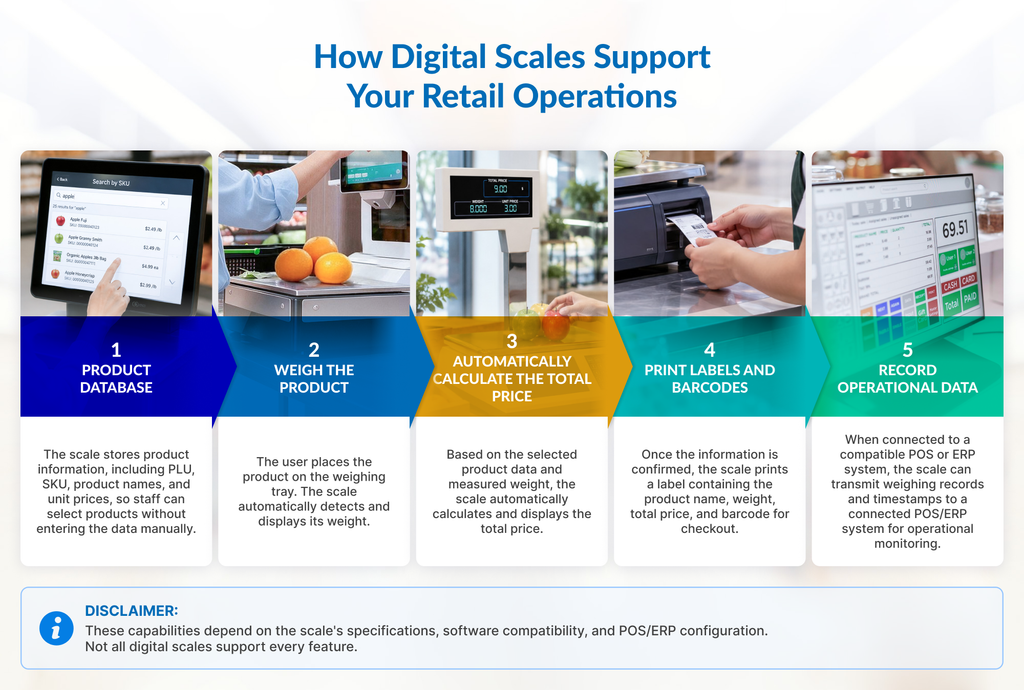
Digital scales are a common fixture in the retail industry, ranging from fruit stands to fresh produce sections in supermarkets. However, relying on traditional, non-integrated scales often introduces various operational bottlenecks: long checkout queues, product code input errors, and unreadable barcodes at the cash register.

On the other hand, modern consumer behavior demands speed, precision, and service flexibility. These operational hurdles are not only inefficient but can also erode customer satisfaction and potentially damage your brand reputation in the long run.

This article explores modern retail digital scale solutions, covering:

  • An overview of digital scales and their core components
  • Five primary functions of digital scales for retail businesses
  • The different types of digital scales
  • Key operational benefits for your store

Read on to discover the right solution for your business; whether your goal is to optimize operational efficiency or elevate the customer experience.

Understanding Digital Scale Technology for Modern Retail

A retail digital scale is a modern weighing device designed to precisely measure product weight while automatically calculating the total selling price. Unlike conventional models, these tools come with built-in automation features to accelerate service, improve accuracy, and minimize the risk of financial loss caused by manual recording errors at checkout.

Unlike mechanical scales, which rely on indicator needles that are highly susceptible to human error, or home kitchen scales that only measure mass without pricing calculations, retail scales are purpose-built to adapt to the operational workflows and business models of various storefronts.

Technically, these scales operate via three core components:

  1. Load Cell: Accurately measures and detects the weight pressure of items.
  2. Digital Processing Unit: Calculates the total price based on weight and unit price per product.
  3. Indicator Display: Transparently presents product weight and total cost information to both buyers and staff.

More advanced models also feature an integrated thermal printer to print ready-to-scan price labels or barcodes, alongside network connectivity for seamless data integration with Point-of-Sale (POS) systems.

Five Core Functions of Digital Scales

Core functions of digital scales supporting retail weighing operations
Digital scales integrate multiple core functions to streamline every stage of the retail weighing process.

Combining the fundamental principles of measuring instruments with the fast-paced demands of retail, modern digital scales deliver five key functions to support your store’s operational efficiency:

1. Accurate Weight Measurement

Customer trust is the foundation of retail survival. Digital scales provide complete transparency, ensuring that the quantity of goods a customer receives always matches the price paid.

Operational Benefit: Eliminates profit loss caused by weight discrepancies (shrinkage) while preventing customer complaints regarding inaccurate measurements.

2. Automatic Price Calculator

Evolving beyond a simple measuring tool, digital scales automatically calculate total prices by multiplying the product’s actual weight by its unit price within seconds.

Operational Benefit: Streamlines transactions to be much faster and more accurate, as staff no longer need to manually calculate totals.

3. Label and Barcode Printing

Beyond measuring and calculating, label-printing digital scales can print thermal labels containing barcodes with embedded product data, weight, and total price.

Operational Benefit: Checkout staff simply scan the barcode at the payment counter without manually inputting data or prices, significantly reducing checkout queues.

4. Product Data Storage (PLU/SKU)

Digital scales function as local databases to store product information, such as Price Look-Up (PLU) codes, Stock Keeping Units (SKUs), item names, and unit prices per kilogram. This data can be managed manually on the device or updated centrally via supporting software.

Operational Benefit: Staff no longer need to memorize item codes or reference easily misplaced, outdated paper price lists.

5. Operational Data Source

When connected to a network, digital scales transmit timestamps and weighing history to central systems (POS/ERP) with every transaction.

Operational Benefit: Management gains real-time data on store peak hours, fresh product sales trends, and weighing volumes to drive strategic decision-making.

Types of Retail Digital Scales

To accommodate diverse business scales, operational models, and product variations, digital scales are available in several primary types:

1. Price Computing Scale

Price computing scales offer the practicality of automated price calculation as items are weighed. Delivered without printers or complex features, this type is an ideal option for small-scale stores with limited product varieties, such as independent fruit stands.

2. Label Printing Scale

Equipped with label and barcode printing capabilities, this scale displays product names, weights, and total prices. It is most commonly found in supermarket fresh produce sections. Utilizing thermal printing mechanisms, you save operational costs by eliminating the need for ink or ribbons. The resulting barcodes print precisely and remain clear when scanned at checkout, sparing staff from manual data entry.

3. POS-Integrated Scale

True to its name, this scale synchronizes directly with the same database used by your Point-of-Sale (POS) system. This removes the need to manually update price data on individual scale units whenever product prices change.

4. Self-Service Scale

Self-service scales empower shoppers to weigh their own items independently, creating a fast and personalized shopping journey. These solutions typically feature touchscreen interfaces with clear product visuals. Operationally, self-service scales effectively reduce fruit and vegetable queue congestion while serving as an ideal solution for stores facing staff shortages.

5. Checkout Scale

Installed directly at the cash register, this scale optimizes the final transaction workflow. For maximum functionality, checkout scales are typically paired with a barcode scanner. In short, cashiers can weigh, scan barcodes, and confirm product details into the purchase list from a single point. Staff no longer need to walk back and forth to the fresh produce area to verify prices, drastically shortening customer checkout times and clearing payment queues simultaneously.

6. Network-Connected Smart Scale

For multi-outlet businesses with branches spread across different locations, managing scale units separately consumes significant time and labor costs. Network-enabled smart scales solve this challenge. 

Eliminating separate device configurations, managers simply access a central system to handle product information (PLU/SKU numbers, price updates, device status monitoring, and daily reporting), instantly updating all scale units across every branch automatically.

Comparison Table: Digital Scale Types in Modern Retail

Scale TypeBest Suited ForKey AdvantagesSystem Integration
Price Computing ScaleConvenience stores, independent fruit shops, & small kiosksCalculates total prices automatically without printing labelsNone (Stand-alone)
Label Printing ScaleSupermarkets & fresh food sectionsPrints thermal labels & scan-ready barcodes for checkoutBasic (PLU data import/export)
POS-Integrated ScaleStores/minimarkets with digital cash register systemsAutomated price synchronization between scale and POSMedium (Connected to POS system)
Self-Service ScaleHigh-traffic vegetable, fruit, & bulk goods areasIndependent weighing, queue reduction, & optimized staff allocationMedium (Connected to POS/Database)
Checkout ScaleCheckout counters (integrated cashiers)Weighs and scans barcodes simultaneously at a single pointHigh (Combined with checkout hardware)
Network-Connected Smart ScaleMulti-outlet retail chains & large store networksCentralized price management, SKU data, and reporting from HQHigh (Fully integrated with Cloud/ERP)

Business Benefits of Retail Digital Scales

Implementing retail digital scales goes beyond modernizing equipment—it is a strategic investment that directly impacts store efficiency and profitability. These core benefits span four key pillars:

1. Operational Efficiency and Speed

Service Speed
Automated weighing and instant barcode scanning cut transaction durations, significantly reducing wait times in fresh food and checkout areas.

Staff Work Efficiency
Automated price calculation and centralized PLU data storage eliminate manual math and paper-based code searches, lightening staff workloads so they can focus on customer service.

2. Accuracy and Business Compliance

Price & Weight Accuracy
Precision sensor technology ensures pricing always matches the true weight of goods, minimizing cash discrepancies, customer complaints, and potential regulatory metrology penalties.

Shrinkage Control
Digital tracking of weighing history helps management monitor and identify variances between incoming fresh product stock volumes and successful checkout transactions.

3. Multi-Outlet Standardization and Governance

Cross-Outlet Consistency
Network-enabled data integration ensures all branches utilize uniform product naming, PLU codes, and pricing structures without requiring manual updates at individual stores.

Data-Driven Decision Making
Timestamps and daily weighing volumes deliver real-time analytics regarding fresh product sales trends, peak operational hours, and projected future scale procurement needs.

4. Customer Experience and Trust

Seamless Shopping Experience
Clear thermal label prints transparently display weight and pricing details, offering shoppers peace of mind while fostering a friction-free shopping journey.

Store Types That Need Digital Scales Most

While foundational principles remain consistent, functional requirements for digital scales vary based on operational models and sold commodities. Recommended scale types tailored to specific business sectors include:

  • Supermarkets & Hypermarkets: Label-printing and POS-integrated scales to manage high-volume fresh food transactions, ensure sharp barcode printing, and accelerate checkout queues.
  • Fruit and Vegetable Stores: Responsive price computing or self-service scales to accelerate staff-assisted or self-weighing processes amidst high daily frequencies of unpackaged bulk goods.
  • Modern Fresh Markets: Network-linked smart scales to centrally standardize pricing and product data across multiple stalls or fresh produce booths without manual adjustments.
  • Bulk Goods Stores (Grains, Nuts, Spices): High-accuracy digital scales with sensitive capacities to measure small gram increments precisely, preventing shrinkage on high-value-per-gram items.
  • Meat & Seafood Shops: Devices resistant to high humidity and wet environments, equipped with rapid label printing to ensure net weights are displayed accurately without compromising hygiene.
  • Pharmacies (Compounding Areas): High-precision digital scales (milligram to gram scale) to guarantee accurate dosages of active ingredients in prescription medications for patient safety.
  • Hardware & Building Supply Stores (Nails, Cables, Bulk Paint): Sturdy, heavy-capacity digital scales to weigh bulk materials like nails, bolts, cable spools, or paint quantities without damaging device sensors.
  • Caterers & Culinary Centers: Portable, practical scales to maintain consistency in mass food ingredient portions, safeguarding standardized sizing and production cost controls.

Factors to Consider Before Choosing a Digital Scale

Selecting a digital scale for retail operations requires looking beyond price tags or aesthetics. Choosing the wrong specifications can hinder store operations or trigger long-term financial losses. Review these six crucial factors before making a purchasing decision:

1. Capacity and Precision Levels

Align maximum capacity and accuracy levels with the types of products you sell. Stores selling small-gram specialty spices require vastly different sensitivity levels compared to fruit shops or wholesale grocery outlets handling dozens of kilograms.

2. Environmental Durability

Evaluate the physical conditions of where the scale will be placed. For wet areas like meat, seafood, or fresh produce counters, ensure devices carry water-resistant certifications. Meanwhile, dusty warehouses or hardware stores demand units with rugged protective casings.

Verify that the scale you purchase complies with local legal frameworks (such as official calibration and re-verification licenses from relevant Legal Metrology authorities). Meeting these requirements protects your business from legal penalties while maintaining consumer trust in measurement validity.

4. POS/ERP Compatibility and Integration Readiness

If your store utilizes a digital cash register system or inventory management software, ensure the chosen scale integrates smoothly with your existing technology ecosystem. Synchronization capabilities save staff from exhausting, time-consuming manual price data entry.

5. Availability of After-Sales Service and Spare Parts

Choose brands that offer transparent servicing options, replacement component availability (spare parts), and supporting supplies like thermal paper rolls. Reliable after-sales support ensures devices can be repaired immediately during technical issues.

6. Learning Curve and Staff Usability

The more intuitive the device interface, the faster store employees can operate it without triggering input errors. Select scales with clearly marked function keys or responsive touchscreens to ensure smooth staff adaptation without delaying queues.

Frequently Asked Questions (FAQ)

1. What is the difference between a retail digital scale and a regular scale?

Retail scales are specifically designed for commercial needs featuring automated price calculations, dual displays for customers and cashiers, and optional barcode printing. Unlike standard kitchen or mechanical scales that only measure mass manually, retail scales integrate directly with store operations to accelerate transactions and minimize input errors.

2. Are digital scales legally required to be periodically calibrated (tera)?

Yes, mandatory compliance applies. Under Law No. 2 of 1981 concerning Legal Metrology, all measuring, measuring-out, and weighing instruments used in commercial transactions must be legally verified and undergo periodic re-verification. This ensures measurement accuracy, maintains legal compliance, and protects consumers from losses caused by weight discrepancies.

3. Can digital scales connect to a Point-of-Sale (POS) system?

Absolutely. Most modern digital scales (particularly POS-integrated and smart scales) include network connectivity features. These devices synchronize directly with store POS systems or inventory software, connecting price and transaction data in real-time without manual input.

4. What is the typical lifespan of a retail digital scale?

High-quality retail digital scales generally last between 5 to 10 years, heavily depending on usage intensity, load capacity, and routine maintenance. Keeping load cell sensors clean, avoiding heavy impacts, and performing regular calibrations or re-verifications significantly extends device longevity.

5. Are digital scales durable enough for wet areas or chillers?

Not all digital scales withstand wet environments. For fresh food, meat, or seafood sections, specialized water-resistant scales with high IP ratings are required. These devices feature protected bodies and internal components built to endure water splashes, high humidity, and cold temperatures.

6. What is a self-service scale, and is it suitable for my store?

Self-service scales feature intuitive touchscreens and product images, allowing shoppers to weigh items independently. They are ideal for large supermarkets or high-traffic fruit shops, proving effective at clearing long queues in fresh produce sections while optimizing staff allocations.

7. How can I update prices across multiple scales simultaneously?

Bulk price updates across numerous scale units are accomplished using smart scales connected to centralized systems (cloud or local servers). Through an office computer, managers update price data or PLU/SKU numbers once, and the system automatically updates all scale units across all branches.

Build the Right Foundation for More Efficient Retail Operations

Ready to take the next step in determining the most precise weighing technology for your store?

Explore our other articles covering digital scale technologies to dive deeper into technical specifications, budget calculations, and integration strategies for your business POS systems.

Featured image: retail store interior with electronic shelf labels (ESLs) and digital signage

Smart Retail: Technologies, Systems, and Solutions for the Modern Store

Featured image: retail store interior with electronic shelf labels (ESLs) and digital signage

As the Internet of Things (IoT) matures, smart retail technologies are playing a pivotal role in transforming brick-and-mortar operations, inventory management, and the overall customer experience. In recent years, the physical store environment has undergone a subtle yet profound evolution: paper price tags are giving way to digital displays, scales automatically issue barcodes, interactive screens engage shoppers, and traditional checkout counters are no longer the sole transaction point.

This shift extends far beyond aesthetics. By automating labor-intensive, repetitive manual tasks, these technologies allow store staff to focus on customer service and high-value operations. For retail enterprises, strategic deployment of smart retail solutions optimizes operational efficiency, protects profit margins, and delivers an elevated shopping experience.

This comprehensive guide provides an end-to-end roadmap of the modern retail technology landscape, detailing core functions, operational advantages, and implementation strategies tailored to various store scales.

Dive Deeper to The Concept of Smart Retail

Smart retail integrates data-driven systems and IoT hardware to automate store operations, heighten inventory accuracy, and enhance in-store customer engagement. This transformation relies on three operational pillars:omnichannel data accuracy, peak-hour throughput, and multi-store consistency.

At its core, smart retail is not merely a collection of standalone gadgets; it relies on seamless, real-time connectivity across core enterprise systems, including Point of Sale (POS) platforms, inventory databases, and shelf-edge displays.

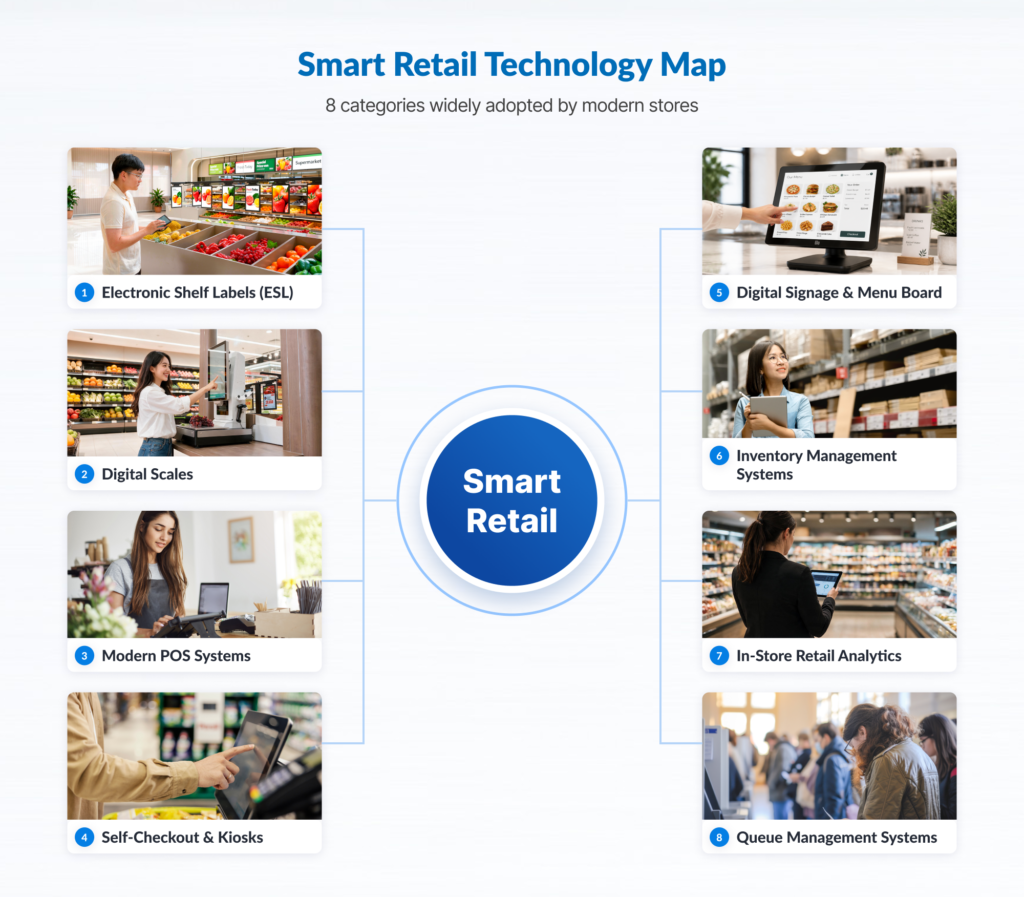
Within the modern retail technology ecosystem, store operations generally encompass eight core categories:

  • Electronic Shelf Labels (ESL) automate shelf pricing updates and eliminate pricing discrepancies.
  • Digital Scales & Automated Labeling expedite product weighing and automated barcode generation.
  • Modern POS & Extended Transaction Points synchronize transactions, payments, and stock levels in real time.
  • Self-Checkout & Self-Service Kiosks provide self-service alternatives while reducing front-end queuing.
  • Digital Signage & Menu Boards enable centralized management of promotional content and dynamic display updates.
  • Inventory Management & Traceability deliver real-time stock visibility to prevent stockouts.
  • Store Analytics & Footfall Monitoring capture customer flow data to optimize labor scheduling and store layout.
  • Queue Management Systems regulate customer flow to decrease perceived and actual wait times.

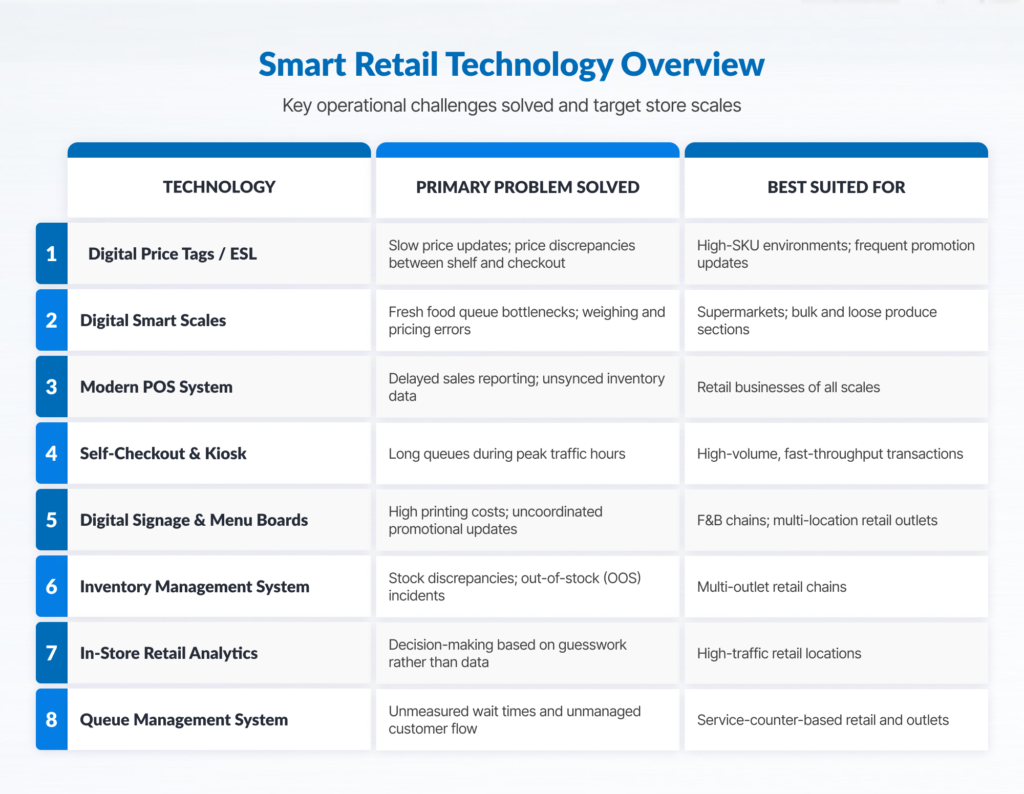
Smart Retail Technologies and Core Functions

Retail technology comparison table showing scope of use and best options.
Key smart retail technologies connected to automate daily operations, eliminate pricing errors, and boost store ROI.

Electronic Shelf Labels (ESL)

Electronic Shelf Labels utilize low-power e-paper displays mounted on shelf rails to show pricing, product specifications, and promotional messages. Connected wirelessly to a central server, price updates made in the core database reflect instantaneously across thousands of shelf tags without manual intervention.

  • Core Pain Point Addressed: Eliminates manual paper re-labeling across thousands of SKUs, which is prone to human error. Therefore preventing price mismatches between shelf and checkout that undermine customer trust.
  • Target Environment: Supermarkets, hypermarkets, consumer electronics stores, pharmacies, and hardware chains with high SKU counts, frequent price adjustments, or dynamic pricing strategies.
  • Deployment Prerequisites: Enterprise integration between central inventory/POS databases and a robust wireless gateway infrastructure throughout the retail floor.

Digital Scales and Automated Labeling

Modern commercial digital scales integrate heavy-duty weighing mechanisms, real-time price calculation driven by master databases, and high-speed thermal barcode printing into a single workflow for fresh food and bulk sections.

  • Core Pain Point Addressed: Mitigates bottlenecks in fresh produce, meat, deli, and bakery sections while eliminating manual price calculation errors. Standardized barcode output ensures frictionless checkout scanning.
  • Target Environment: Grocery stores, supermarkets, specialty food retailers, and bulk goods stores managing variable-weight inventory.
  • Deployment Prerequisites: A clean, structured master product database featuring standardized Price Look-Up (PLU) codes synchronized across all weighing hardware.

Modern POS and Extended Transaction Points

Next-generation Point of Sale (POS) systems serve as the transactional engine of the store, connecting fixed registers, mobile tablets, and handheld devices directly to cloud-based or on-premises inventory control and financial reporting modules.

  • Core Pain Point Addressed: Resolves front-end congestion during peak hours and eliminates delayed sales reporting. Management gains real-time visibility into stock movement and revenue without waiting for end-of-day register reconciliation.
  • Target Environment: All retail formats, ranging from single boutique stores to multi-regional retail chains requiring real-time operational control.
  • Deployment Prerequisites: Stable internet connectivity, secure local networking, and peripheral hardware compatibility with modern payment standards (including credit cards, contactless payments, and QR code standards).

Self-Checkout and Self-Service Kiosks

Self-checkout lanes and self-ordering kiosks utilize interactive touchscreens, embedded barcode scanners, and integrated payment terminals to enable fully autonomous scanning, ordering, and payment.

  • Core Pain Point Addressed: Alleviates register lines during peak traffic and allows operators to reallocate staff from manual scanning to customer assistance, shelf replenishment, and store maintenance.
  • Target Environment: Urban convenience stores, quick-service food outlets, fast-casual dining, high-volume pharmacies, and transit-hub retail units.
  • Deployment Prerequisites: An intuitive, user-friendly UI/UX, stable payment gateway integrations, optimal floor layout design, and initial on-site staff facilitation for customer onboarding.

Digital Signage and Digital Menu Boards

Digital signage system utilizes commercial-grade visual displays managed via a centralized Content Management System (CMS). This system allows retailers to deploy dynamic promotional campaigns, high-definition promotional videos, and real-time menu updates across individual stores or nationwide networks.

  • Core Pain Point Addressed: Eliminates recurring design, printing, and distribution costs associated with static paper marketing materials, while preventing campaign execution delays by ensuring synchronized go-to-market messaging across all locations.
  • Target Environment: Quick-service restaurant (QSR) chains, fashion boutiques, cosmetics retailers, lifestyle stores, and multi-location retail brands running frequent seasonal promotions.
  • Deployment Prerequisites: High-quality visual media production, licensed CMS software, commercial displays, and sufficient network bandwidth for remote content distribution.

Inventory Management and Stock Traceability

Advanced inventory management systems combine rapid barcode scanning, enterprise mobile computers, and RFID technology to track inventory movement accurately from distribution centers to the backroom and sales floor.

  • Core Pain Point Addressed: Resolves inventory discrepancies, prevents lost revenue caused by stockouts, and minimizes working capital tied up in slow-moving inventory.
  • Target Environment: Value scales alongside store count, warehouse complexity, and SKU variance, making this critical for mid-to-large-scale retail operations.
  • Deployment Prerequisites: Strict operational discipline regarding scanning protocols during receiving, stock transfers, and shelf replenishment, backed by reliable ERP or WMS integration.

Store Analytics and Customer Traffic Monitoring

Retail analytics platforms utilize specialized traffic-counting sensors, optical cameras, and Wi-Fi signal tracking to collect quantitative data on shopper traffic patterns, dwell times, and queue lengths.

  • Core Pain Point Addressed: Replaces guesswork with empirical data. Store managers can optimize labor scheduling against footfall peaks, measure display conversion efficiency, and refine floor plan layouts.
  • Target Environment: Mid-to-large retail formats, department stores, flagship locations, and shopping mall units with high daily traffic.
  • Deployment Prerequisites: Well-defined analytical targets and Key Performance Indicators (KPIs) to transform raw traffic data into actionable operational improvements.

Queue and Customer Flow Management Systems

Digital queue management solutions organize customer waiting lines using automated ticket dispensers, directional digital displays, and audio announcements, particularly for service counters requiring consultation or customization.

  • Core Pain Point Addressed: Eliminates disorderly physical lines, minimizes perceived wait times, reduces shopper friction, and provides management with metrics on service speed per counter.
  • Target Environment: Retail formats featuring specialized service counters, including prescription pharmacies, telecom service centers, optical shops, and customer service desks.
  • Deployment Prerequisites: Clear counter segmentation, comfortable waiting areas, and prominent display screens visible across the waiting floor.

Summary Matrix: The Modern Retail Technology Landscape

Retail technologies: Every solution's scope of use, and best implementation option.
Each smart retail solution addresses distinct operational bottlenecks, allowing businesses to select tools that directly match their store scale and customer traffic demands.

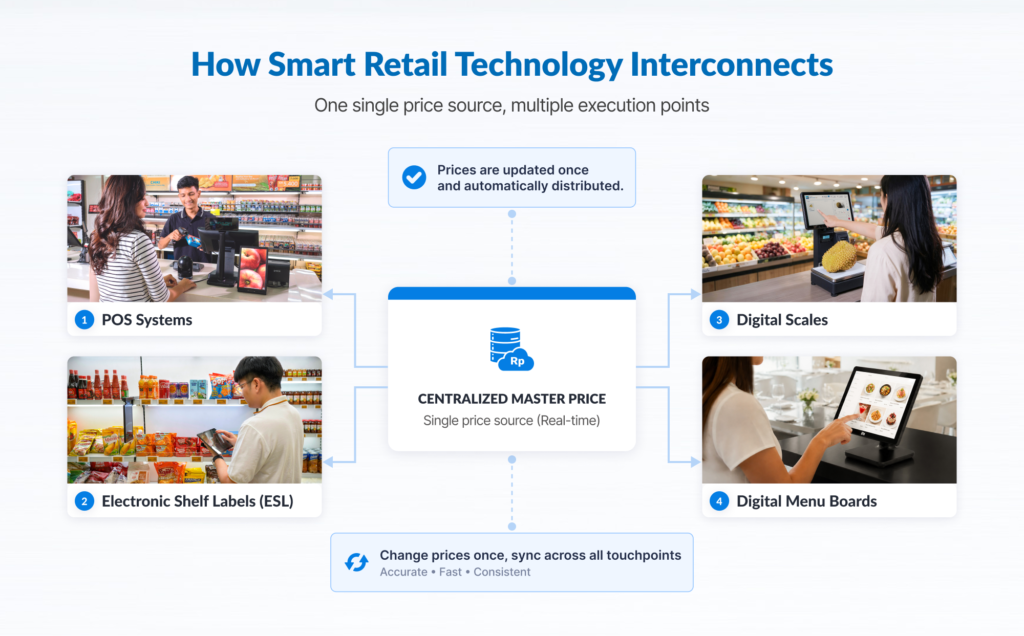
System Integration: The Core Driver of Smart Retail ROI

Flowchart showing smart retail system interconnectivity with master data.
Real-time price synchronization across digital hardware endpoints protects profit margins and creates a frictionless, reliable shopping experience across every store in your retail network.

The primary value of retail digitization lies not in deploying standalone hardware, but in establishing real-time interoperability across devices. Maximum ROI is achieved when peripheral hardware seamlessly exchanges data with backend enterprise systems.

With proper integration, a price adjustment executed in the central database propagates automatically to the POS, Electronic Shelf Labels, digital scales, and customer-facing digital signage simultaneously.

Ultimately, long-term success in smart retail depends on system interoperability rather than sheer hardware volume.

Selecting the Right Technology Roadmap

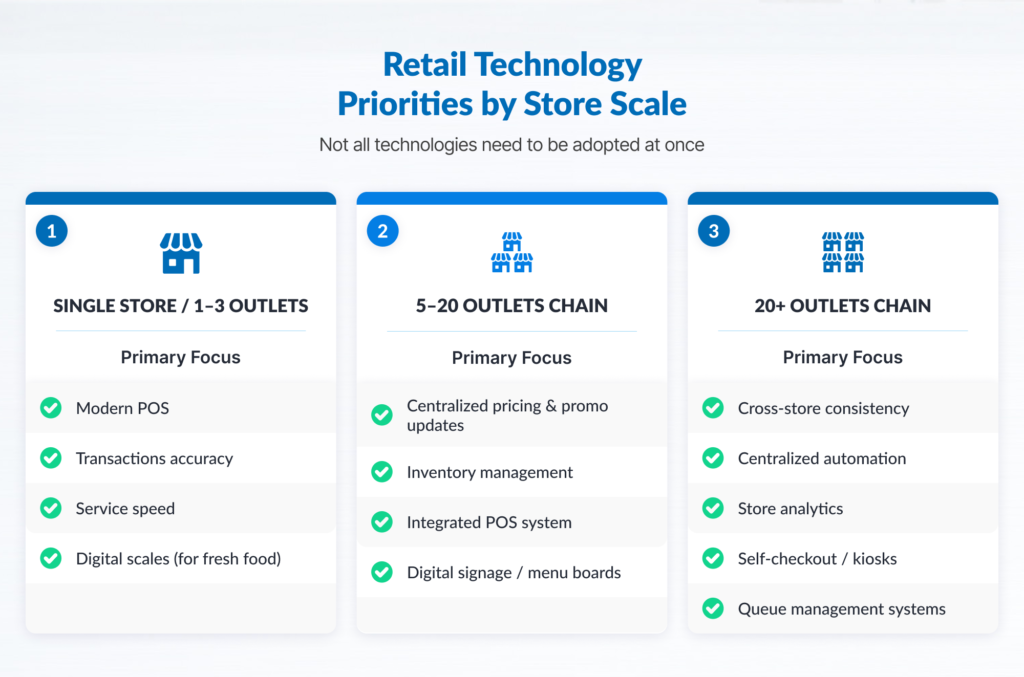
Retailers don’t and should not need to deploy all technologies simultaneously. Over-implementing complex systems without a solid foundation can disrupt daily operations. Scale technology adoption based on store count and operational complexity:

Illustration: Retail technology solutions categorized by business scale.
A phased approach to retail tech deployment aligns digital investment with business growth, allowing stores to solve critical bottlenecks as their footprint expands- without overhauling systems all at once.

1. Emerging Chains (1 to 3 Locations)

At this scale, centralized infrastructure management offers limited return. Capital expenditure should focus on tools that resolve immediate operational bottlenecks, accelerate checkout speed, and secure cash control:

  • Cloud-based modern POS supporting multi-payment options.
  • Integrated digital scales (essential for fresh produce or bulk formats).
  • Basic barcode scanning and stock-logging tools to mitigate shrinkage.

2. Growing Networks (5 to 20 Locations)

As the store footprint expands, manual price updates, localized promotional rollouts, and decentralized stock allocations become major operational drags:

  • Electronic Shelf Labels (ESL) to eliminate shelf-to-register pricing discrepancies across branches.
  • Centralized digital signage to maintain brand consistency while cutting print overhead.
  • Multi-location inventory management systems to streamline inter-store transfers and warehouse fulfillment.

3. Enterprise Retail Networks (20+ Locations)

For large-scale retail chains, labor optimization and operational consistency drive competitive advantage. Automation transitions from an operational preference to a core necessity:

  • Full-scale ESL deployment integrated with automated planogram compliance monitoring.
  • Self-checkout lanes and self-service kiosks to manage high transaction volumes efficiently.
  • Advanced store analytics (footfall counters and queue monitoring) to optimize labor allocation and maximize revenue per square meter.

A common industry pitfall is investing prematurely in complex peripheral systems before establishing clean master data. Always map operational bottlenecks prior to committing hardware capital.

Implementation Prerequisites for Smart Retail Deployments

Deploying digital solutions in physical stores is an operational transformation project rather than a routine IT procurement task. To ensure seamless execution and user adoption, build upon the following operational foundations:

  • Master Data Audit & Fixing: Electronic shelf labels, scales, kiosks, and POS systems rely entirely on data integrity. Standardize product names, SKUs, PLUs, price structures, and tax categories prior to system integration.
  • Standard Operating Procedure (SOP) Alignment: Technology accelerates well-defined processes, but amplifies operational disorder if workflows are unstructured. Document receiving, price override, return, and shelf-replenishment workflows before applying automation.
  • API and System Compatibility: Legacy POS or ERP systems must support seamless integration (via REST APIs or enterprise data connectors) to communicate with new hardware without requiring costly custom middleware.
  • Network Infrastructure & Power Stability: Wireless devices (including ESLs and mobile POS units) demand stable local connectivity. Conduct thorough site surveys for Wi-Fi and gateway coverage, and ensure hardware is backed by surge protection.
  • Comprehensive Workforce Training: Store personnel must be proficient in operating new equipment, troubleshooting basic technical issues, and guiding first-time customers through self-service interfaces.
  • Nationwide Technical Support & Service Level Agreements (SLAs): Retail hardware undergoes continuous operational strain. Partner with technology vendors offering nationwide field coverage and binding SLA commitments to ensure business continuity.

Many forward-thinking retailers adopt a phased implementation methodology: resolving immediate front-end friction before scaling capital expenditure into advanced automation.

Key market drivers accelerating this transition include:

  • Digital Payment Ubiquity: The rapid growth of digital wallets and unified QR payments has normalized fast, contactless checkout, creating ideal conditions for self-service kiosks and modern POS systems.
  • Rising Operational and Labor Costs: Margin pressure encourages retailers to automate manual tasks, such as re-tagging shelves and physical stock audits, allowing labor to be redirected toward high-touch customer service.
  • Omnichannel Consumer Expectations: Modern shoppers expect physical stores to offer the speed, pricing accuracy, and inventory visibility typical of e-commerce platforms.

Rather than attempting full store automation overnight, a modular approach empowers businesses to resolve their most pressing operational pain points first.

Frequently Asked Questions (FAQ)

Is smart retail technology only suitable for enterprise chains?

No. Single-store operators capture immediate value from foundational tools. Modern POS platforms and integrated digital scales significantly improve data accuracy and financial reconciliation regardless of scale.

Which technology should be implemented first?

Begin with a modern POS system and centralized inventory management. A structured master data architecture and robust POS ecosystem are essential prerequisites before introducing peripheral hardware like self-checkout kiosks or digital shelf labels.

Do all smart retail devices require uninterrupted internet connectivity?

Offline resilience depends on system architecture. Many enterprise POS systems and smart hardware support local offline modes, allowing continuous core processing over local networks before auto-synchronizing once connectivity is restored.

Does adopting smart retail require replacing legacy POS hardware?

Not necessarily. Most modern hardware peripherals can interface with legacy POS or ERP platforms via APIs or enterprise middleware, provided the existing backend supports structured data export.

What is the typical deployment timeline?

Timelines range from a few days for single-site hardware deployments to several months for phased multi-store rollouts requiring enterprise integration, network configuration, testing, and change management.

Will smart store technologies replace retail employees?

No. Smart retail technologies automate repetitive, low-value tasks (such as manual price updates and product weighing) reallocating staff toward customer engagement, sales assistance, and store presentation.

The Future of Physical Retail Starts at Every Integration Point

Modernizing physical retail is not a matter of acquiring hardware, it is about engineering an integrated ecosystem tailored to clear operational objectives. Long-term success relies on executing the correct deployment sequence, ensuring seamless system integration, and partnering with reliable technical support. A flexible digital foundation ensures your retail network remains operationally resilient and competitive.

Explore smart retail solutions for your enterprise here. From Electronic Shelf Labels and modern POS systems to self-service kiosks and digital signage, discover scalable technology solutions designed for your operational needs.